let-leavers-exercise-until-their-grants-expiry-date
🌟 Let leavers exercise until their grant's expiry date
choose-whether-admins-can-download-employees-client-master-list
🌟 Choose whether admins can download employees' Client Master List
redesigned-grant-detail-page
🌟 A redesigned Grant Detail page
pause-vesting-for-an-employee-not-grant-by-grant
🚀 Pause vesting for an employee, not grant by grant
bring-back-a-returning-employee-with-rehire
🚀 Bring back a returning employee with Rehire
pay-for-an-exercise-in-parts-not-all-at-once
🚀 Pay for an exercise in parts, not all at once
ask-equity-agent-straight-from-search
🚀 Ask Equity Agent straight from search
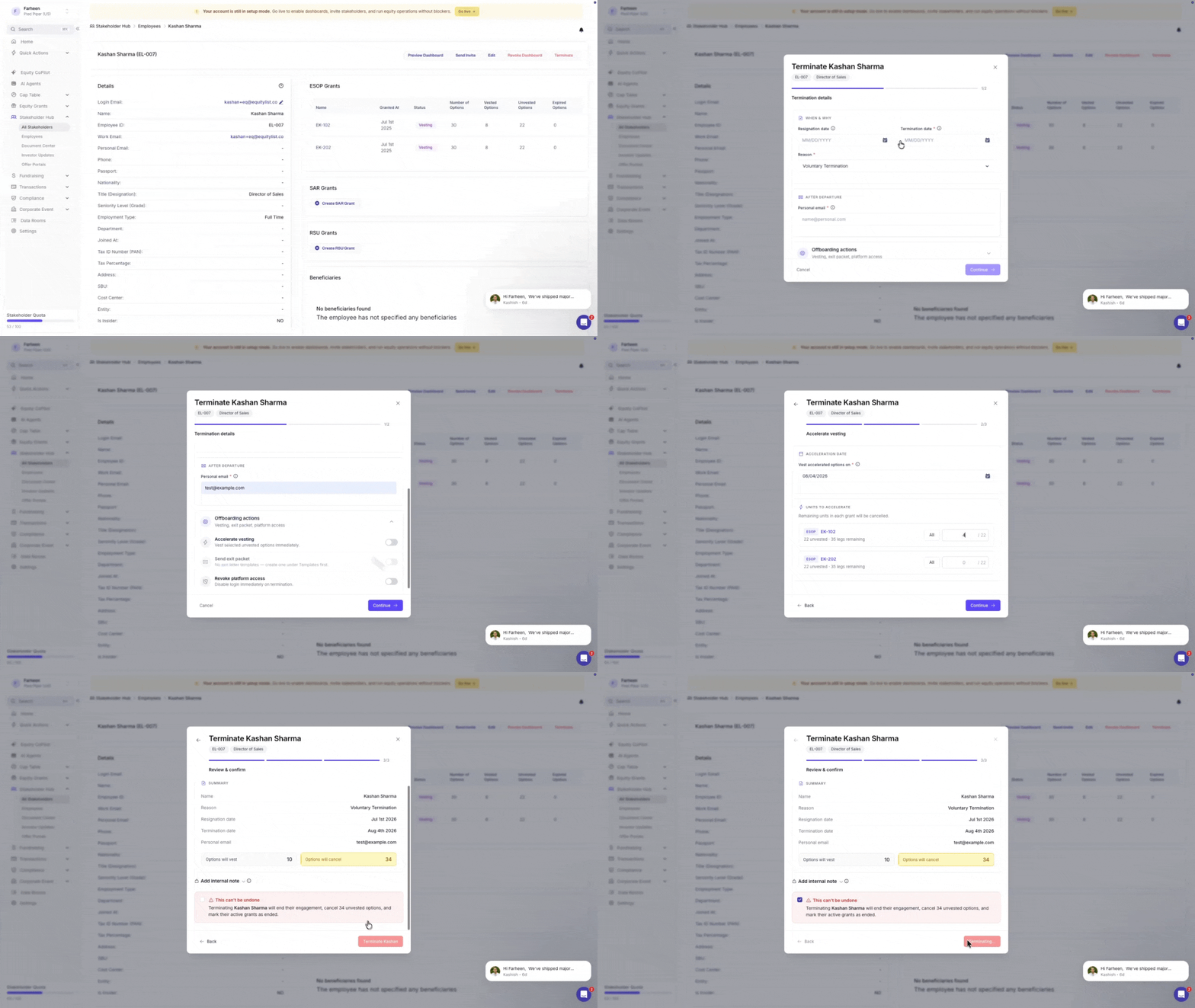
clearer-safer-termination-flow
🌟 A clearer, safer termination flow
see-your-equity-progression-as-a-stacked-bar-chart
🌟 See your equity progression as a stacked bar chart
tag-every-grant-with-an-issuance-reason
🚀 Tag every grant with an issuance reason
customize-exercise-periods-by-employee-tenure
🚀 Customize exercise periods by employee tenure
cancel-grant-with-full-audit-trail
🚀 Cancel a grant, with a full audit trail
accelerate-vesting-for-specific-grants-during-termination
🚀 Accelerate vesting for specific grants during termination
search-less-get-there-faster
🚀 Search less. Get there faster.
intuitive-way-to-navigate
🚀 A more intuitive way to navigate
redesigned-homepage
🚀 A redesigned homepage
tax-id-and-securities-account-documents-are-now-view-only-during-account-approval
🚀 Tax ID and Securities Account documents are now view-only during account approval
settle-sar-pools-with-a-new-cash-stock-method
🚀 Settle SAR pools with a new Cash + Stock method
find-equity-awards-reports-faster-with-a-redesigned-ui
🌟 Find Equity Awards reports faster with a redesigned UI
place-multiple-signature-blocks-anywhere-in-a-document
🚀 Build documents with a drag-and-drop PDF editor
share-certificates-now-use-a-cleaner-tabbed-layout
🌟 Share certificates now use a cleaner, tabbed layout
bulk-update-grant-letter-templates-across-multiple-grants
🚀 Bulk-update grant letter template across multiple grants
summary-of-exercise-activity
🚀 Get a high-level summary of exercise activity
configure-post-termination-exercise-periods-in-sar-pools
🌟 Configure post-termination exercise periods for SAR pools
extend-payment-deadlines-for-pending-exercises
🌟Extend payment deadlines for exercises
configure-grant-letter-signing-requirements
🚀 Configure grant letter signing requirements
expired-lapsed-grants-are-shown-separately
🚀 Expired and lapsed grants are now shown separately
fix-or-nullify-board-and-shareholder-consents-without-breaking-your-audit-trail
Fix or nullify board and shareholder consents without breaking your audit trail
protect-stakeholder-equity-with-beneficiary-nominee-designations
Protect stakeholder equity with beneficiary/nominee designations
stakeholder-dashboard-jan-2026
New stakeholder dashboard (Jan 2026)
quality-of-life-improvements-dec-2025
Quality of life improvements (Dec 2025)
hide-employee-pii-across-more-reports-dec-2025
Hide employee PII across more reports
bulk-invite-employees-using-filters-during-onboarding
Bulk invite employees using filters during onboarding
filter-employees-by-dashboard-access-and-key-attributes
Filter employees by dashboard access and key attributes
bulk-update-employee-fields-in-one-action
Bulk update employee fields in one action
record-share-splits-directly-within-the-transfer-workflow
Record share splits directly within the transfer workflow
record-past-share-repurchases-with-automatic-cap-table-updates
Record past share repurchases with automatic cap table updates
quality-of-life-improvements-nov-2025
Quality of life improvements (Nov 2025)
separate-pages-for-equity-pools-and-grants
Separate pages for equity pools and grants
dynamic-global-banking-details-for-fundraising-accounts
Dynamic global banking details for fundraising accounts
breadcrumb-navigation-added-across-pages
Breadcrumb navigation added across pages
ccd-table-added-to-shareholder-view
CCD table added to shareholder view
grant-letters-default-to-today-date
Grant letters default to today’s date
refreshed-esop-expense-reports-ind-as-15-as-102
Refreshed ESOP expense reports (IND AS 15 & AS 102)
smartsheet-uploads-for-all-equity-workflows
Smartsheet uploads for all equity workflows
draft-grants-restricted-for-company-admins
Draft grants are now restricted for company admins
cleaner-employee-dashboard
🌟 Cleaner employee dashboard access & invite controls
intuitive-share-class-creation-flow
🌟 Smoother, more intuitive share class creation flow
grant-summary-report
🚀 New ‘Grant Summary Report’ for a clean & quick snapshot
grant-vesting-reports-overhaul
🌟 Grant vesting reports get a major overhaul
draft-state-disabled-for-exercises
🌟 Disabled ‘Draft’ state when exercising options
archiving-records
🚀 Archiving records is now available
bulk-actions
🌟 Bulk Actions - do more in less time across equity workflows
record-allotment-date-during-exercise-execution
🌟Record allotment date during exercise execution
ccps-added-separate-share-type
🌟CCPS added as a separate share type
show-isin-share-certificates-and-shareholder-dashboards
🌟Show ISIN in share certificates and shareholder dashboards
choose-resignation-or-last-working-day-in-vesting-templates
🌟Choose resignation or last working day in vesting templates
track-convertible-debentures
🚀 Track convertible debentures end-to-end
granular-control-with-exercise-settings
🚀 Granular control with exercise settings
activity-log-with-detailed-change-history
🌟 Enhanced ‘Activity Log’ with detailed change history
expiry-settings-for-exercise-periods
🌟 Enhanced expiry settings for exercise periods
login-experience-with-multiple-options
🌟 Improved login experience with multiple options
roles-permissions-for-improved-access-control
🌟 Granular roles & permissions for improved access control
new-streamlined-grant-creation-flow
🚀 New streamlined grant creation flow
hide-employee-details-when-generating-reports
Hide employee details when generating reports
bypass-employee-e-signature-for-grant-execution
Bypass employee e-signature for grant execution
new-employee-consents-feature
New employee consents feature
new-document-center-to-share-files-easily-with-employees
New ‘Document Center’ to share files easily with employees
new-single-sign-on-sso-integration
New Single Sign-On (SSO) integration
show-fmv-growth-chart-in-the-employee-dashboard
Show FMV growth chart in the employee dashboard
upgraded-board-consents-for-equity-grants
Upgraded board consents for equity grants
comprehensive-cap-table-ledger-report
Comprehensive cap table ledger report
major-upgrade-to-the-exercise-workflow
MAJOR upgrade to the exercise workflow
new-share-transfer-flow-and-bulk-inviting-shareholders
🚀 New share transfer flow and bulk inviting shareholders
upgraded-tools-for-when-employees-exit
🌟 Upgraded tools for when employees exit
enhancements-for-easier-cap-table-analysis
🌟 Enhancements for easier cap table analysis
major-upgrades-to-vesting-templates
🌟 Major upgrades to vesting templates
issue-and-track-warrants
Issue and track warrants
multiple-share-transfers-in-a-single-flow
Multiple share transfers in a single flow
streamlined-options-exercising-workflow
Streamlined options exercising workflow
accounting-for-partially-signed-grants-in-pool-calculation
Accounting for partially signed grants in pool calculation
enhanced-share-certificate-drafting-and-issuance
Enhanced share certificate drafting and issuance
revamped-cap-table-layout
Revamped cap table layout
quality-of-life-improvements
Quality of life improvements
updated-user-interface-for-company-and-employee-dashboards
Updated user interface for company and employee dashboards
options-calculation-when-issuing-grants
Options calculation when issuing grants
pause-a-vesting-schedule
Pause a vesting schedule
upgraded-valuations-feature
Upgraded ‘Valuations’ feature
cap-table-equitylist-improvements
Quality of life improvements
equitylist-esigning-flow
Updated eSigning flow
esops-sar-grant-letter-template
Redesigned grant letter template
buyback-esops-management
A powerful new buyback flow
e-signing-signatories
Updated e-Signing flow with signatories
equity-award-management
New interface for Equity Award management
improved-employee-termination-flow
Improved employee termination flow
introducing-custom-grants-letters
Introducing custom grants letters
esop-expense-report-enhancements
ESOP expense report enhancements
introducing-multi-entity-management
Introducing multi-entity management
new-permission-level-cap-table-manager
New permission level: cap table manager
intercom-integration-enhanced-customer-support
Intercom integration for enhanced customer support