






Product updates
What’s new on EquityList: new features, improvements, and everything we’ve shipped, newest first.
Get updates by email

In a scheme's or grant's Exercise Period settings, a new "Until grant expiry date" option lets a leaver's post-termination exercise period run until each grant's own expiry date, rather than a fixed or tenure-based number of days.
Admins can choose it at the scheme or grant level, for stock option, SAR and RSU grants, in any of three places:
- As the exercise period for a termination type, such as voluntary or involuntary termination.
- For a specific tenure bracket in tenure-based rules.
- As the default for leavers who don't fall into any bracket, shown as the Otherwise (Default) row in tenure-based rules.
For example: leavers with under 2 years of tenure get 90 days to exercise, while those with 2 years or more can exercise until their grant expires.
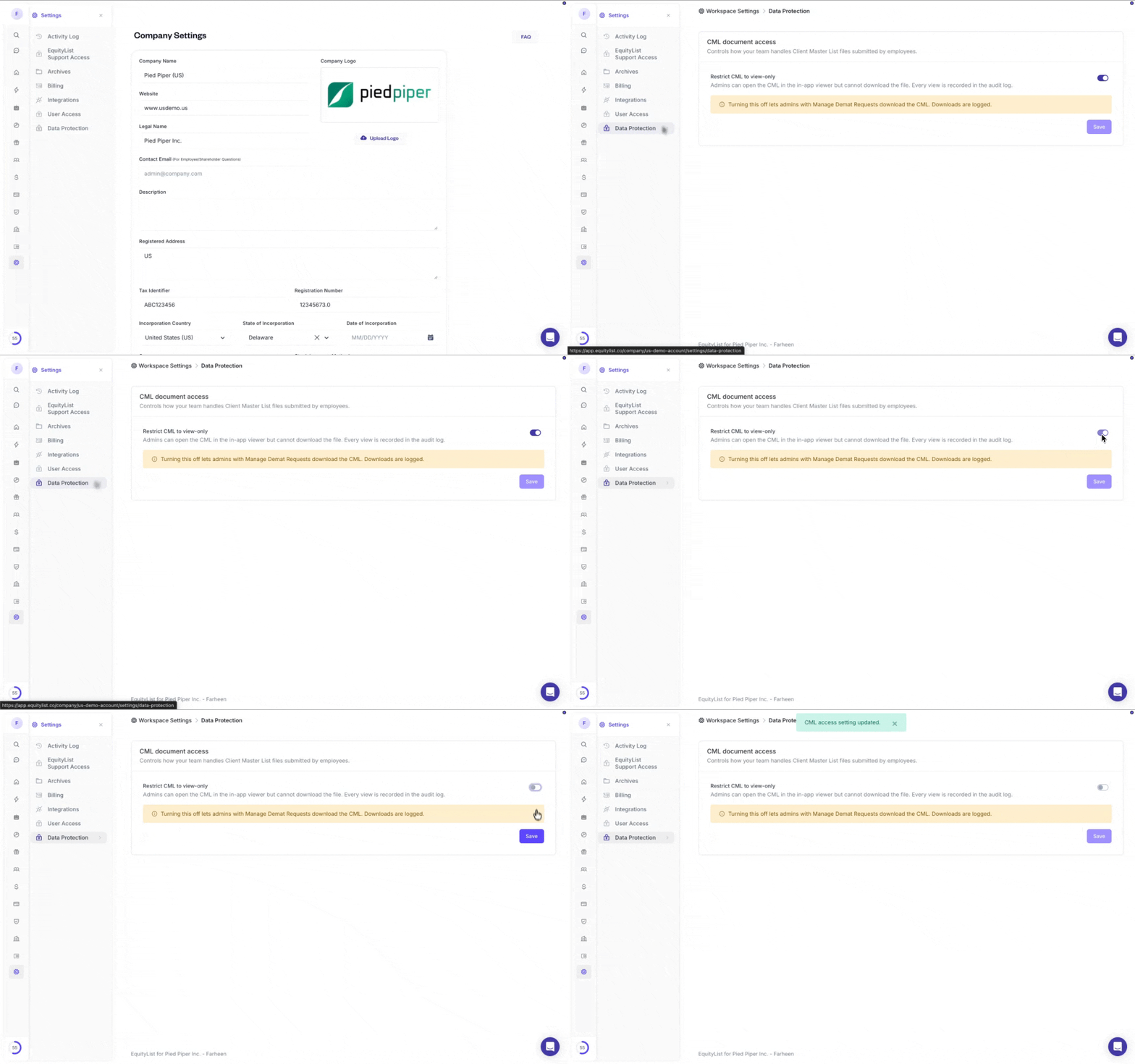
Under Settings > Data Protection, a new company-level setting, "Restrict CML to view-only," lets each company decide whether admins can download the Client Master List (CML) that employees upload with their demat account details.
Some companies need to forward the CML to their RTA or depository participant to complete an allotment, while others want the file locked down.
- Off (default): admins with Manage Demat Requests can download the CML, and every download is recorded.
- On: admins can open the CML in the in-app viewer only, with no download, and every view is recorded.
(This turns CML download back on for every company by default. If your company prefers view-only, switch the setting on.) Only users with the Admin role can change it.
Data Protection settings are available on Enterprise plans.
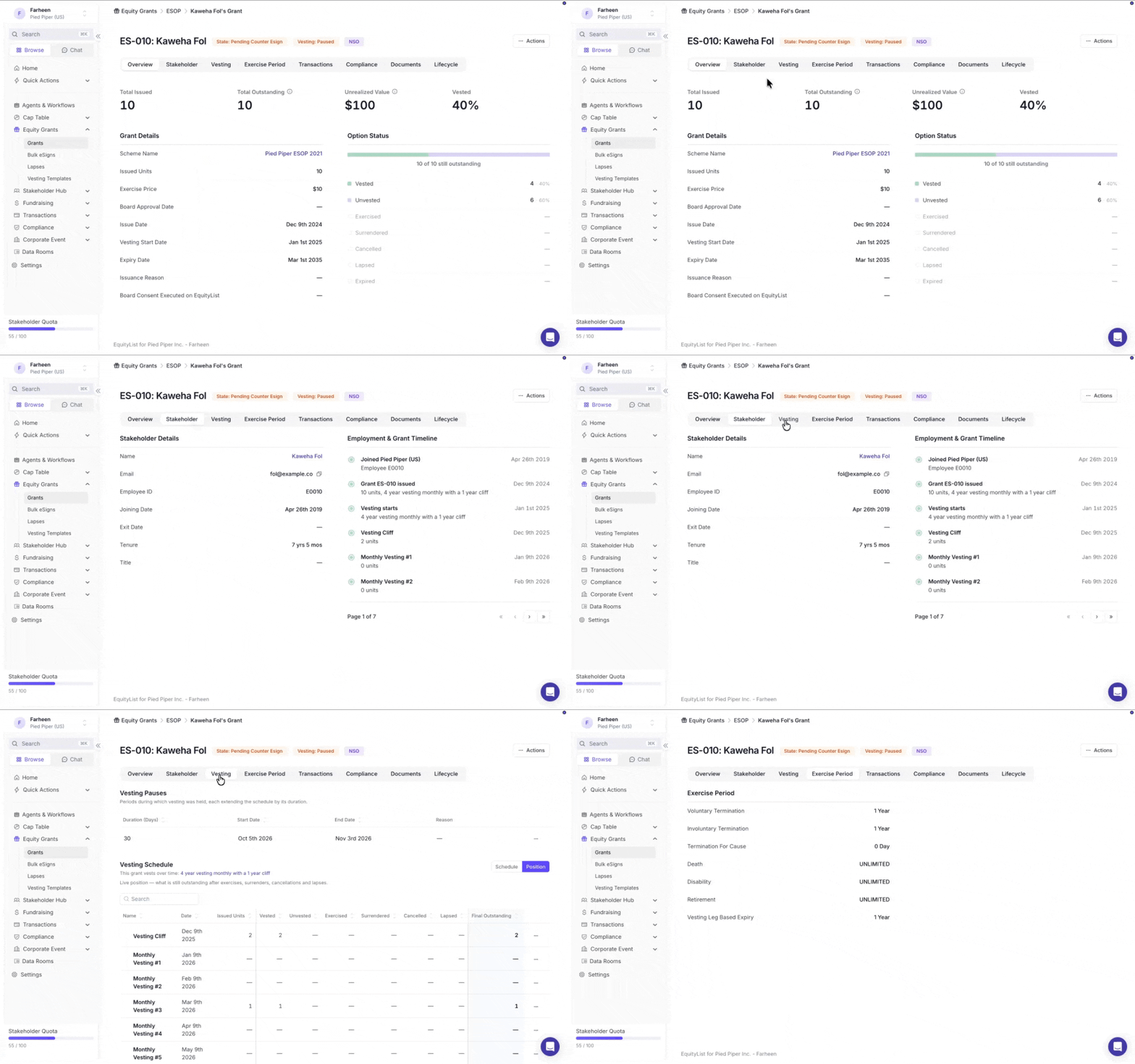
Under Equity Awards > Grants, the admin Grant Detail page is now organised into eight tabs: Overview, Stakeholder, Vesting, Exercise Period, Transactions, Compliance, Documents and Lifecycle.
The Overview leads with two refreshed cards:
- Grant Details: the grant's key terms in a cleaner order, with Board Approval Date placed right after Exercise Price.
- Option Status: tiles for Total Issued, Total Outstanding, Unrealized Value and Vested %, plus a stacked bar and legend breaking down vested outstanding, exercised, surrendered and cancelled units.

On an employee's profile under Stakeholder Hub > Employees, a Pause Vesting action now pauses every grant the employee holds in a single step. Stock options, SAR and RSU grants are all covered, and vesting resumes automatically the day after the end date.
Before you confirm, the pause modal lists every grant it will cover. Starting a pause from a grant page? The modal asks whether to pause just that grant or all of the employee's grants, with "Pause this grant" preselected.
- Reaches forward: any grant issued to the employee before the pause ends joins it automatically, including grants created by bulk upload.
- One record per employee: a Vesting Pauses section on the profile lists every pause on the employee's grants.
- One email per change: the employee gets one email per change, not one per grant, when a pause is created, edited or removed.
(Don't see Pause Vesting on the employee page? Reach out to your account manager to upgrade your app to the latest version.)
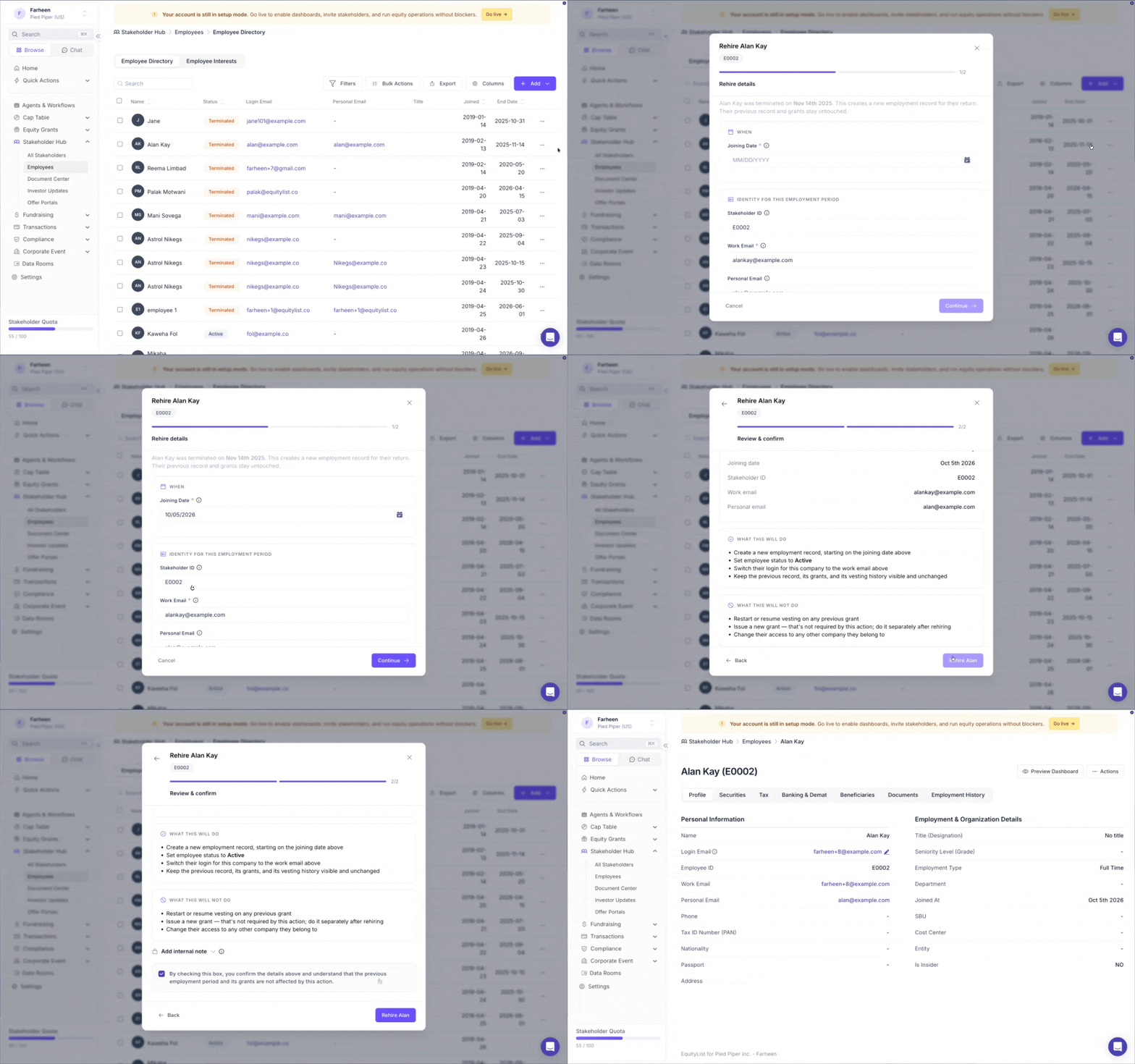
On a departed employee’s page under Stakeholder Hub → Employees, a new Rehire button creates a new employment record when they return, linked to the same employee, giving you a complete history. Each period appears in the Employment History tab with its own employee ID, work email, joining date, and exit date.
Previously, rehiring someone meant adding another employee record for the same person.
The rehire form is pre-filled with details from their previous employment period. Confirm what stayed the same, update what changed, and add a joining date after their previous exit date.
- Vesting does not resume: grants from the previous employment period keep the same vested, cancelled, and lapsed amounts they had when the employee left. Any new equity issued after rehire is a new grant with vesting starting from the new joining date.
- ID and email can stay the same or change: the employee ID and work email can each be kept or updated.

On an exercise request’s Overview, employees can now pay the exercise cost and perquisite tax separately, in partial amounts, either online or offline. They no longer have to pay the full amount at once.
Bank transfer limits and large tax dues can make it difficult to pay everything in one go. For example, if the exercise cost is ₹10,00,000, an employee can pay ₹5,00,000 now and the remaining ₹5,00,000 later. Payment options are now shown directly on the page: Pay Exercise Cost and Pay Perquisite Tax, along with an “Already paid offline? Record it” link for cheque or NEFT/RTGS payments.
- See what’s paid and what’s left: each payable shows its current status, such as “₹5,00,000 paid · ₹5,00,000 due.” Payment actions only let employees pay the amount still due.
- See deadlines next to each payment: the top banners are gone. Each deadline is shown next to its payable and becomes more prominent as it gets closer.
- Clear payment statuses: Payment processing is shown for online payments that haven’t settled yet, while Pending payment reconciliation is shown for offline payments waiting for admin approval.
For US companies, which don’t have a payment gateway, employees can only record offline payments with proof of payment.
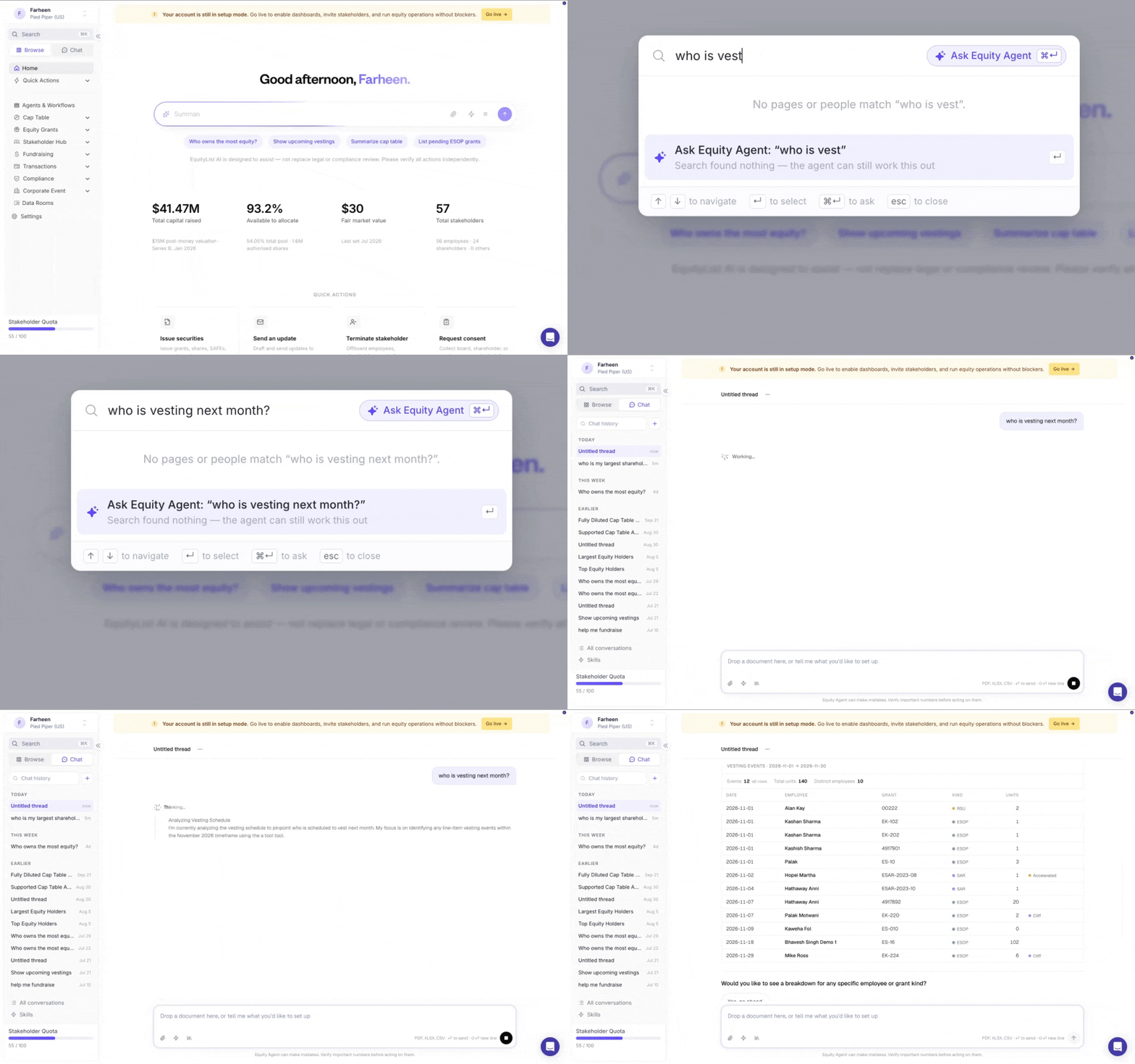
In the ⌘K / Ctrl+K search bar on the company dashboard, you can now ask Equity Agent a question directly. Type your question and click Ask Equity Agent, or press ⌘/Ctrl + Enter. Your question will open as a new Equity Agent conversation.
The button is always visible on the right side of the search bar. Available on workspaces where Equity Agent is enabled.
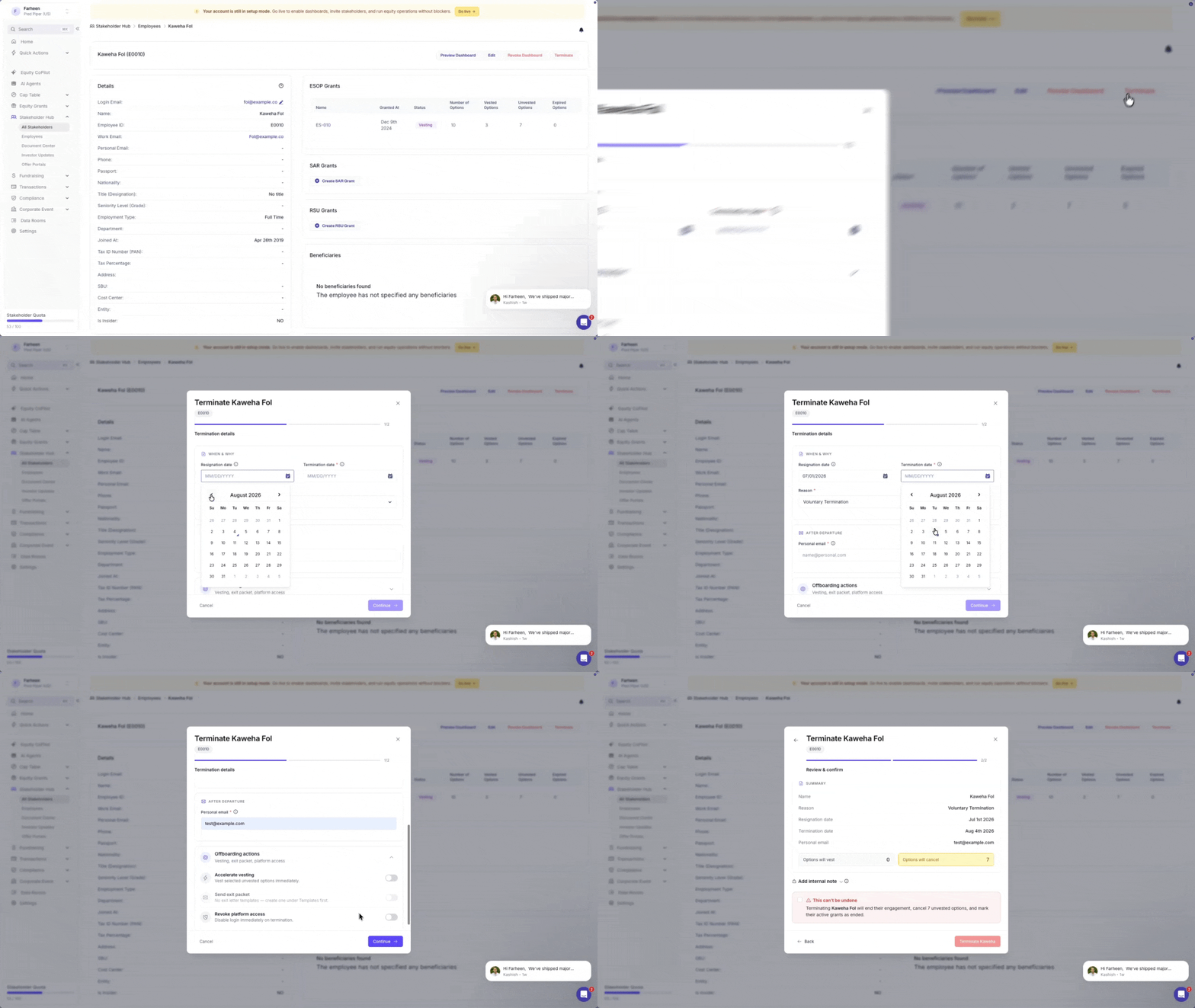
Under Stakeholder Hub > Employees > Terminate, the termination pop-up has been rebuilt as a step-by-step wizard with a live progress stepper and one consistent review step on every path.
Fields are grouped into labeled cards ("When & why", "After departure") instead of one long flat list, with the fine print moved into tooltips. Steps for accelerating vesting or sending an exit letter only show up when those actions are toggled on — but every path, no matter which toggles are set, now ends on a Confirm step with the vest/cancel unit totals and an unconditional "this can't be undone" checkbox standing between the admin and the click.
- A success screen confirms the termination and shows which follow-up actions (exit packet, access revoke) are in flight.
- The internal offboarding note is renamed "Add internal note" and marked clearly as team-only, never shared with the employee.
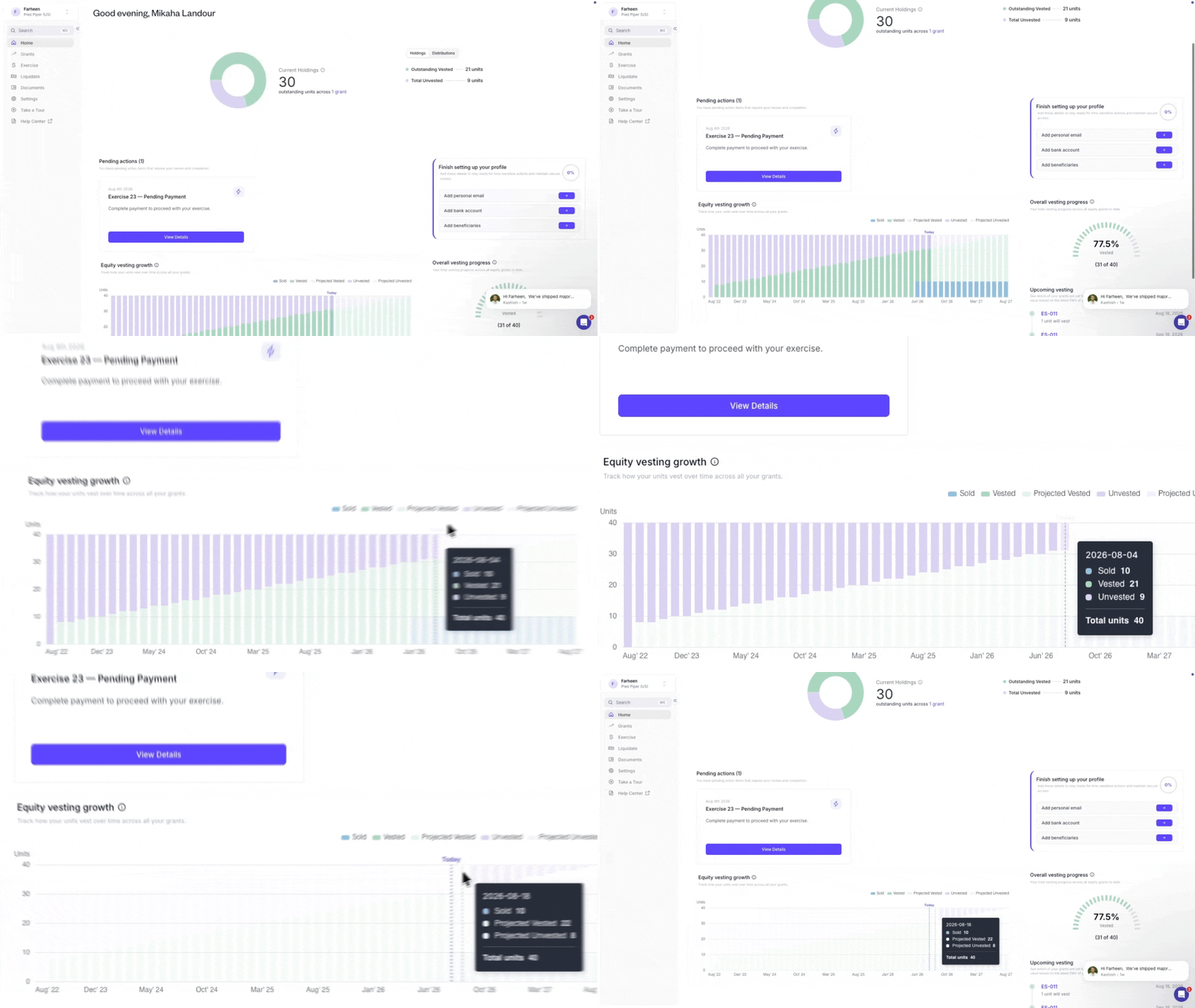
On the Stakeholder Dashboard, the Equity Vesting Growth chart is now a stacked bar graph that clearly separates vested, unvested, exercised, and surrendered equity instead of one blended line.
Vested and unvested values move with the market — updating dynamically as FMV changes — while exercised and surrendered values stay locked to the FMV on their event date, so past transactions never shift after the fact. Hover anywhere on the chart for the full breakdown.
- Value visibility off: instead of disappearing, the chart now renders in unit mode — the same four stacks, shown as unit counts rather than currency.
- Value visibility on: a Value/Units toggle next to the chart heading lets you switch views; it defaults to Value.
- Listed companies: the chart always shows units, since a listed company's FMV tracks live public stock price and would make the chart noisy day to day.
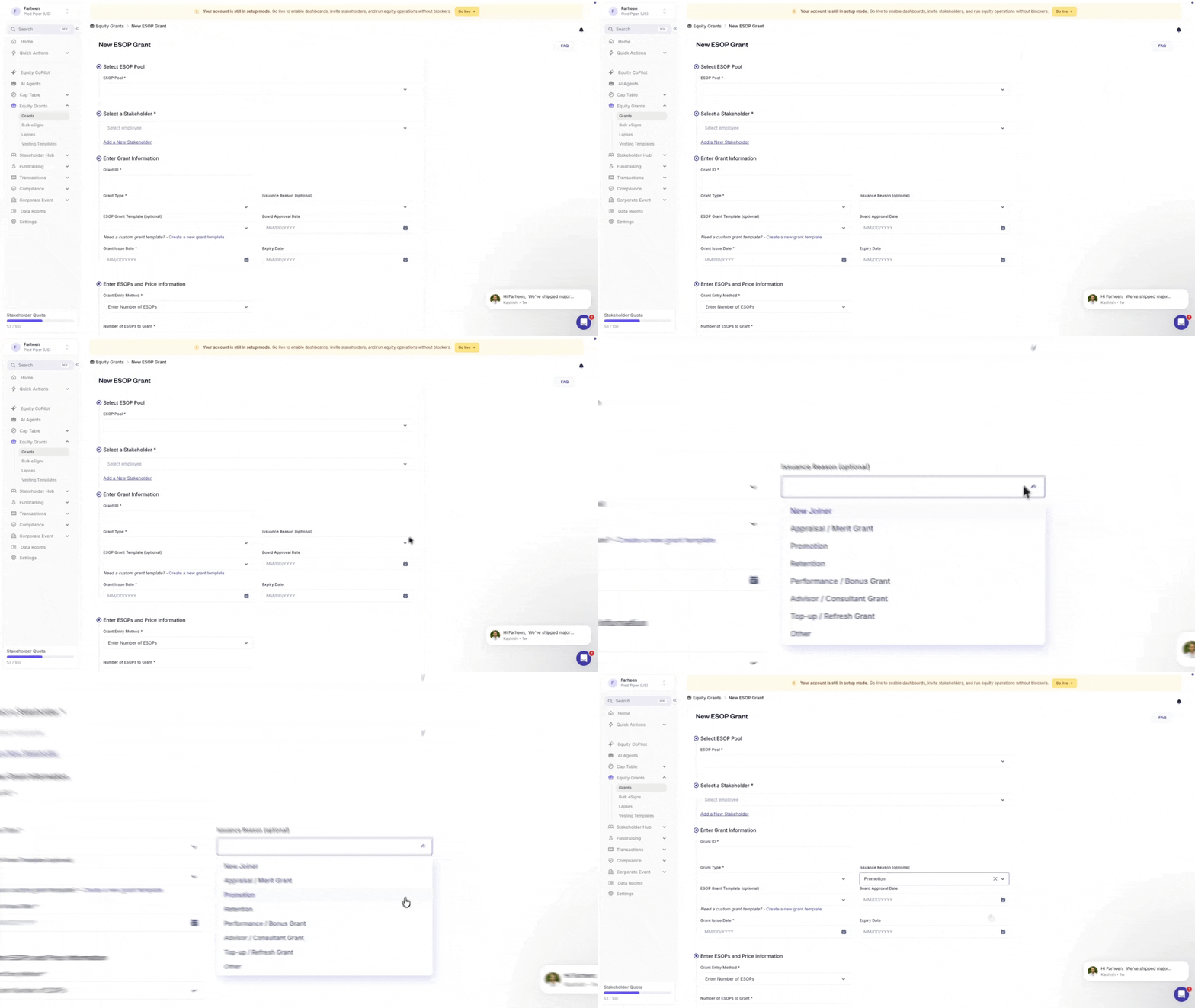
In the Equity Grants > New Grant issuance flow, admins can now select an Issuance Reason—such as New Joiner, Promotion, or Retention—from a predefined dropdown list for stock option, SAR, and RSU grants.
Captured right at issuance, shown on the grant's detail view, and added as a column in grant reports — finance and people teams can finally filter or pivot grant activity by reason for any quarter or year, no separate spreadsheet required.
- Reason options: New Joiner, Appraisal / Merit Grant, Promotion, Retention, Performance / Bonus Grant, Advisor / Consultant Grant, Top-up / Refresh Grant, Other.
- Selecting a reason is optional at issuance, so it won't block bulk or imported grants.

Under Equity Grants > Grants > New Grant, in a grant's Exercise Period settings, admins can now configure post-termination exercise periods based on an employee's tenure, rather than using a single fixed rule for everyone.
Set tenure brackets and their exercise period logic through dropdowns and input fields — and for anything the standard brackets don't cover, drop in a custom formula expression. Once configured, the rule joins your list of available exercise period options, ready to reuse.
- Configurable at both the scheme level and the individual grant level.
- All changes to tenure-based rules are tracked in the Activity Log.
- Permission to configure these rules is available to Admins by default, and can be separately enabled for Grant Managers.
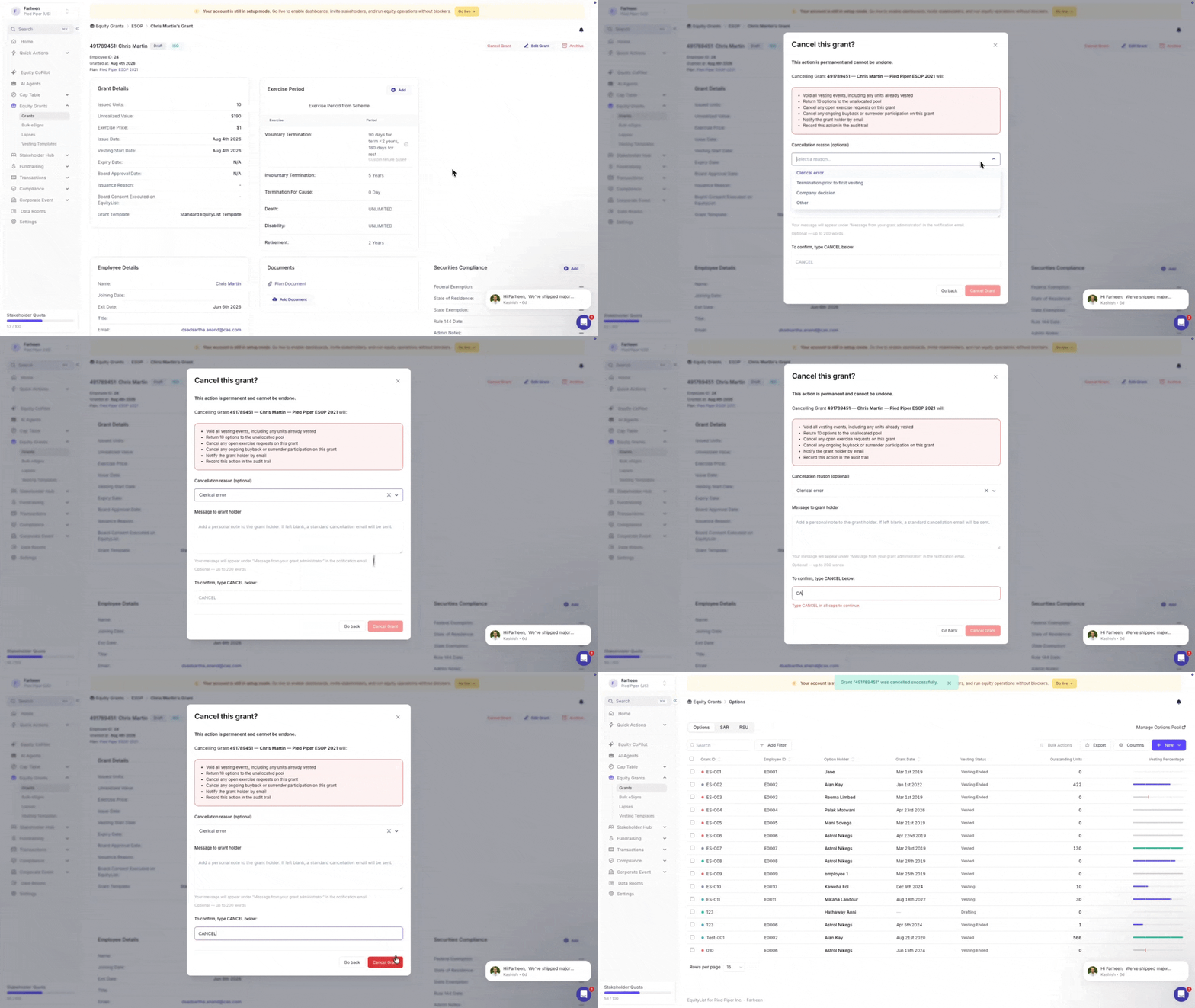
Under Equity Grants > Grants, admins can now cancel a grant directly from the grant detail page or grant list, for stock option, SAR, and RSU grants in Pending Countersign and Executed status.
One action voids every vesting event on the grant — past and future — sends the cancelled units straight back to the unallocated pool, cancels any open exercise requests or buyback/surrender participation, and emails the grant holder automatically. Add an optional cancellation reason and a personal note to the grant holder, then type "CANCEL" to confirm — deliberately permanent, and impossible to walk back.
- Cancelled grants are always shown (labelled) in grant reports, with a filter option to include or exclude them.
- Lapsed, Expired, and Hidden grants can't be cancelled — those states already carry their own terminal meaning.
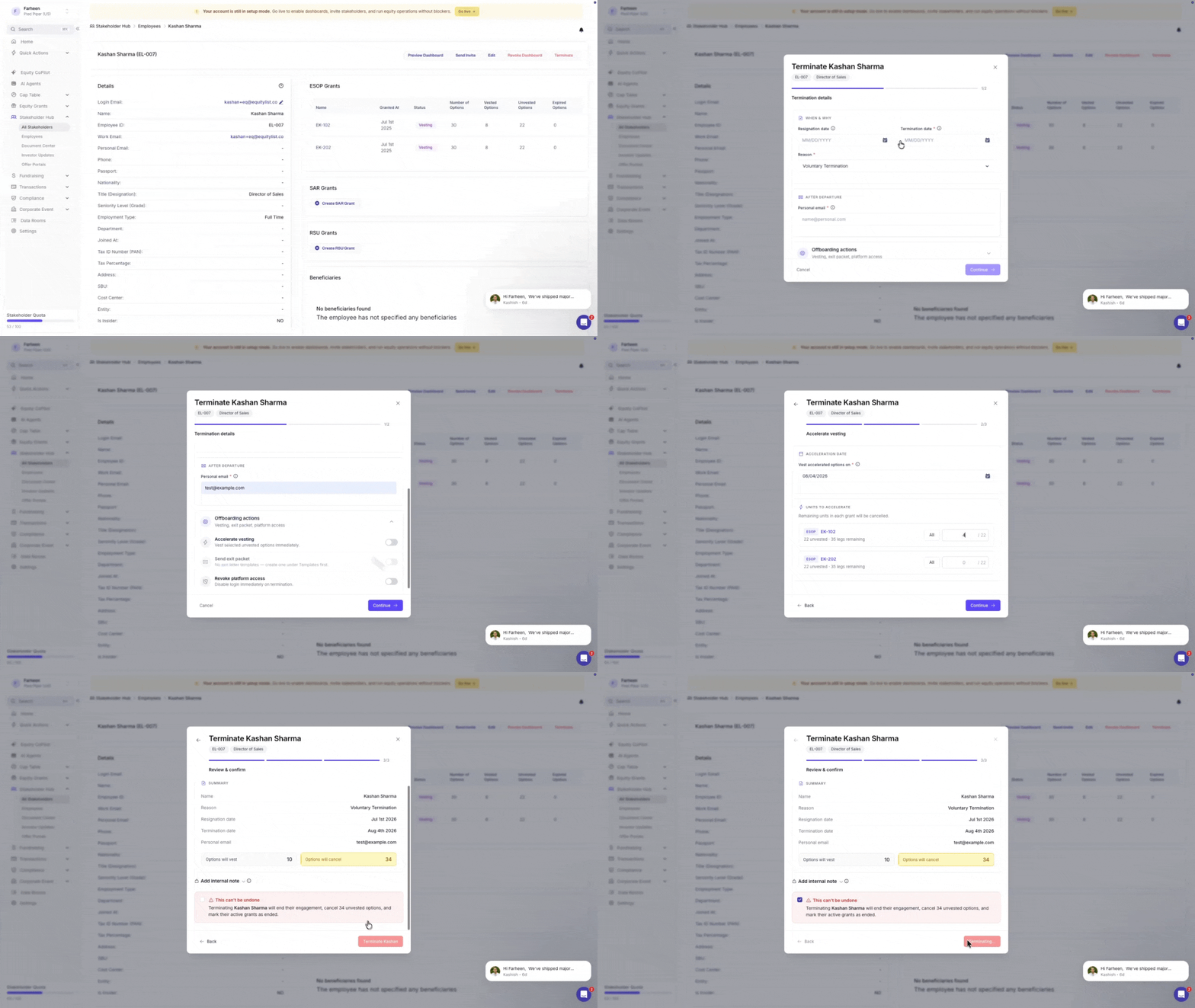
Under Stakeholder Hub > Employees > Terminate, admins can now accelerate vesting on a grant-by-grant basis when terminating an employee, instead of an all-or-nothing toggle.
Enter an exact unit amount per grant, and the system takes it from there — consuming unvested vesting legs earliest-first until that amount is reached, splitting a leg into an accelerated portion and a cancelled remainder if needed. Need to move fast? A "Vest All" button pre-fills every eligible grant with its full unvested balance, and you can log an optional reason for the acceleration right there.
- Eligibility: grants with an unmet cliff, performance-based grants, and fully vested or expired grants are excluded or shown disabled.
- Scope: SAR grants follow the same logic as stock options; RSU grants are not part of this flow.
A final review step summarizes accelerated units and revocation/exit-letter status before the termination is confirmed.
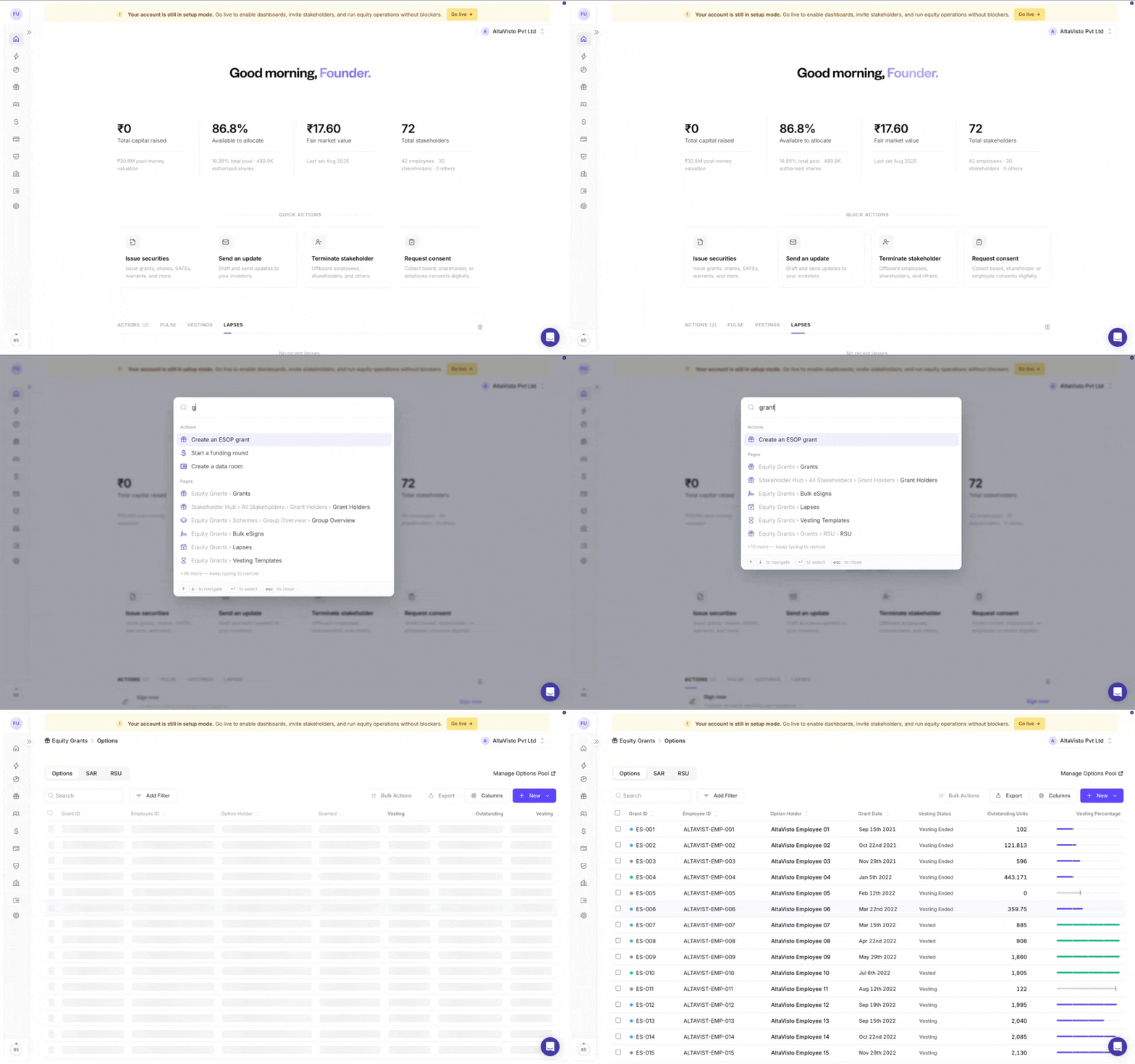
Know where you need to go? You no longer need to navigate through the sidebar to find it.
Press ⌘K on Mac or Ctrl+K on Windows from anywhere in EquityList to open global search. Start typing the name of a page, feature, or action, and jump directly to it in seconds.
Try it now: press ⌘K or Ctrl+K →These are some of the most significant experience updates yet—and an important step towards making equity management faster, clearer, and more intuitive.

We’ve now reorganized the navigation around how you actually use the platform. Related workflows sit together, sections are easier to scan, and each one expands independently to keep the sidebar focused and uncluttered.
We’ve also introduced a dedicated Compliance section, bringing together the company information, configurations, documents, and legal workflows that require your attention.
From here, you can review and manage:
- Share certificate issuance settings
- Company and statutory information
- Legal documents and records
- Exercise-related configurations
- Other compliance settings and actions
We recommend taking a moment to explore the new Compliance section and ensure your company information and configurations are up to date.
You’ll also find your shareholder, employee and advisor directory under Stakeholders Hub and all your equity instrument types under Cap Table.

Your new homepage brings the most important information and actions together in one place.
At a glance, you can now see a clearer snapshot of your company’s equity, including the total capital raised, equity available to grant, the latest FMV, and total stakeholder count.
A new Quick Actions section allows you to access frequently used workflows, including issuing securities, sending investor updates, terminating stakeholders, and requesting consents.
You’ll also find a consolidated view of upcoming actions, company activity, vestings, and lapses—helping you stay ahead of what needs attention without navigating through multiple sections.

Tax ID and Securities Account documents can no longer be downloaded during account approval. They can only be viewed in the in-platform PDF viewer, preventing local downloads during approval.
Why it matters: These documents contain sensitive personal and identity information. Making them view-only during account approval enhances privacy and compliance by preventing the files from being downloaded and stored locally.
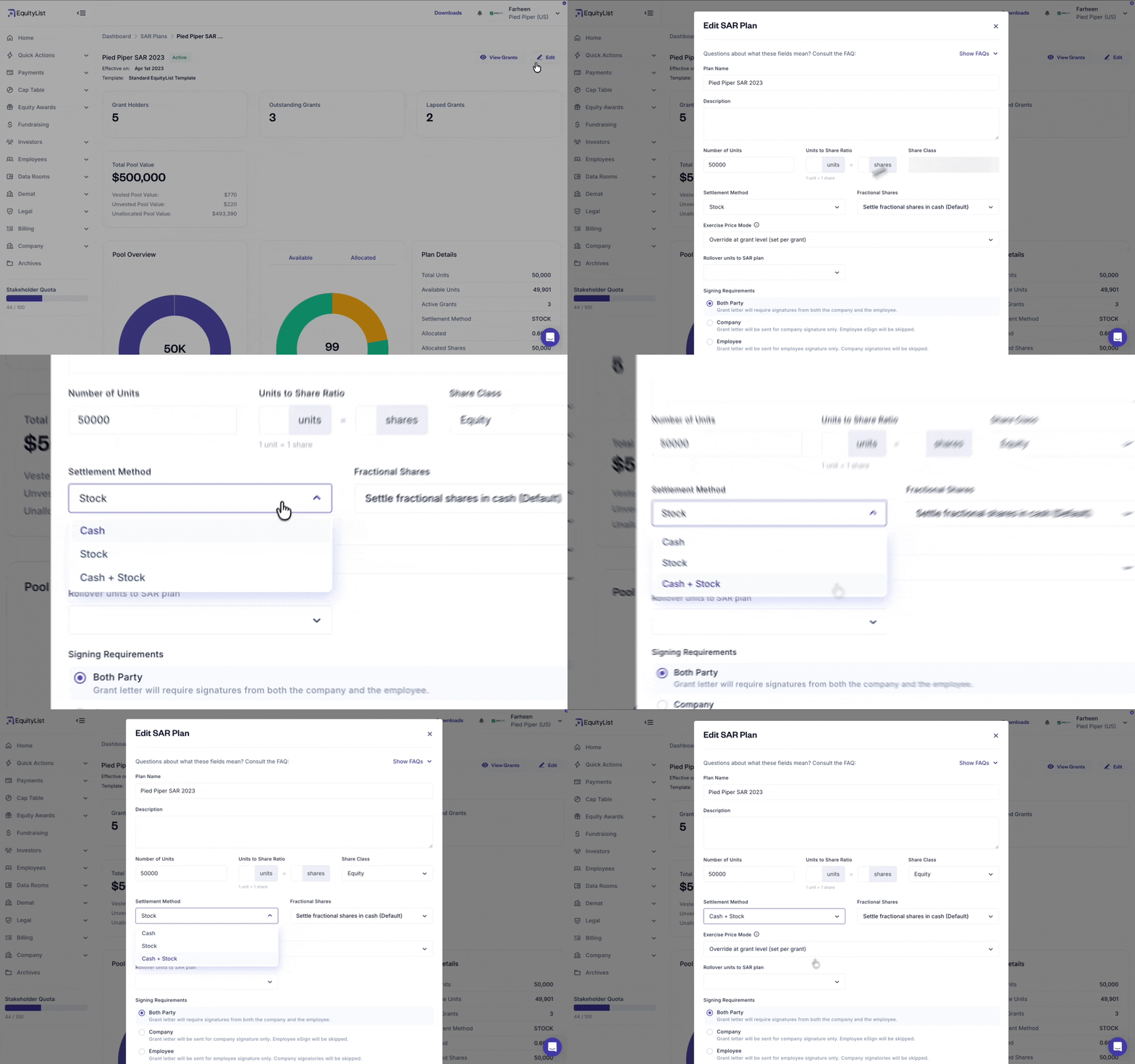
Equity Awards > Pools
When configuring a SAR pool, you can now choose a new ‘Cash + Stock’ settlement method, in addition to the existing Cash and Stock options.
- Cash: No impact on share dilution; settled in cash only
- Stock: Full impact on dilution; settled in shares
- Cash + Stock (new): Full impact on dilution — because the split isn't fixed at setup, the full pool is treated as stock-settled.
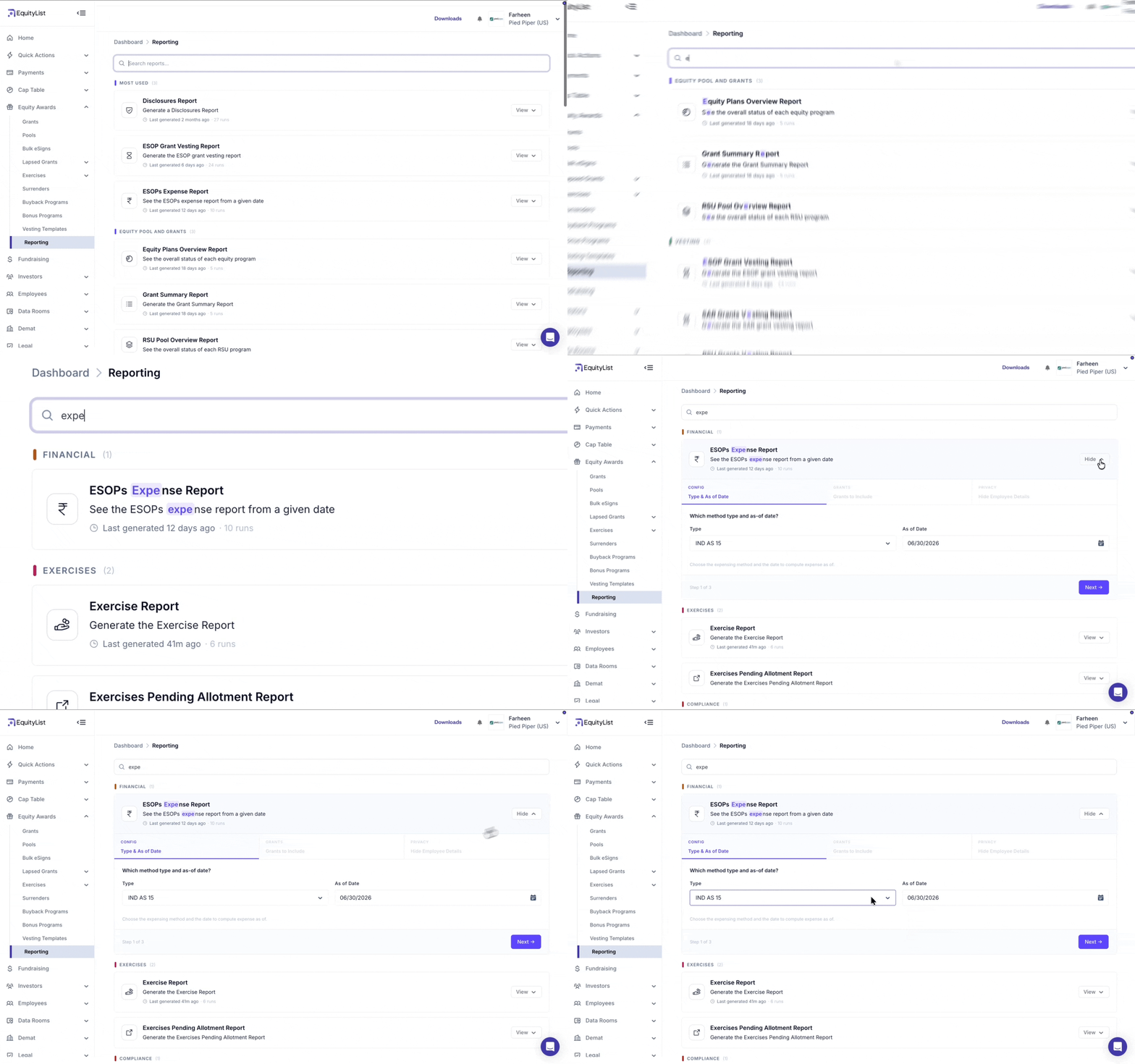
Equity Awards > Reporting
The reporting experience has been redesigned to make reports easier to find. Your most frequently used reports are now surfaced at the top, and improved search lets you narrow down to the exact report you need.
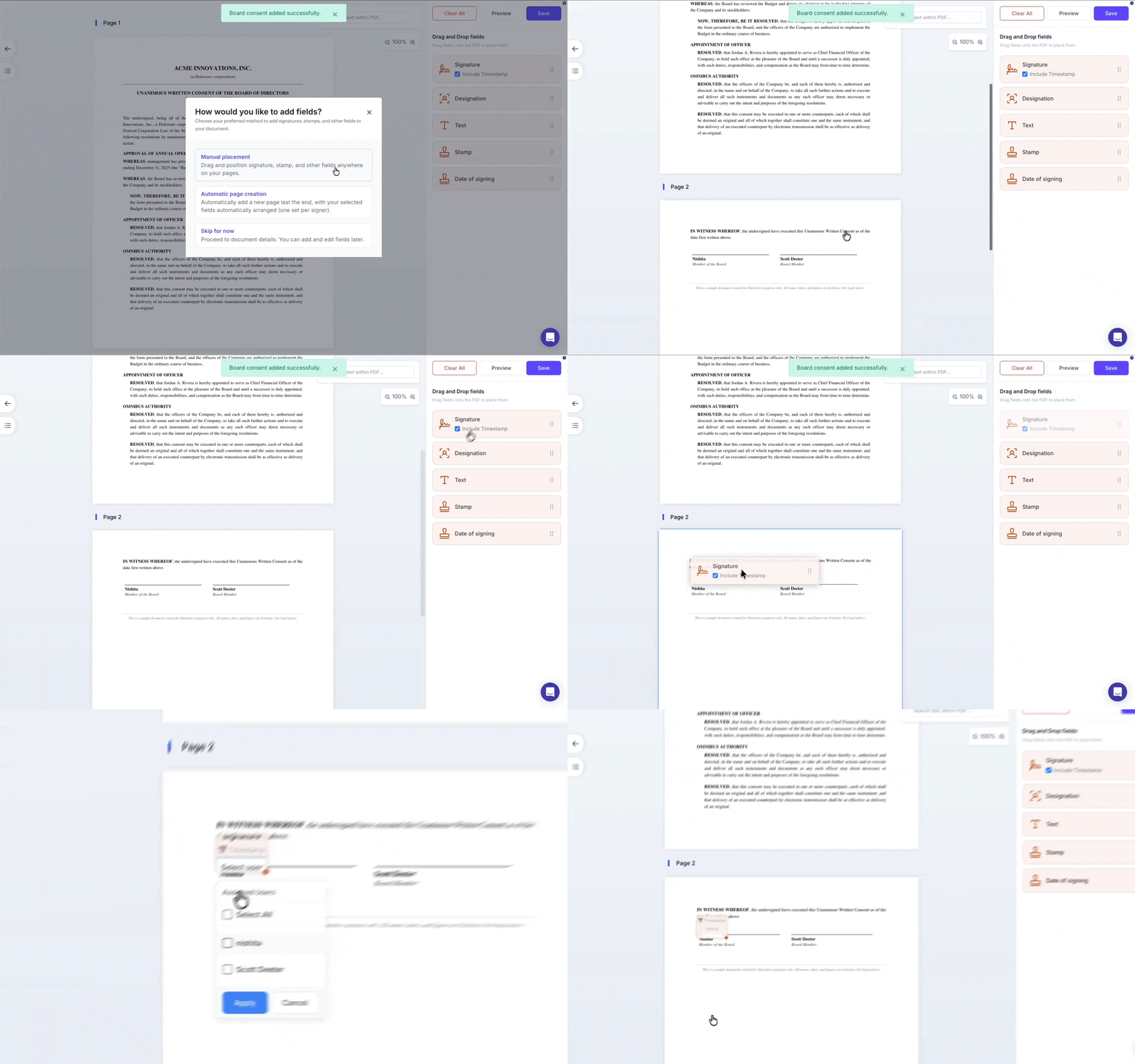
In the PDF editor used for e-signing documents, you can now place fields — such as signature, designation, and stamp — directly onto a document by dragging and dropping them from the UI, rather than inserting template variables as before.
You can add multiple signature blocks anywhere on the page and assign each one to a different signatory — so the layout matches your company's legal document requirements, where different signatories may sign in different places.
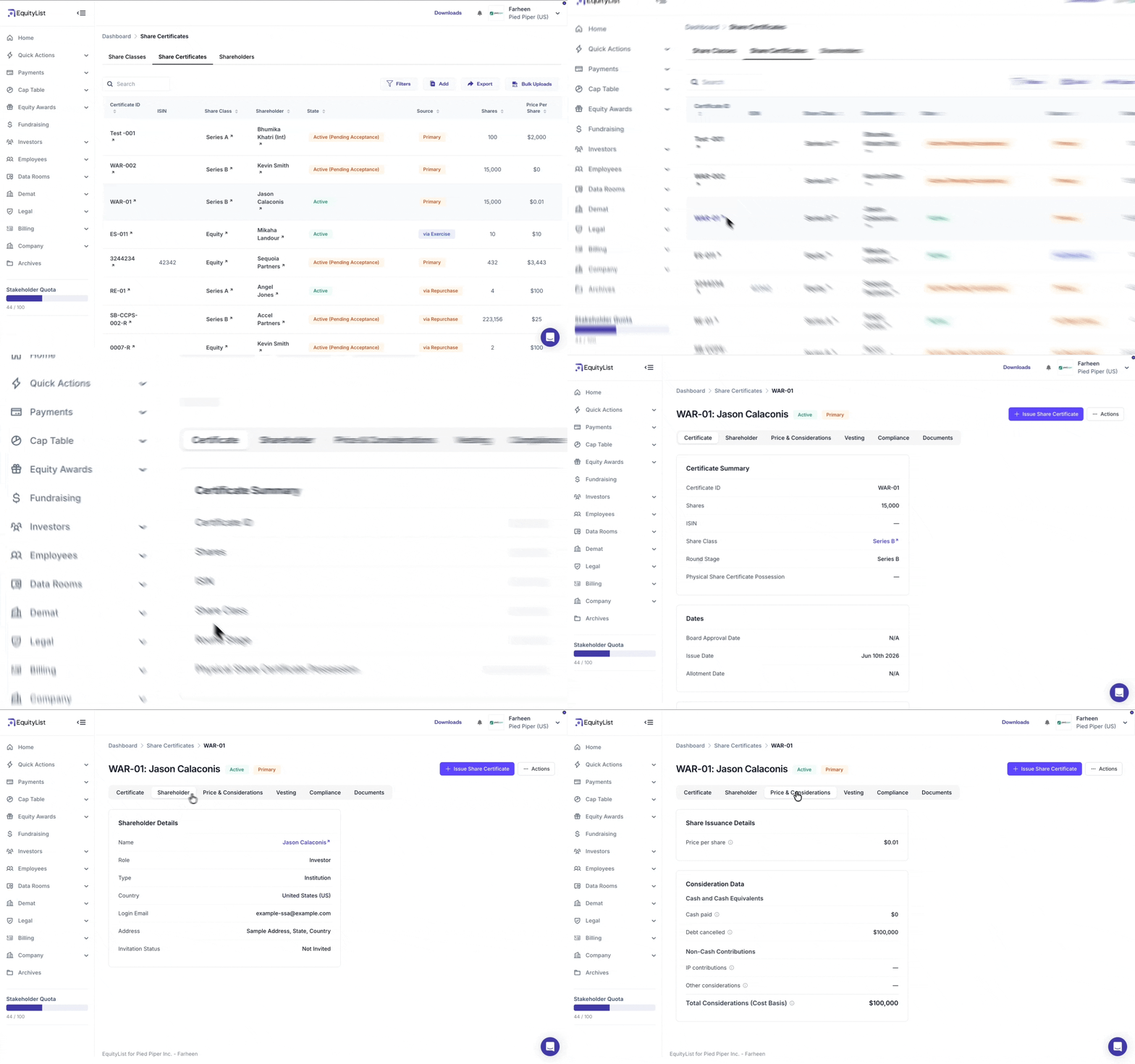
Cap Table > Shares > Share Certificates
The share certificate section has had a full UI overhaul, moving to a cleaner tabbed layout that reduces clutter and improves readability.
Share issuance details (how shares were issued on the cap table) and consideration data (the value exchanged to acquire them, i.e. cost basis) are now clearly separated rather than mixed together.
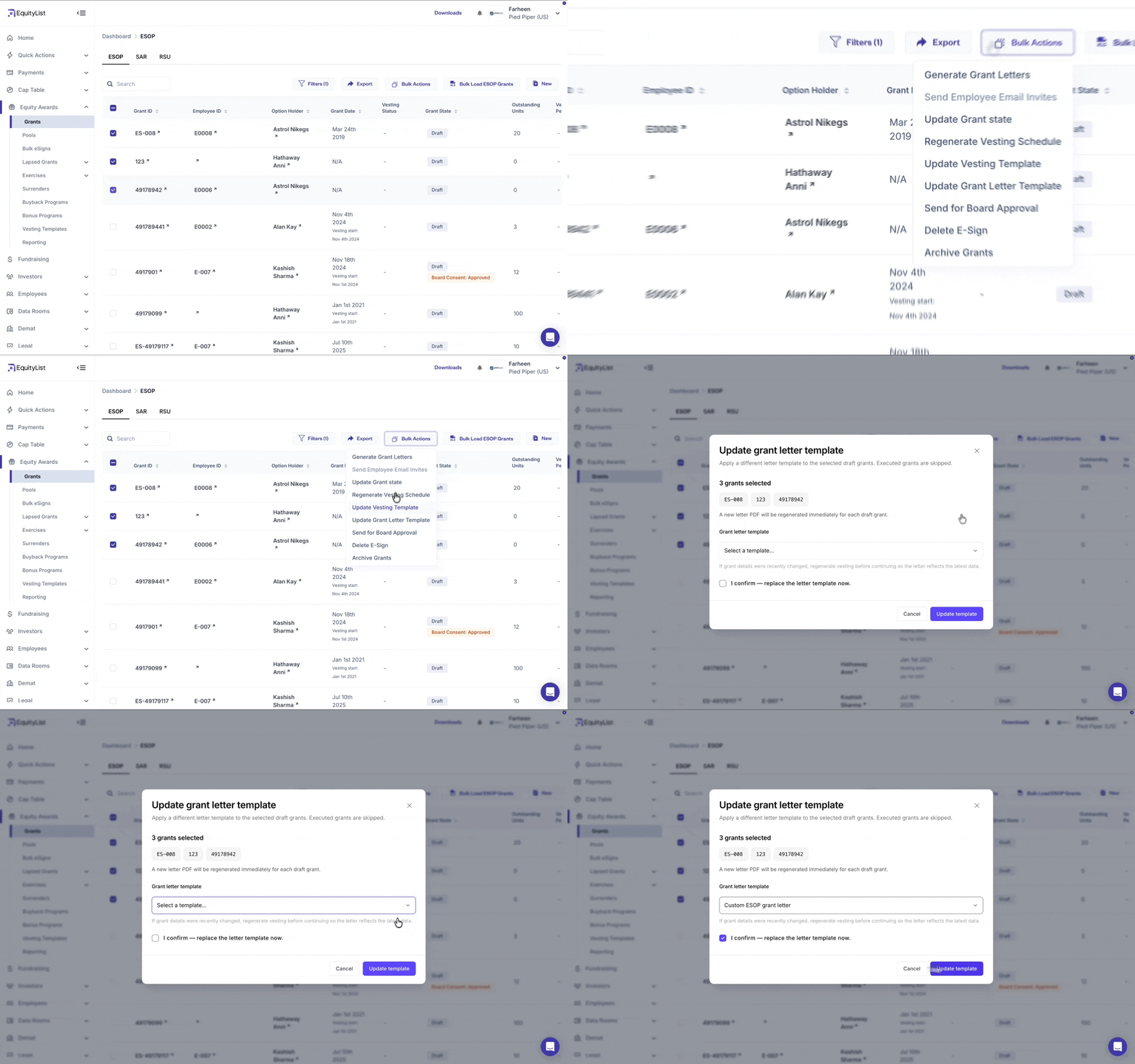
Equity Awards > Grants > Bulk Actions
Admins can now re-map a revised grant letter template to multiple draft grants in a single action — across ESOP, SAR, and RSU. No more editing grants one by one.
How it works:
- Select your grants, then pick a template: Only templates mapped to the selected grants' type are shown.
- Letters regenerate automatically: Draft grant letters are regenerated using the newly selected template.
- Executed grants are protected: If your selection includes executed grants, you'll see a warning and can proceed with draft grants only. If all selected grants are executed, the action is blocked.
- Full tracking: Every change is logged. A completion email and in-app notification confirm the update, including any grants that couldn't be processed.
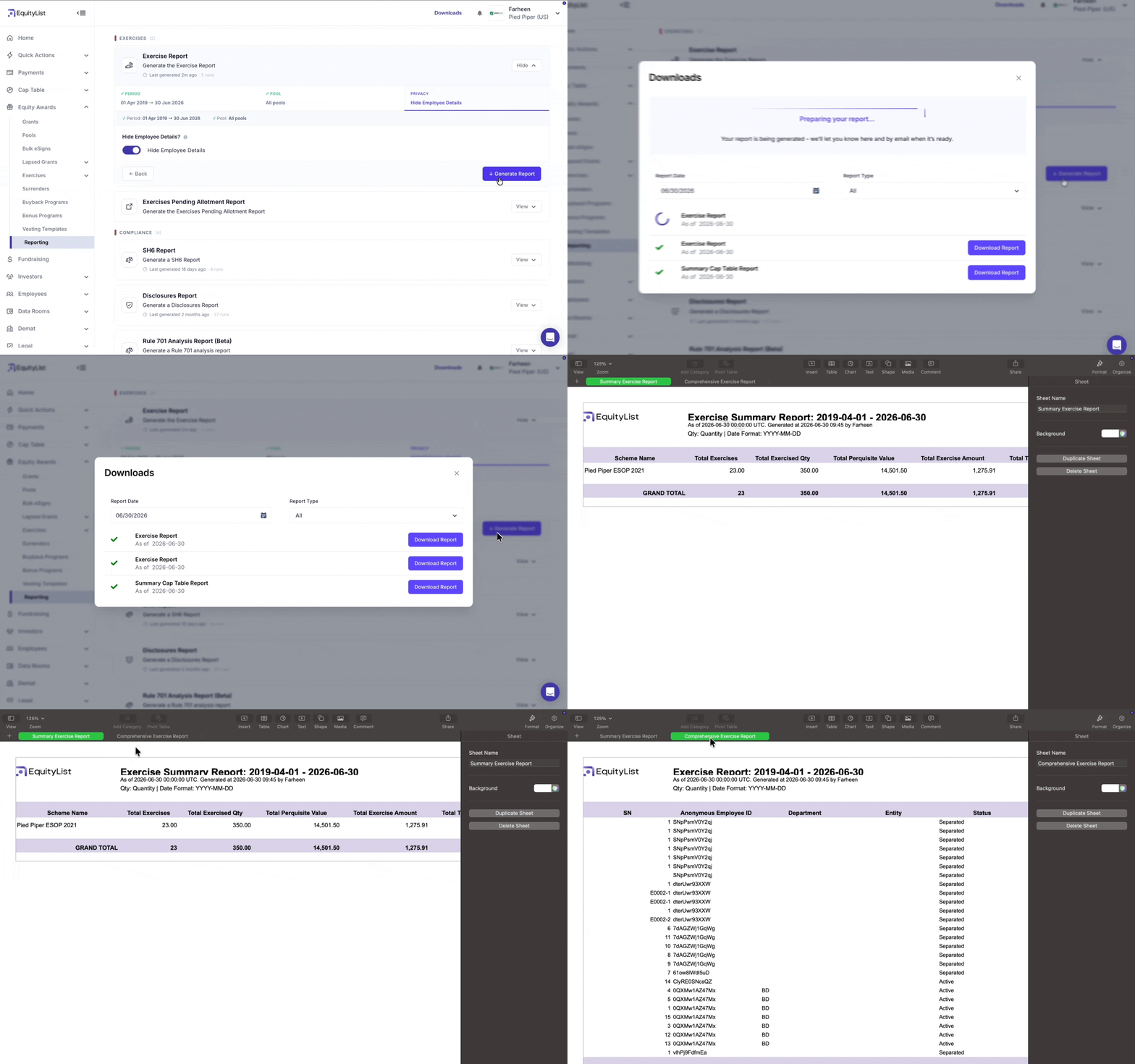
Equity Awards > Reporting > Exercise Report
The Exercise Report now includes a new ‘Summary Exercise Report’ tab that aggregates high-level exercise information alongside the existing detailed Exercise Report, which lists each exercise request—giving teams a faster way to analyze activity.
The detailed Exercise Report also gains new columns for richer participant-level insight:
- SN: Sequential number for each exercise request
- Designation: Employee designation at the time of exercise
- Entity: Legal entity under which the participant holds the grant
- Payment Deadline Extended: Revised payment deadline date, shown where an extension exists (blank otherwise)
- Exercise Letter Signed On: Date the participant signed the exercise letter (blank if unsigned)
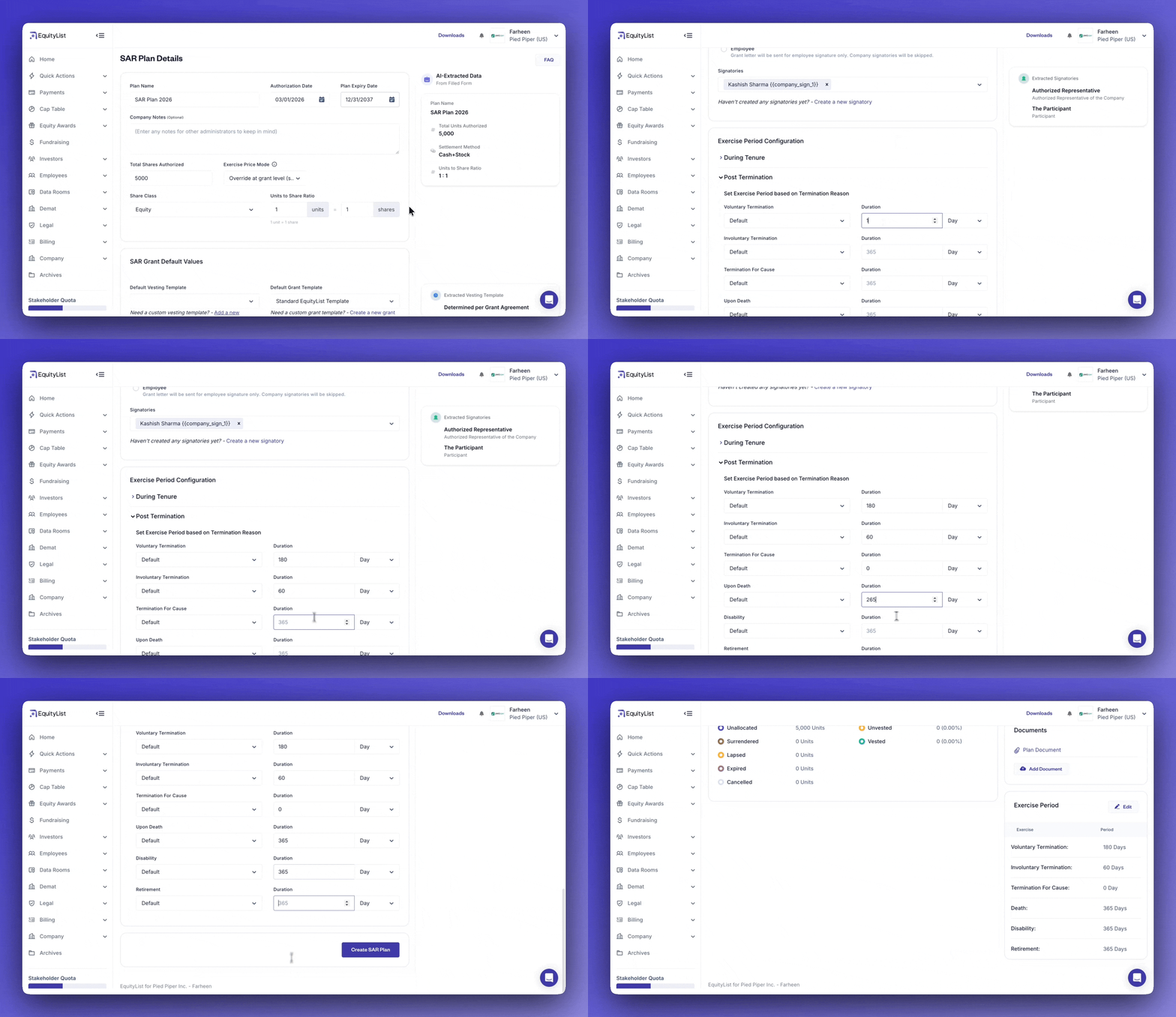
Equity Awards > Pools > SARs
Post-termination exercise periods are now available for SAR pools.
Previously available only for ESOP pools, this capability lets you configure separate exercise windows for voluntary termination, involuntary termination, termination for cause, retirement, death, and disability.
The applicable exercise period is automatically applied when a stakeholder is terminated.
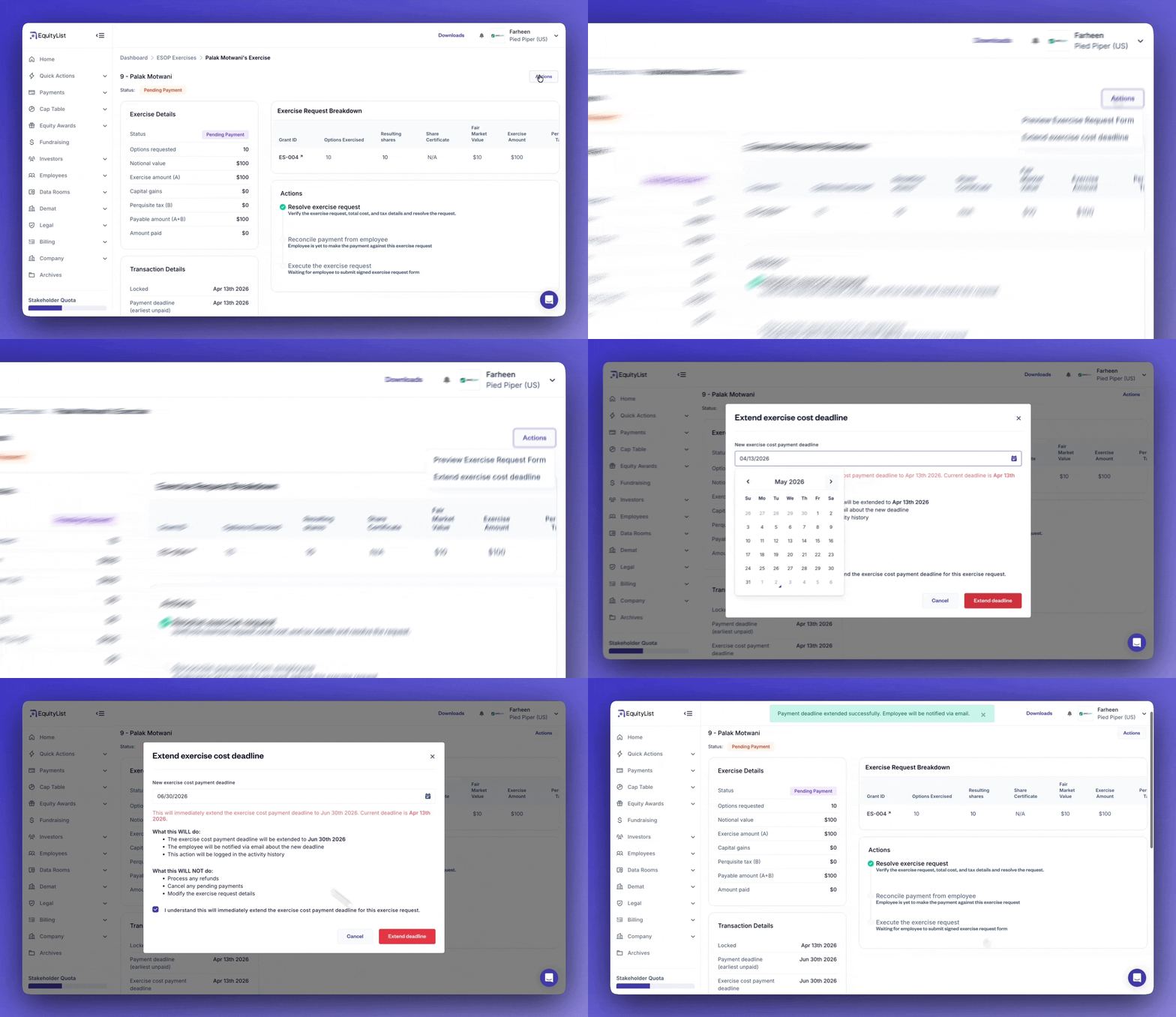
Equity Awards > Exercises > ESOP > [Exercise in Pending Payment/Cancelled status] > Actions
Admins can now extend payment deadlines for exercises in Pending Payment and Cancelled status. They can set a new deadline for either exercise cost or perquisite tax payments.
This provides flexibility for option holders who need additional time to arrange funds or complete banking formalities, without invalidating their original exercise request.
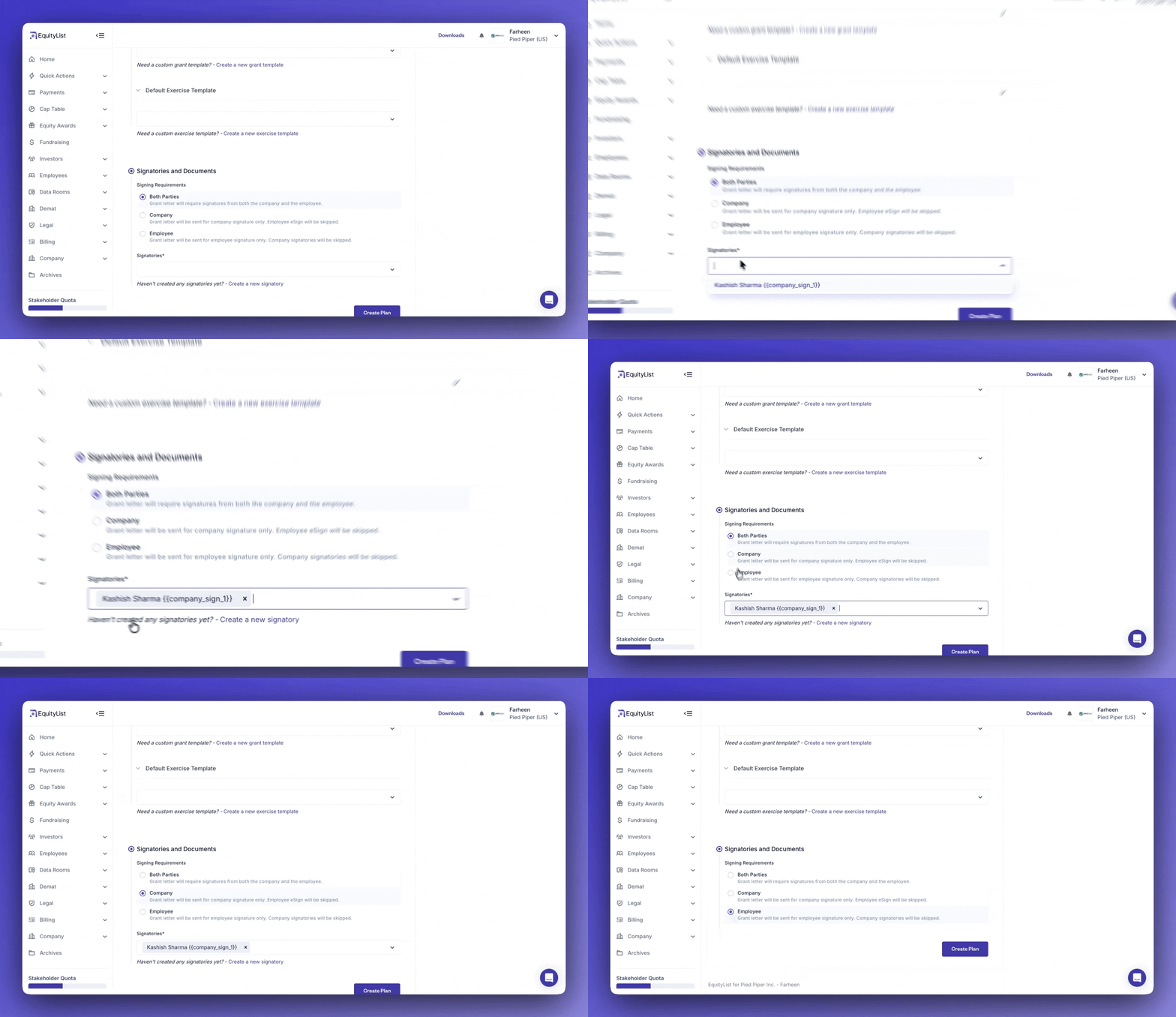
Equity Awards > Pools > ESOP
When setting up ESOP pools, you can now choose who needs to sign grant letters—both parties, company only, or employee only—instead of using a one-size-fits-all approach.
This allows you to configure grant letter signing requirements based on your company's approval and signature workflows.
Three signing modes available:
- Both parties: Grant letters require signatures from both the company and the option holder
- Company only: Only company signatories are required to sign. The option holder signature step is skipped, and the option holder receives a finalized copy for their record
- Employee only: Only the option holder is required to sign the grant letter
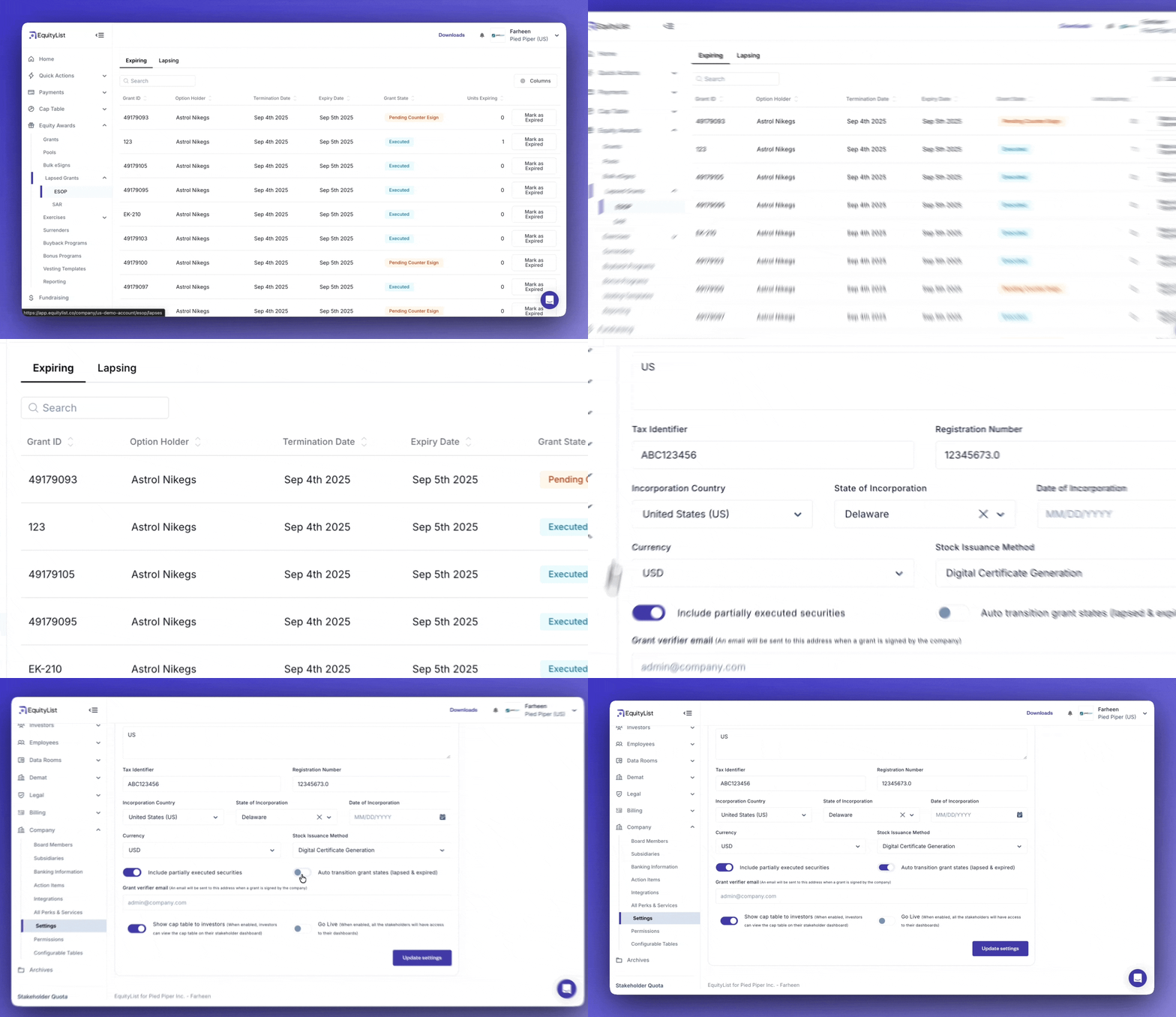
Equity Awards > Lapsed Grants > Expiring/Lapsing
The Lapsed Grants section now has two separate tabs: Expiring (grants whose scheme-defined validity period has ended) and Lapsing (grants from terminated employees whose post-termination exercise period has elapsed).
Previously, Expired and Lapsed were grouped into a single view. Separating them makes it easier to understand why a grant is no longer exercisable and take the appropriate action.
Companies can choose to automatically transition grants when the applicable criteria are met, or disable auto-transition in Settings and review each status change manually.
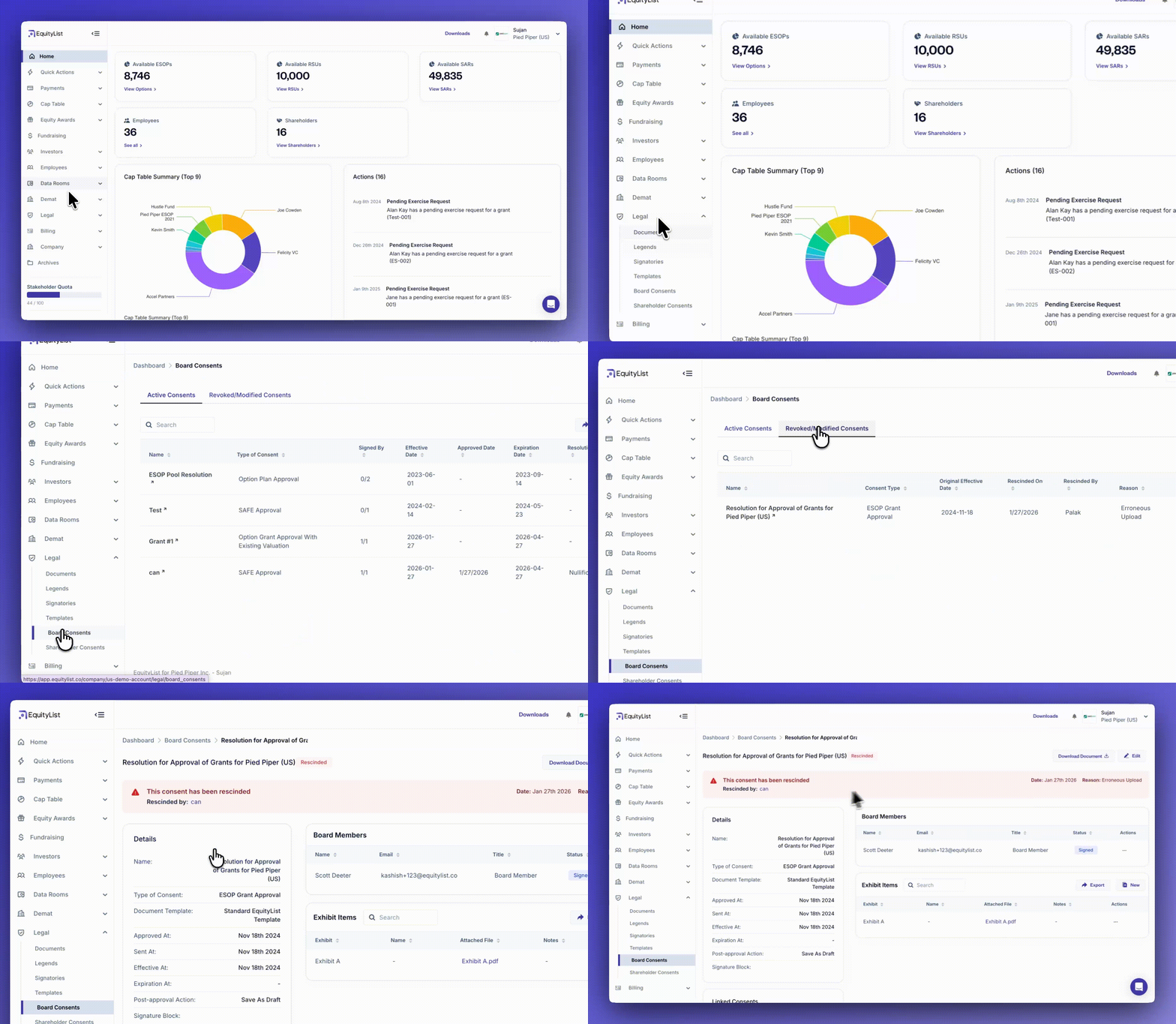
Under Legal > Board Consents or Shareholder Consents, you can now rescind, nullify, or amend signed consents without losing your compliance records.
If a consent was uploaded with wrong information, had a procedural defect, or was revoked by the board, you can formally record that. The platform asks for a reason, optional supporting documents, and a link to the replacement resolution — either one you create in EquityList or upload from an external source.
Rescinded consents move to a separate tab. Your active list stays clean, and you keep the full audit history. All linked consents show their relationships, so auditors and legal teams can trace exactly what changed, when, and why.
- Record rescissions with clear reasons (like erroneous upload, procedural defect, revoked by board, and others)
- Link rescinded consents to replacements automatically
- We notify board members or shareholders when you rescind a consent
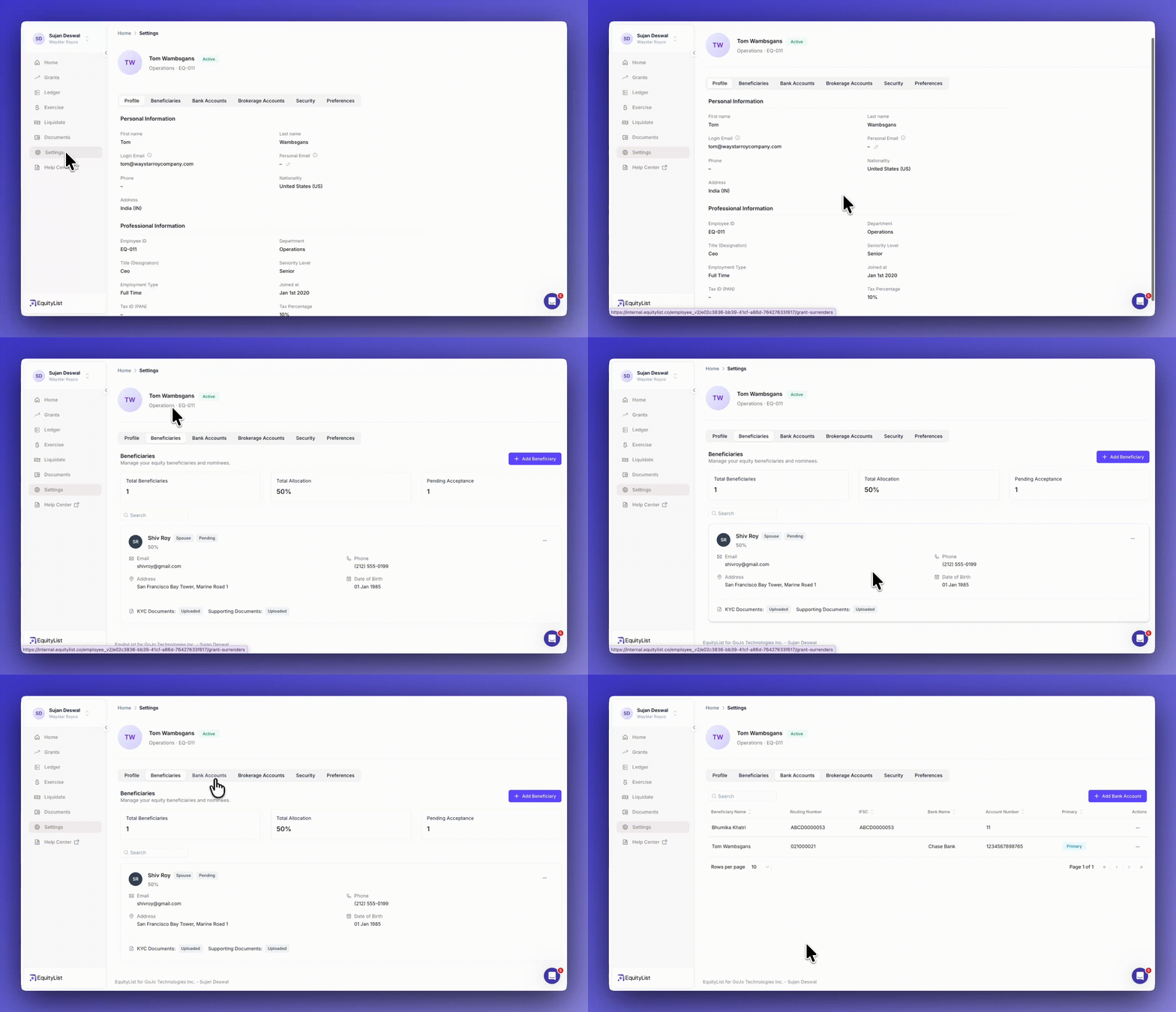
In the EquityList stakeholder-facing dashboard, under Settings > 'Beneficiaries' tab, stakeholders can now set up verified beneficiaries/nominees for their equity holdings.
When an employee adds a beneficiary/nominee, they can add KYC documents (optional), send a notification, and track formal acceptance. This creates a clear audit trail for when transmission events happen.
Stakeholders can add up to 10 beneficiaries/nominees and split allocations by percentage. If they name a minor, the platform asks for legal guardian details and runs a separate acceptance flow.
Stakeholders can also upload wills, letters of intent, or personal declarations. These stay encrypted and hidden from the company — we only unlock them during verified transmission events with proper legal documentation.
Both stakeholders and admins can see the full picture at a glance: total beneficiaries, percentage splits, and which acceptances are still pending.
Your stakeholders' equity now looks and feels like the real investment they are.
We've completely redesigned the stakeholder dashboard with clearer numbers, better visibility, and an experience that treats equity the way any serious financial holding should be treated.
What’s new(er)? 👇️
Re-designed ‘Home’ page
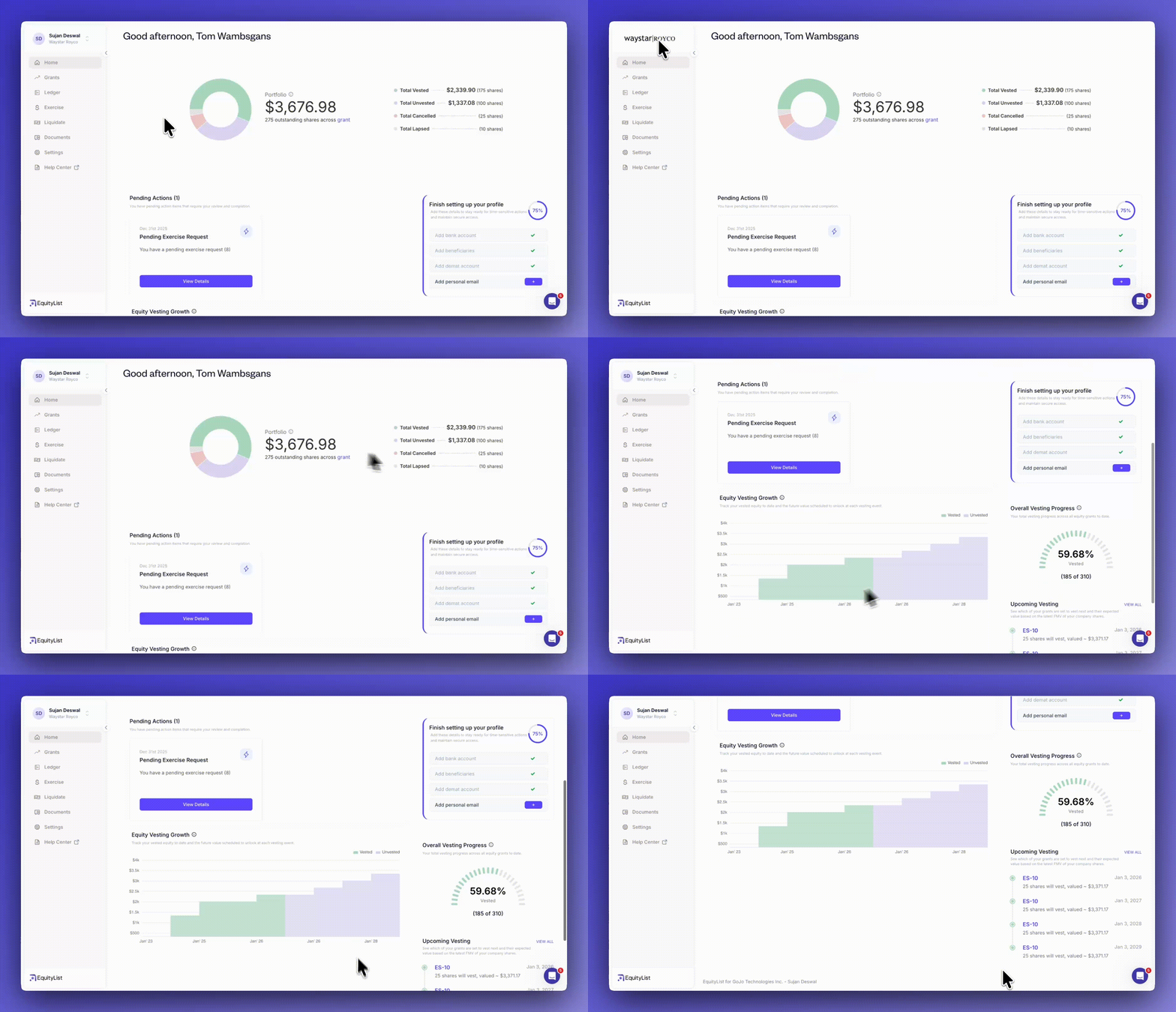
A portfolio-style dashboard showing total vested value, equity growth over time, and pending actions.
‘Grants’ page
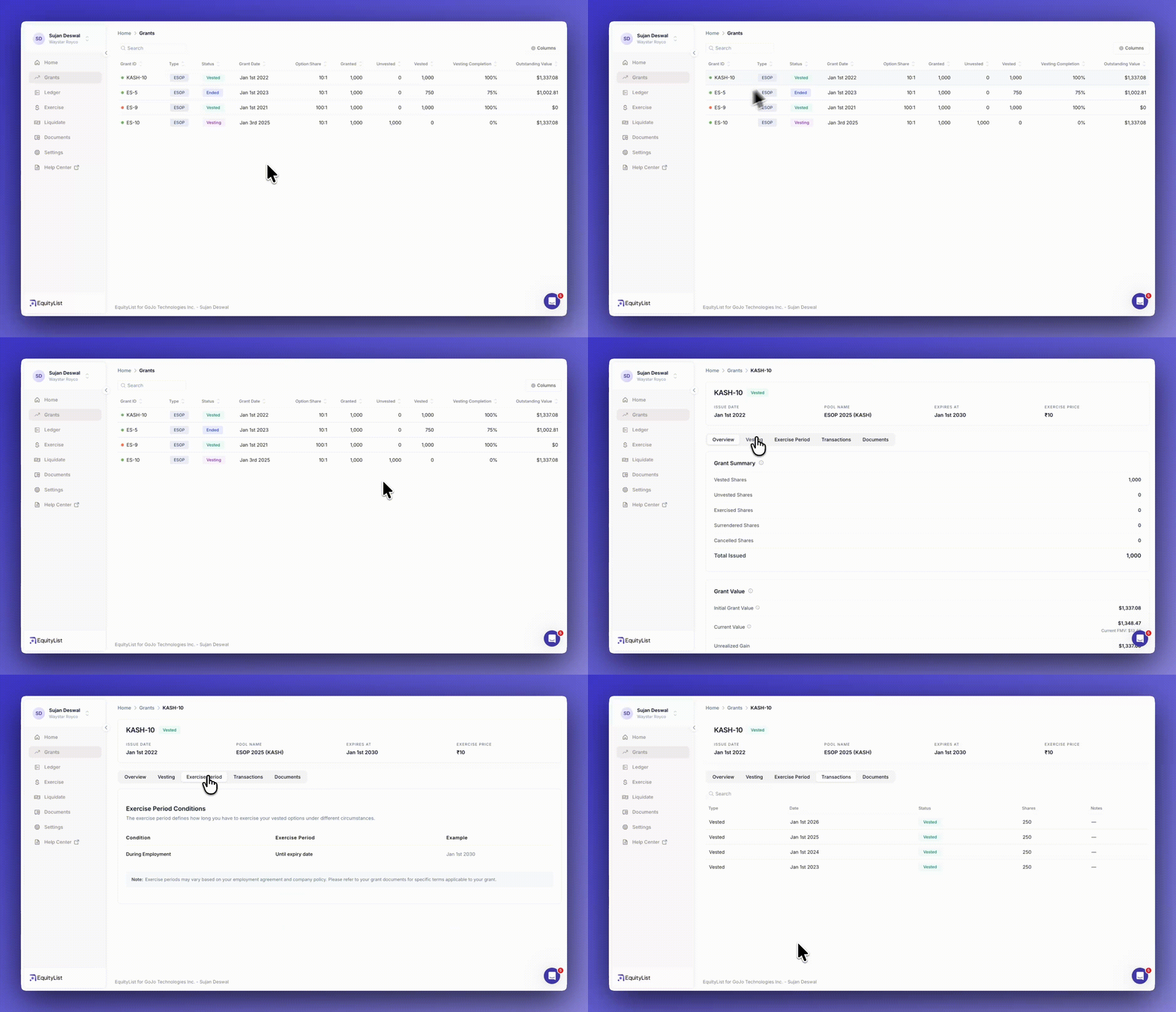
Stakeholders can view their grants at a glance with status, vesting progress, and current value.
New ‘Ledger’ page
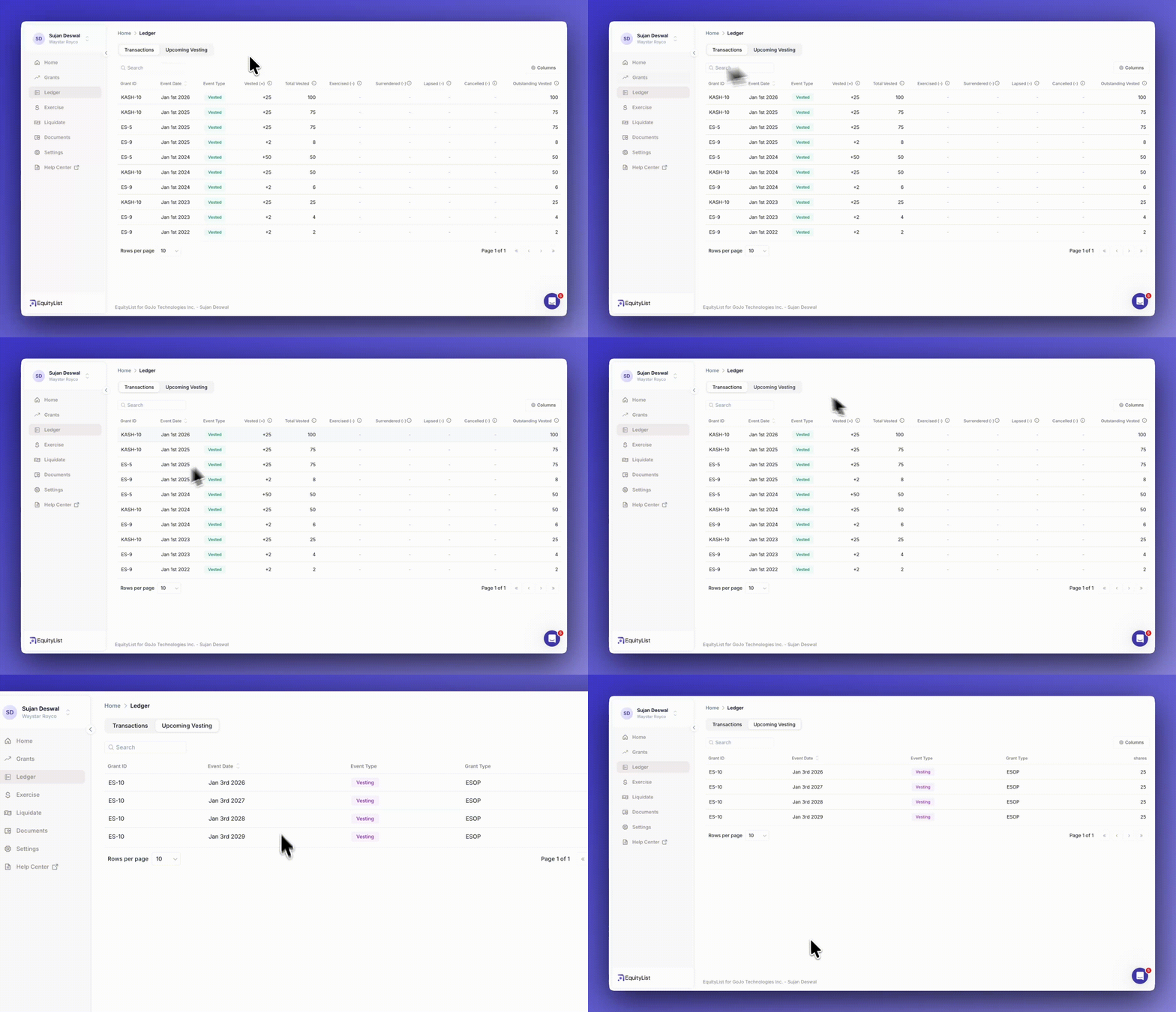
A complete transaction history so stakeholders can see exactly how their equity changed over time.
Deep-revamp to ‘Beneficiary’ section (under ‘Settings’)
Stakeholders can add beneficiaries, allocate them equity by percentage, and store proof-of-identity verification.
New ‘Liquidate’ page
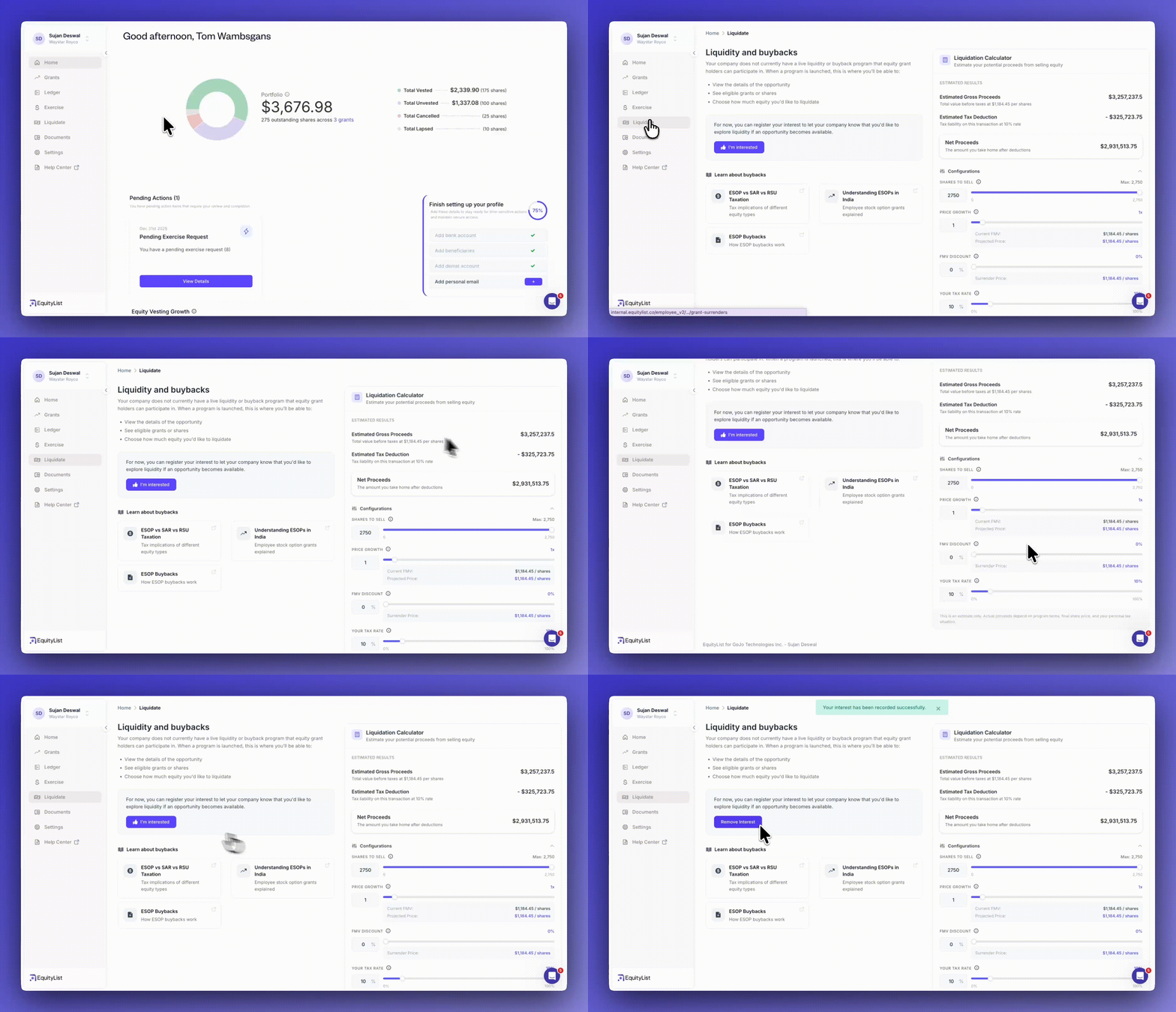
Stakeholders can register interest in future liquidity events (like buybacks) and estimate their potential proceeds with the built-in simulator.
‘Exercise’ page
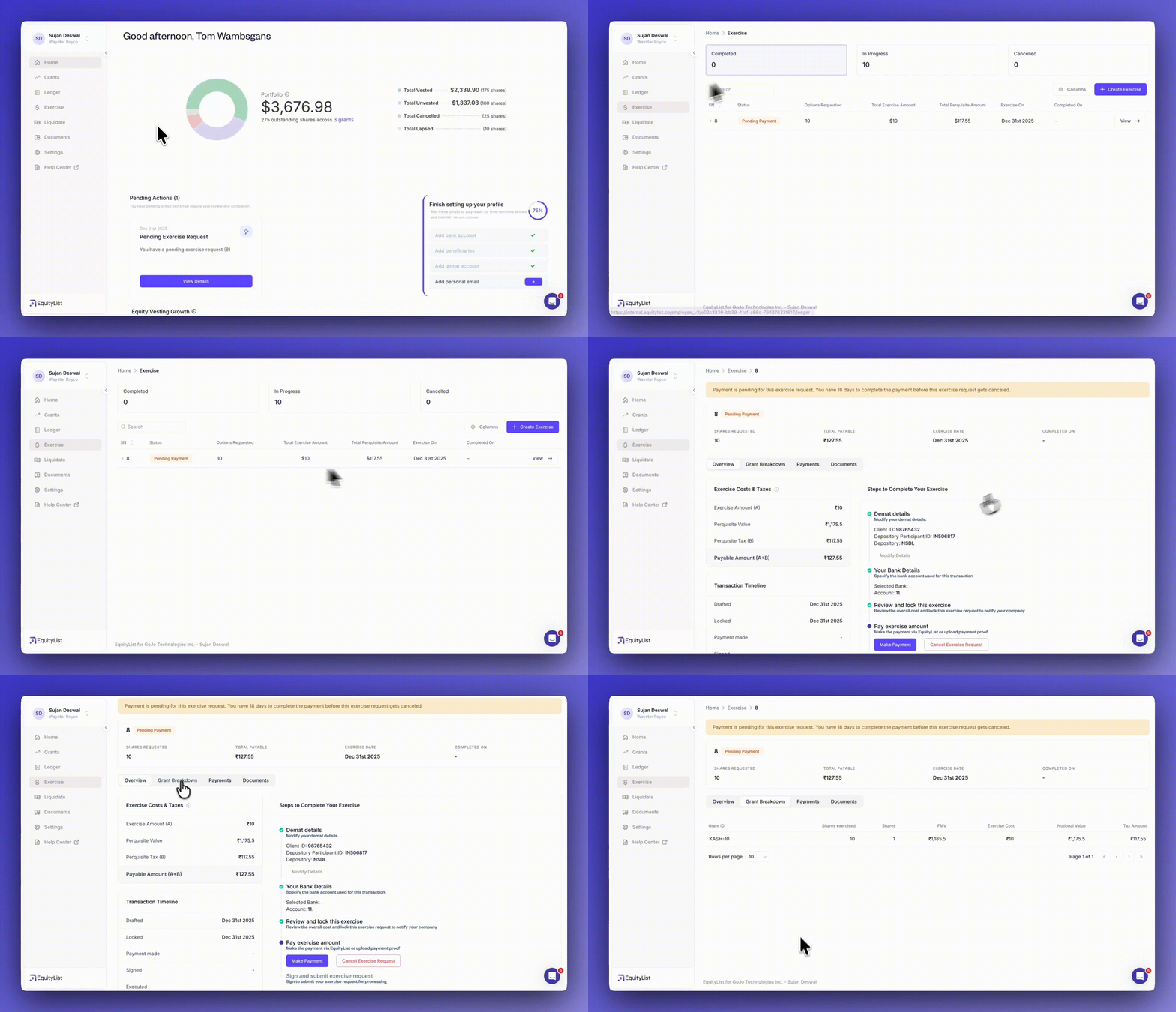
A clearer way to create and track exercise requests with status, amounts, and perquisite breakdowns.
Filters added to shareholders view
- Under Cap Table > Shares > Shareholders, you can now filter shareholders by entity type (e.g. individual, institution), role (e.g. investor, employee, advisor), and invitation status & date, for quicker lookup and reconciliation.
Filters added to share certificates
- Under Cap Table > Shares > Share Certificates; now includes filtering options such as certificate state (e.g. active, draft, cancelled), source (e.g. issued, exercised, converted), issue date, and number of shares, making it easier to locate specific certificates during audits or reviews.
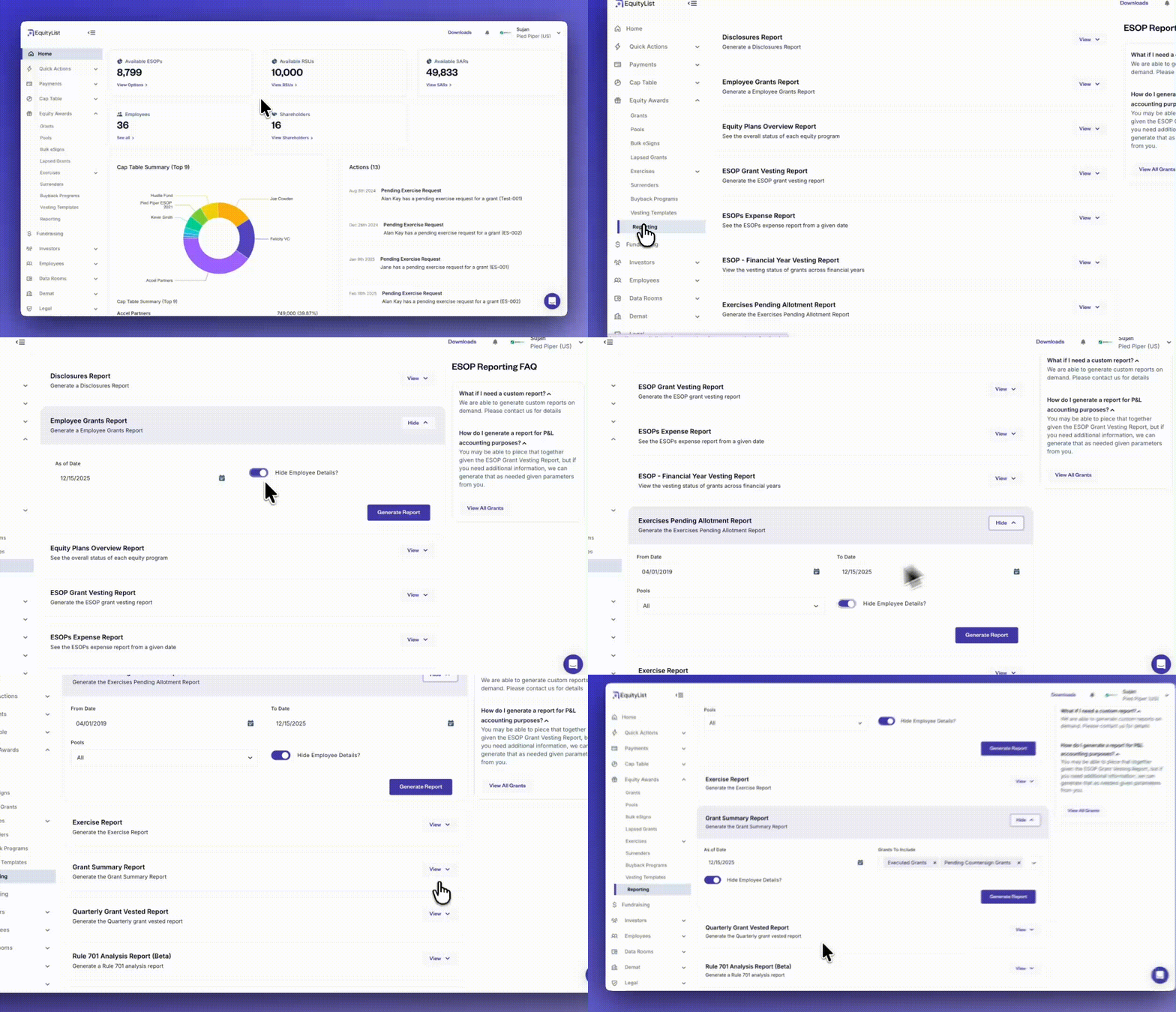
Under Equity Awards > Reporting, employee PII (personally identifiable information) can now be hidden across more reports, removing the need for HR or other teams to manually scrub sensitive information before sharing. This makes it easier to generate audit-ready reports while maintaining privacy and compliance.
Reports included in this update:
- Employee Grants Report
- ESOP Grant Vesting Report
- ESOPs Expense Report
- ESOP – Financial Year Vesting Report
- Exercises Pending Allotment Report
- Exercise Report
- Grant Summary Report
- Quarterly Grant Vested Report
- Rule 701 Analysis Report (Beta)
- Rule 718 ASC Expense Report (Beta)
- RSU Grants Vesting Report
- SAR – Financial Year Vesting Report
- SAR Grants Vesting Report
- SH6 Report
- Surrenders Overview Report
Reports currently excluded:
- Disclosures Report
- Equity Plans Overview Report
- RSU Pool Overview Report
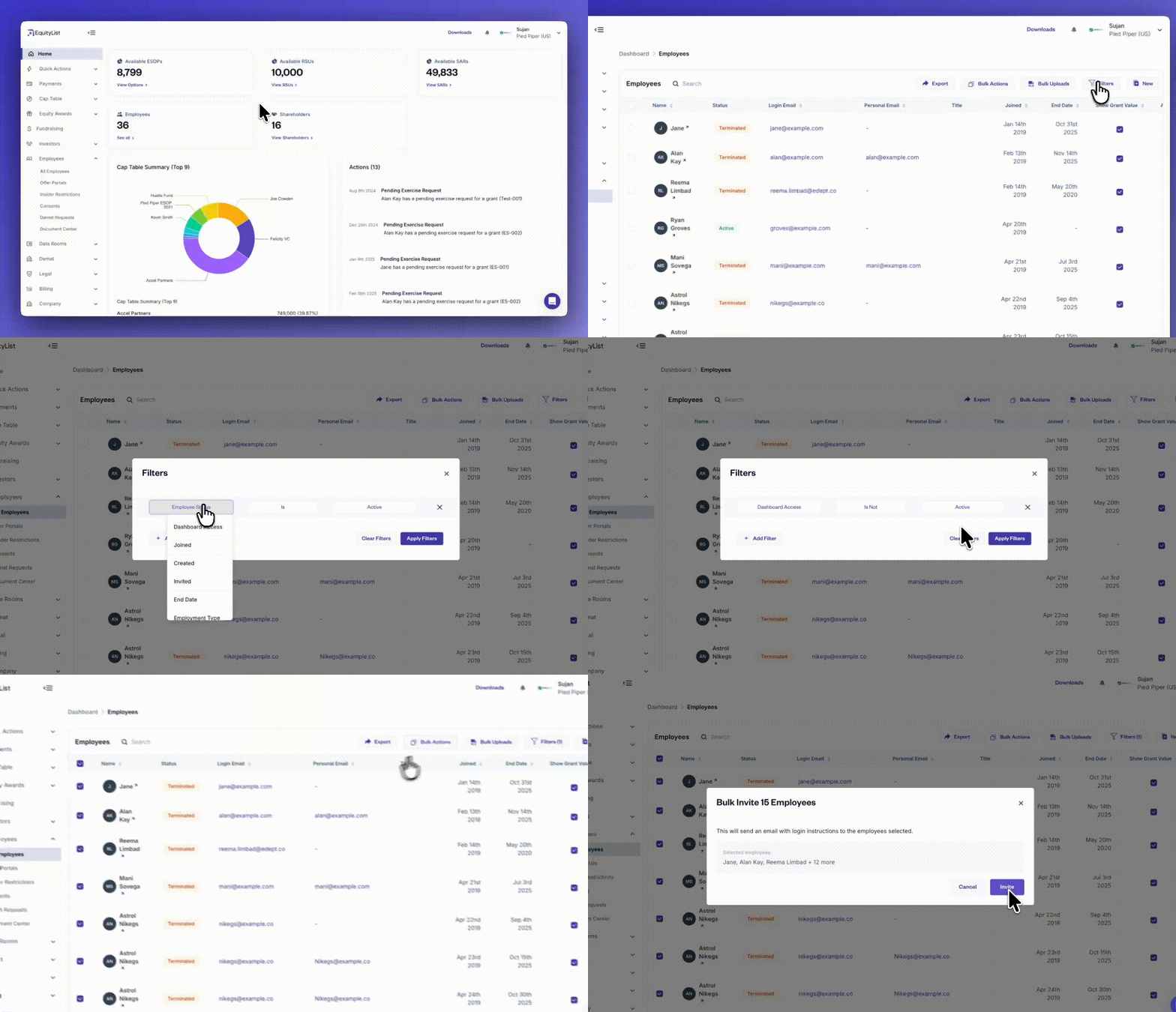
Under Employees > All Employees, you can now apply filters and send dashboard invitations in bulk to the selected employee group. This removes the need to navigate through the ‘Grants’ page or export spreadsheets just to determine who should be invited.
The bulk invite action makes onboarding significantly faster for companies with large teams or complex grant histories, and gives admins a clearer, more controlled way to manage rollout of dashboard access.
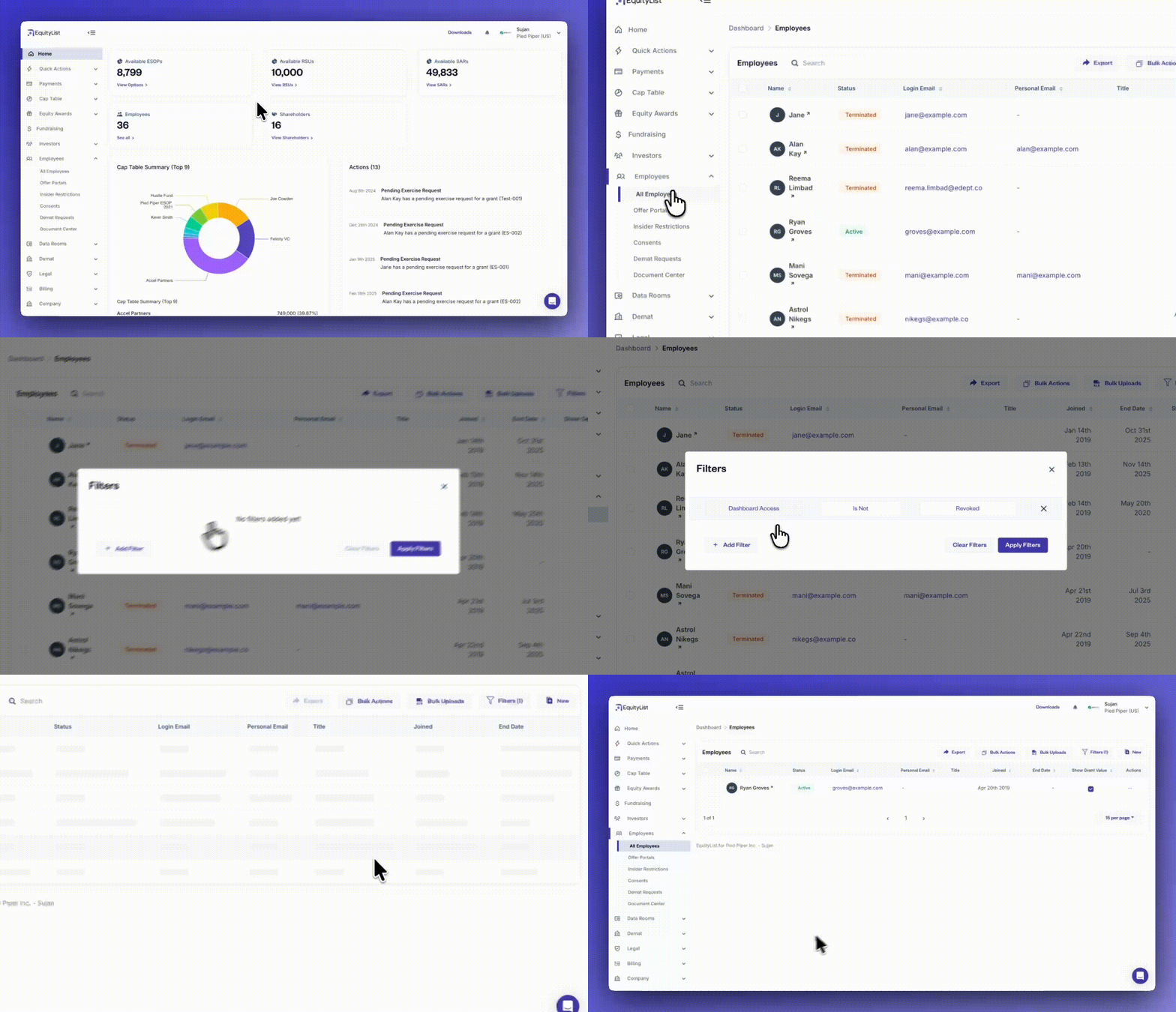
Under Employees > All Employees, it’s now much easier for HR and admin teams to see which employees have dashboard access and which don’t, without manually checking individual records.
The employees page includes new filters that let you segment by dashboard access, employment status, joining date, termination reason, employee type (full-time or contractual), and tax percentages, among others.
These filters simplify access reviews, onboarding checks, and offboarding audits, while also helping HR teams track employees by lifecycle or policy settings.
You can also revoke dashboard access in bulk directly from the filtered list whenever required.
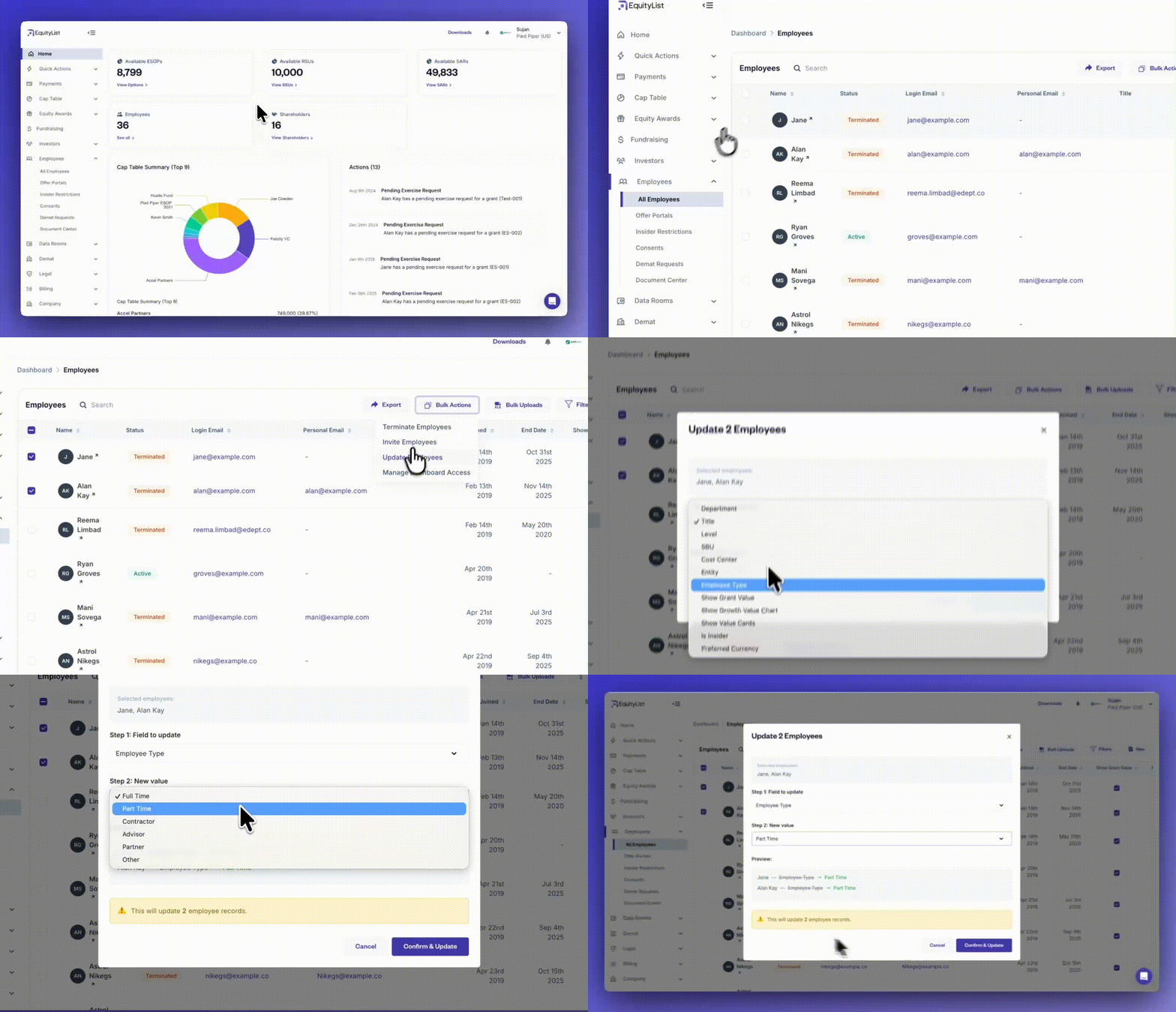
From the left-side menu, under Employees > All Employees, you can now make changes to multiple employee records at once without relying on bulk-upload spreadsheets. Select the employees you want to update, click on ‘Bulk Actions’, and choose the ‘Update Employees’ option.
A modal will let you pick the specific field you want to update and enter the new value. Once confirmed, the platform applies that change to all selected records instantly.
This helps you manage recurring updates without needing external files or manual edits.
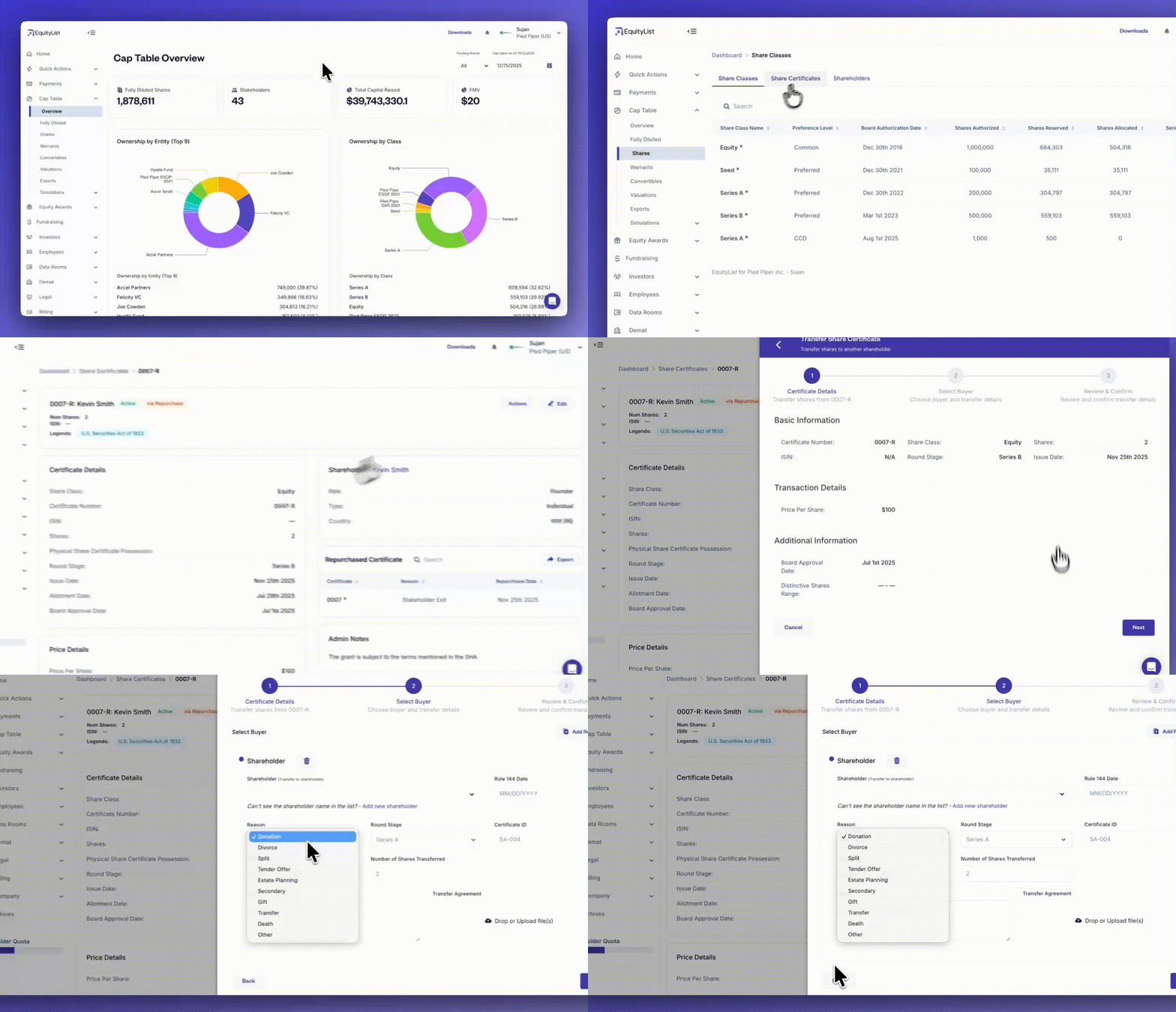
Under Cap Table > Shares > Share Certificates, share splits can now be formally recorded inside EquityList using the transfer workflow.
When creating a transfer, admins can select “Split” as the reason, ensuring the resulting certificate is clearly marked with a ‘Split’ state for easier auditability and downstream tracking.
Transfers to the same shareholder are supported within this workflow, as a mechanism to help represent split activity when no ownership change occurs.
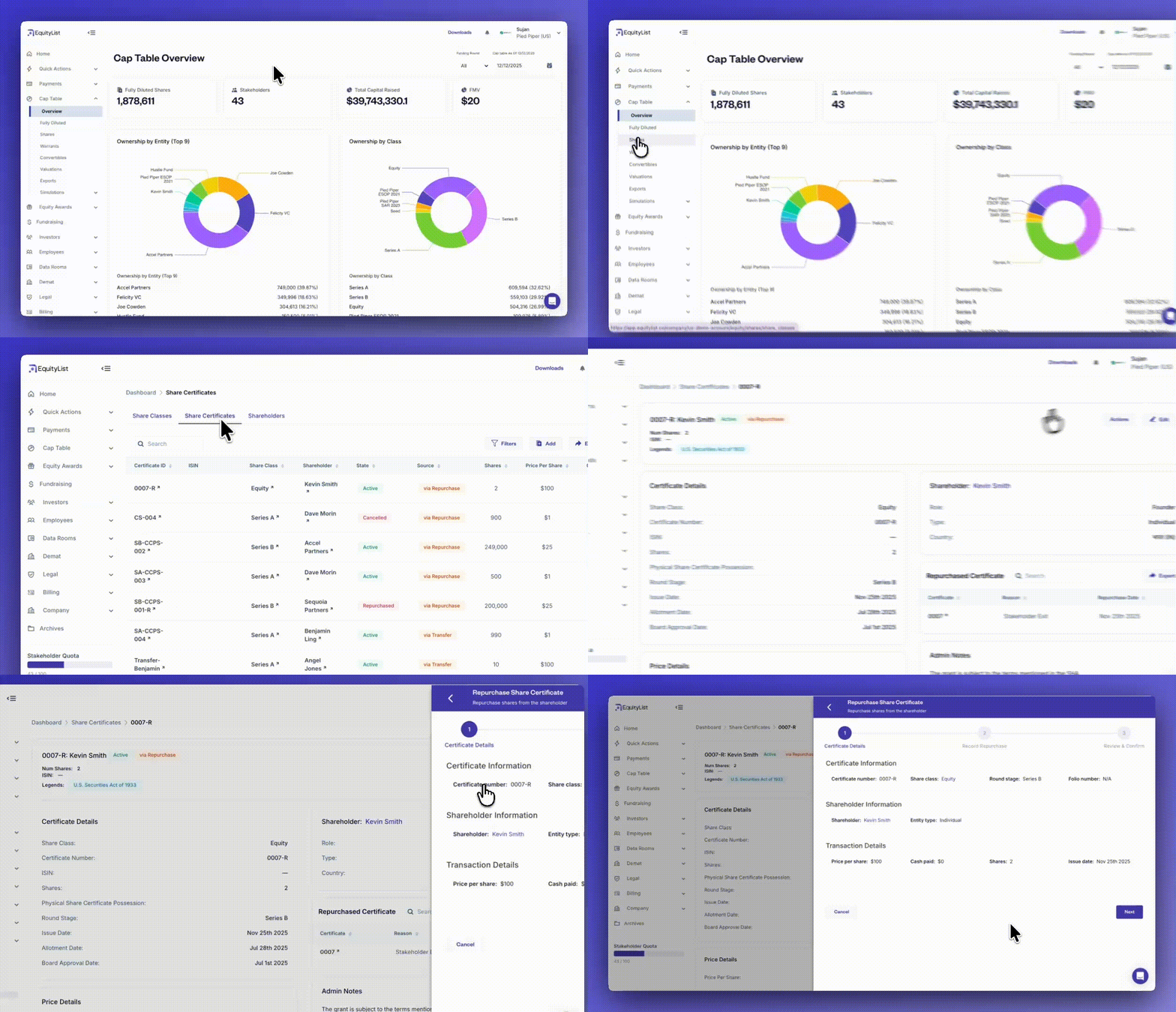
Under Cap Table > Shares > Share Certificates > [Certificate] > ‘Actions’ you can now reflect previously executed share repurchases directly on the platform.
Whether shares were bought back due to an employee departure or the company decides to clean its cap table, you can record repurchases and let EquityList handle all downstream adjustments automatically.
Once recorded, the system updates certificate statuses, adjusts the balance of remaining shares, and maintains a clean audit trail for compliance.
This ensures your equity records stay aligned with reality, even when transactions happen outside the platform.
- Record both full and partial repurchases with repurchase reason, pricing, and date
- Upload supporting documentation for future audits
- Auto-calculated transaction value with override support
- New certificate automatically issued for remaining shares in a partial repurchase
- Cap table and activity log updated instantly after confirmation
Reports update
- Consistent formatting across cap table reports
When you review cap table reports, you’ll now see uniform header colors, column widths, and number alignment — matching the formatting used in other equity award reports. - Overall standardized report format and logic review
When you generate reports, they now follow the updated layout and logic used in the grant vesting reports — ensuring every report looks and calculates consistently.
Cleaner share class view in ‘Detailed Cap Table Report’
When you review your detailed cap table report (under Cap Table > Exports), you’ll now see only actual share classes (like common and preferred shares). Warrants, CCDs, and other convertible instruments no longer appear since they haven’t been issued yet (thereby, no longer cluttering the report with empty columns).
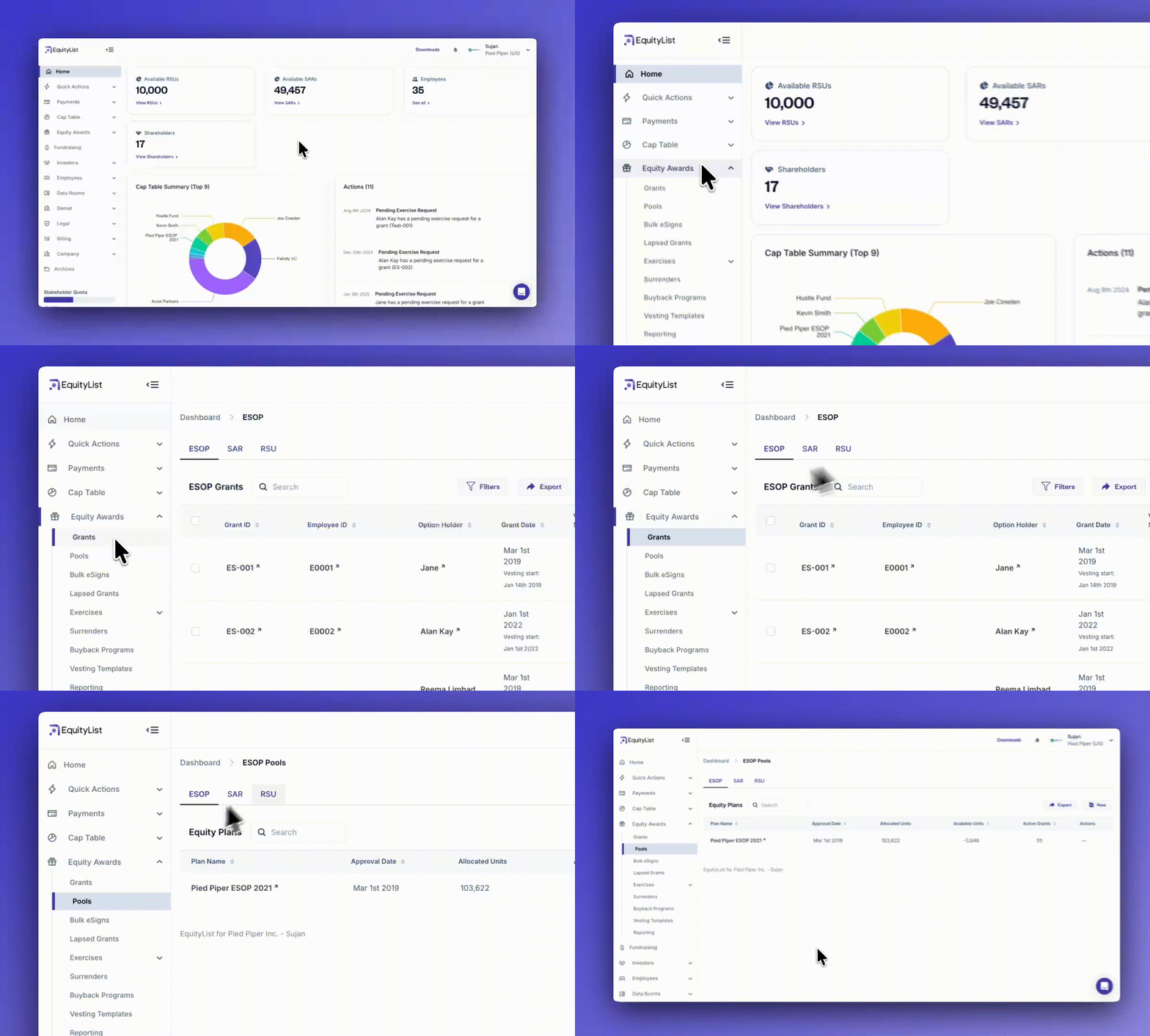
When you track pool allocations and grants, you’ll now see them on separate pages — reducing confusion and giving each its own detailed view.
- You can find the new ‘Pools’ page on the left-side menu under Equity Awards > Pools.
- The ‘Grants’ page, like earlier, continues to exist under Equity Awards > Grants.
Both pages retain the original categorization and separate list for ESOPs, SARs, and RSUs with clear labels.
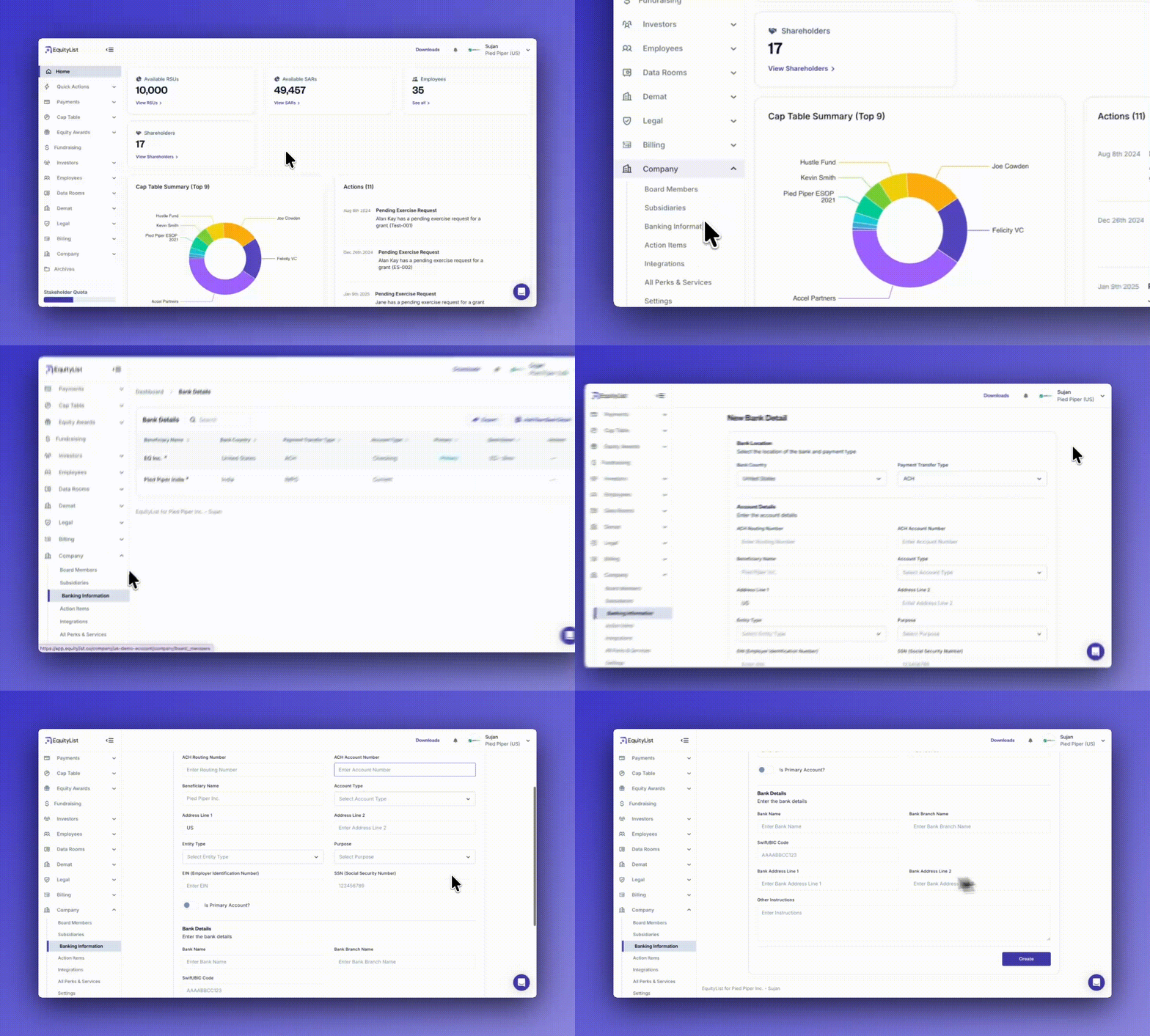
(Under Company > Banking Information) When you need to store or verify bank details for fundraising, you can now capture both global and region-specific banking fields — all validated automatically based on the selected country.
- Smart forms: Common fields like Bank Name, Account Number, and Entity Type appear by default.
- Region-aware fields: IFSC and PAN in India, ACH Routing and EIN in the US, IBAN/SWIFT globally, and more.
- Built-in validation: Ensures every field follows regional banking standards before submission.
- Secure & compliant: All financial data is encrypted, logged, and auditable.
- Scalable system: Supports continuous expansion to new countries and regulatory requirements. [Note: Currently, available only on request]

When you move between detailed views — you can now see a breadcrumb trail showing your exact navigation path. Furthermore, clicking any section of the breadcrumb instantly takes you back to that page.
- Clear context: Always know where you are within EquityList.
- Quick navigation: Jump back to higher-level pages in one-click.
- Consistent experience: Available across all major modules inside the platform.

For admins, when you need to review debt alongside equity holdings for any shareholder (under Cap Table > Shares > Shareholders > [shareholder name]), you’ll now also see a dedicated ‘Debentures’ table along with the existing tables for share certificates, convertible debt, SAFEs, and warrants.
The same is applicable for your shareholders when they review their own dashboards.
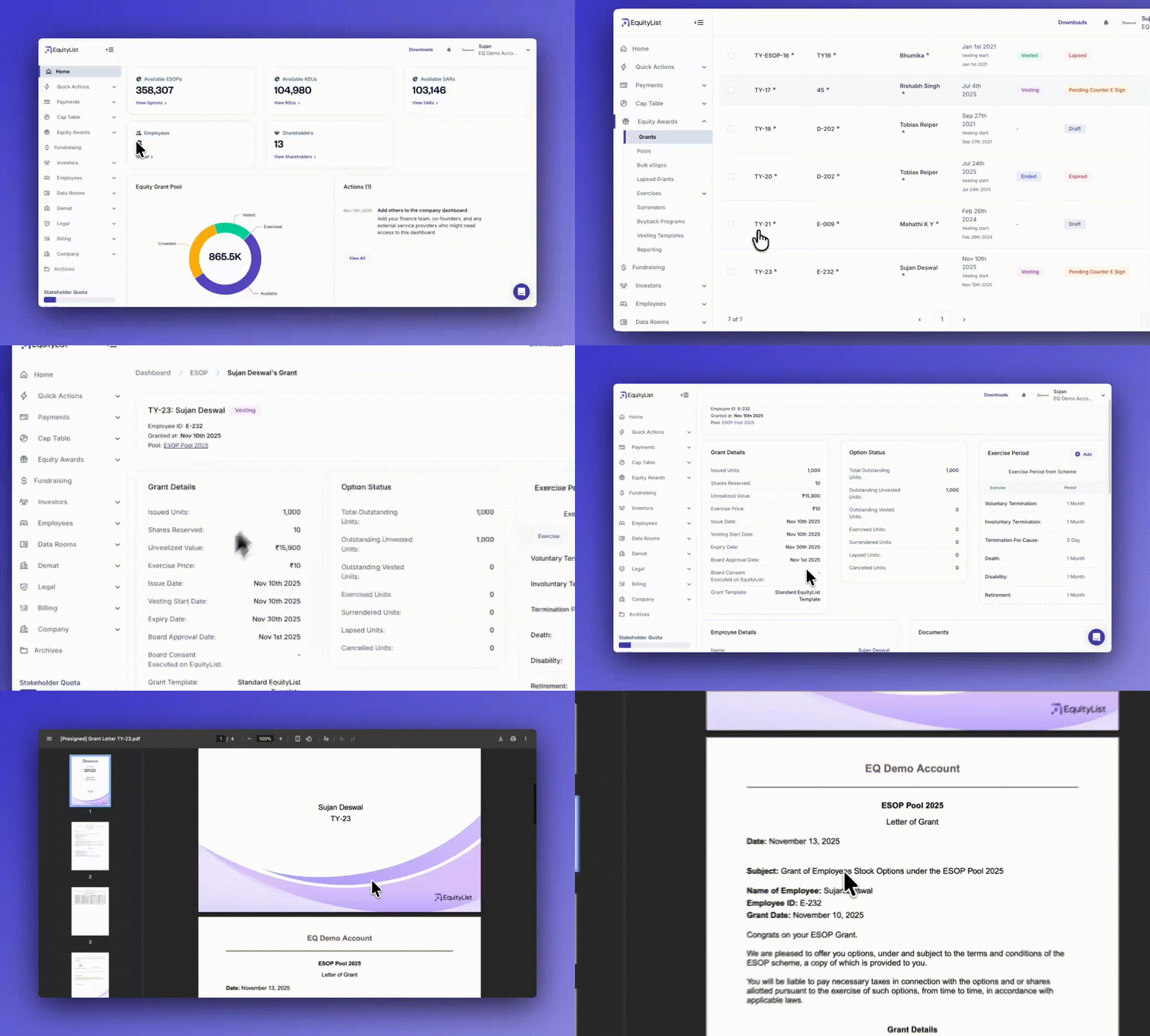
When you generate a grant letter, the document now auto-fills with today’s date at the top, instead of using the historical grant date. This keeps the letter aligned with the actual day it’s created.
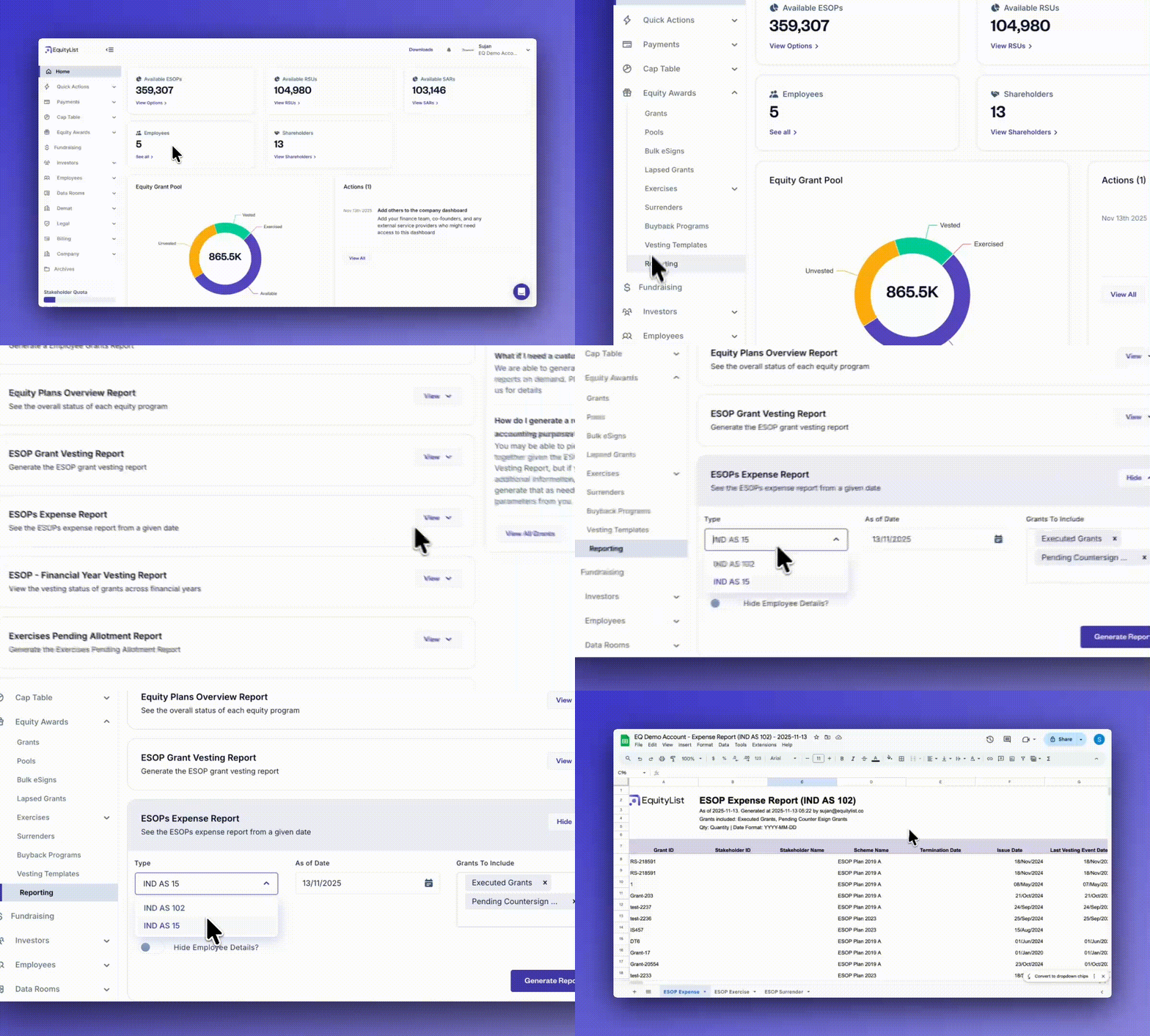
This update affects Indian companies only.
When you need to prepare expense calculations under IND AS 15 or AS 102, you can now generate cleaner, standardized reports with improved formatting and clear data references. This enables your finance and audit teams get consistent, review-ready outputs every time.
- Simpler layouts: ‘Net Cost’ column removed for clarity.
- Consistent formatting: Number, date, and text alignment now match the Vesting Report style.
- Quick context: Top section now shows “Qty = Quantity | Date Format = YYYY-MM-DD.”
- Currency clarity: Cost columns include a currency symbol header.
- Structured headers: Updated field names for easier reconciliation and analysis.
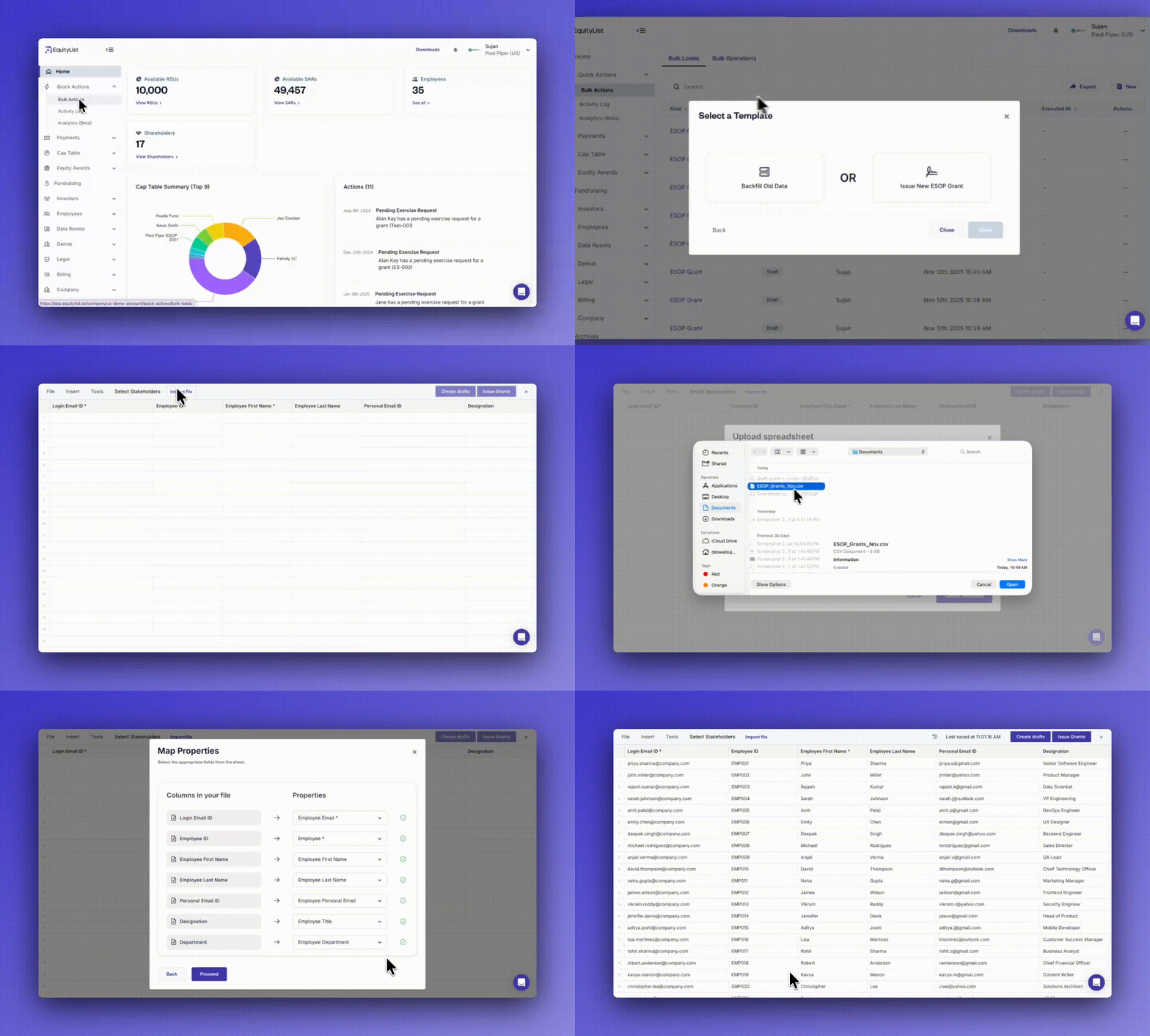
When you need to update multiple records at once, you can now bulk import data across all major modules using our new ‘Smartsheet’ interface (shortcut: Quick Actions > Bulk Actions).
- Unified imports: Works for ESOP, SAR, and RSU grants, employees, exercises, terminations, and all key instruments like CCDs, SAFEs, and warrants.
- Spreadsheet friendly: Easily upload
.xlsxor.csvfiles using our downloadable templates- Tip: Find these templates in the smartsheet itself under File > Export As.
- Smart mapping: Quickly match your spreadsheet columns to platform fields in seconds.
- Bulk actions: Instantly create or update records without manual entry.
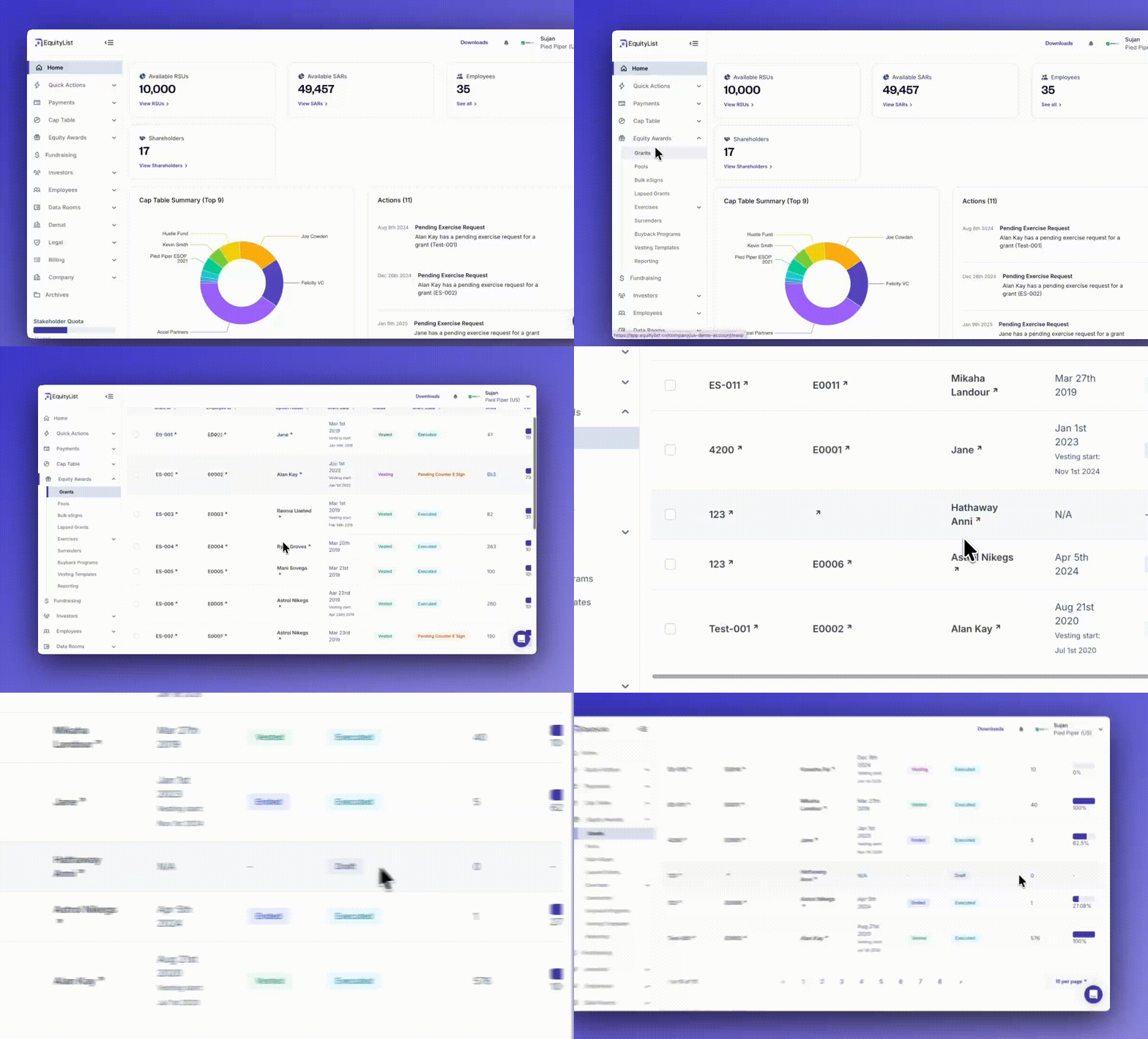
When you’re managing equity data, you no longer have to worry about draft grants being treated like active ones. Drafts are now clearly marked, hidden from most workflows, and excluded from billing. This keeps your records clean and compliant.
- Improved access control: Employees with only draft grants can’t log in or view dashboards.
- Clearer visibility: Draft grants now show a Draft tag instead of vesting status.
- Simplified views: Vesting progress, completion percentage, and events are hidden for drafts.
- Consistent across plans: Changes apply to ESOP, SAR, and RSU grants.
- Accurate reporting: Draft grants are excluded from billing. But you can still view them in reports by applying the right filters when generating the report.
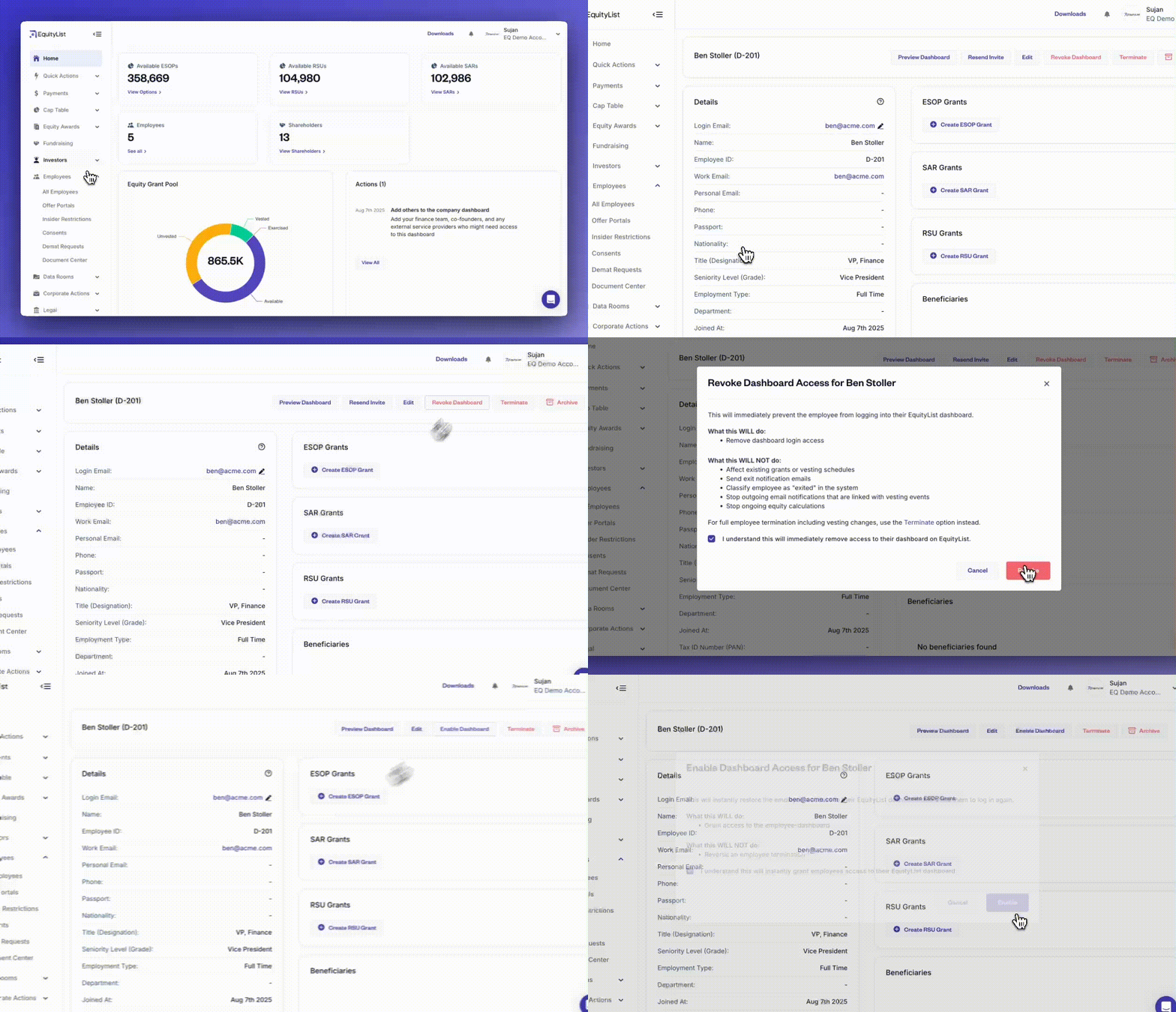
When managing employee access, you’ll now see improved controls that reduce confusion using clearer button labels, updated invite states, and a reworded ‘Revoke Dashboard’ action.
This ensures you know exactly what will and won’t happen when revoking access, without affecting grants, vesting, or employment status.
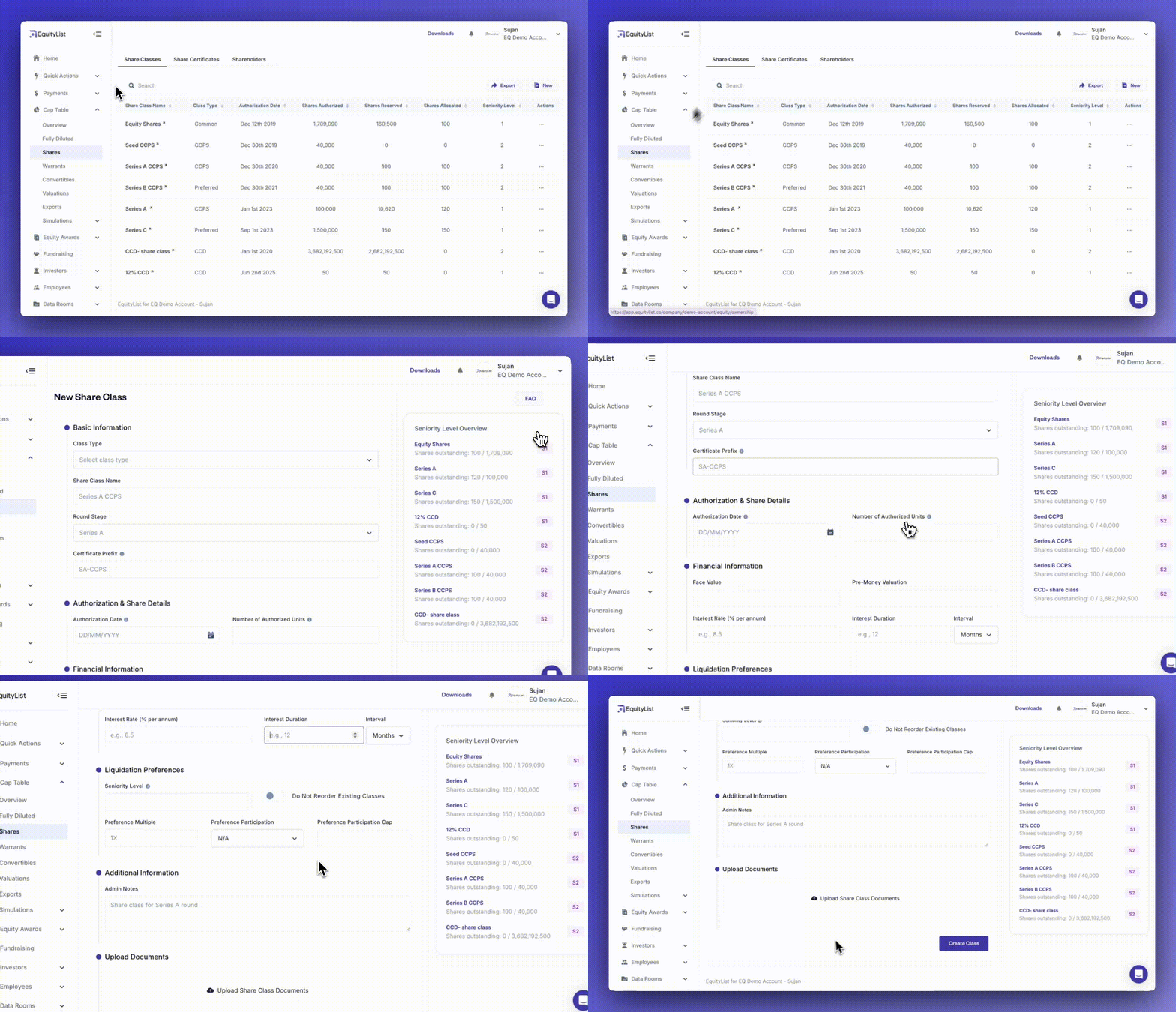
When adding a new share class, the updated flow now helps you avoid common errors and confusion—with better field ordering, cleaner validation, and contextual prompts for selecting ‘Seniority Level’.
You can now upload supporting documents and view your current seniority stack (on the right-side) while filling the form, so decisions are easier and more informed.
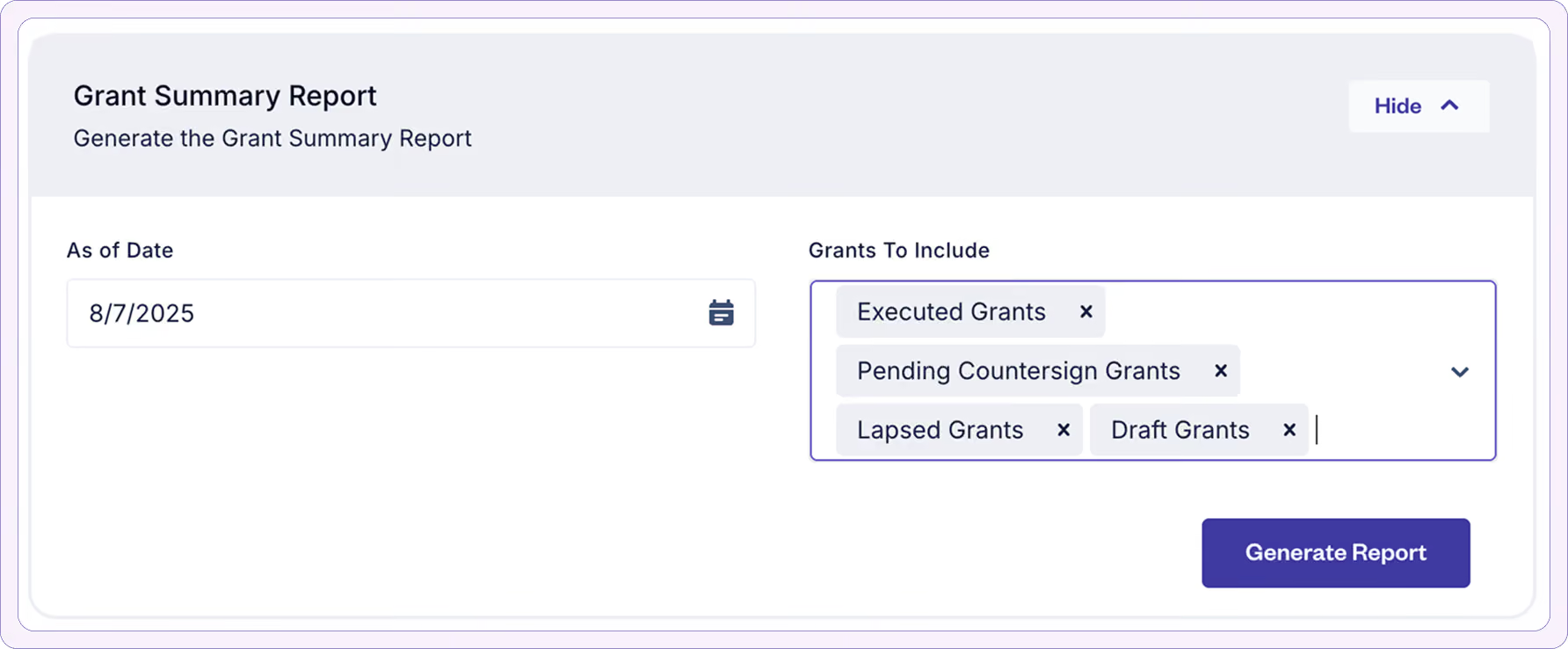
When you need a single, authoritative view of every equity grant, the new ‘Grant Summary Report’ puts all the essentials in front of you in one clean, consistent format - across ESOP, SAR, and RSU plans.
Highlights:
- One row per grant: No more wading through detailed vesting events when you just need the big picture.
- Board-ready in seconds: Scheme name, share class, key dates, grant type, vesting template, exercise price, and complete quantity/state breakdown (issued, vested, unvested, exercised, surrendered, cancelled, lapsed, expired).
- Built for speed and clarity: Consistent terminology, global-ready grant type handling, and professional formatting make it instantly usable for internal reviews or external sharing.
- Compliance-ready: Includes termination reasons, state of residence/exemptions, and admin notes for a full audit trail.
- Scenario-based exercise rights: Post-termination exercise periods for voluntary, involuntary, cause, death, disability, and retirement.
- Unified format: Works across all equity plan types - ESOP, SAR, and RSU - without switching reports.
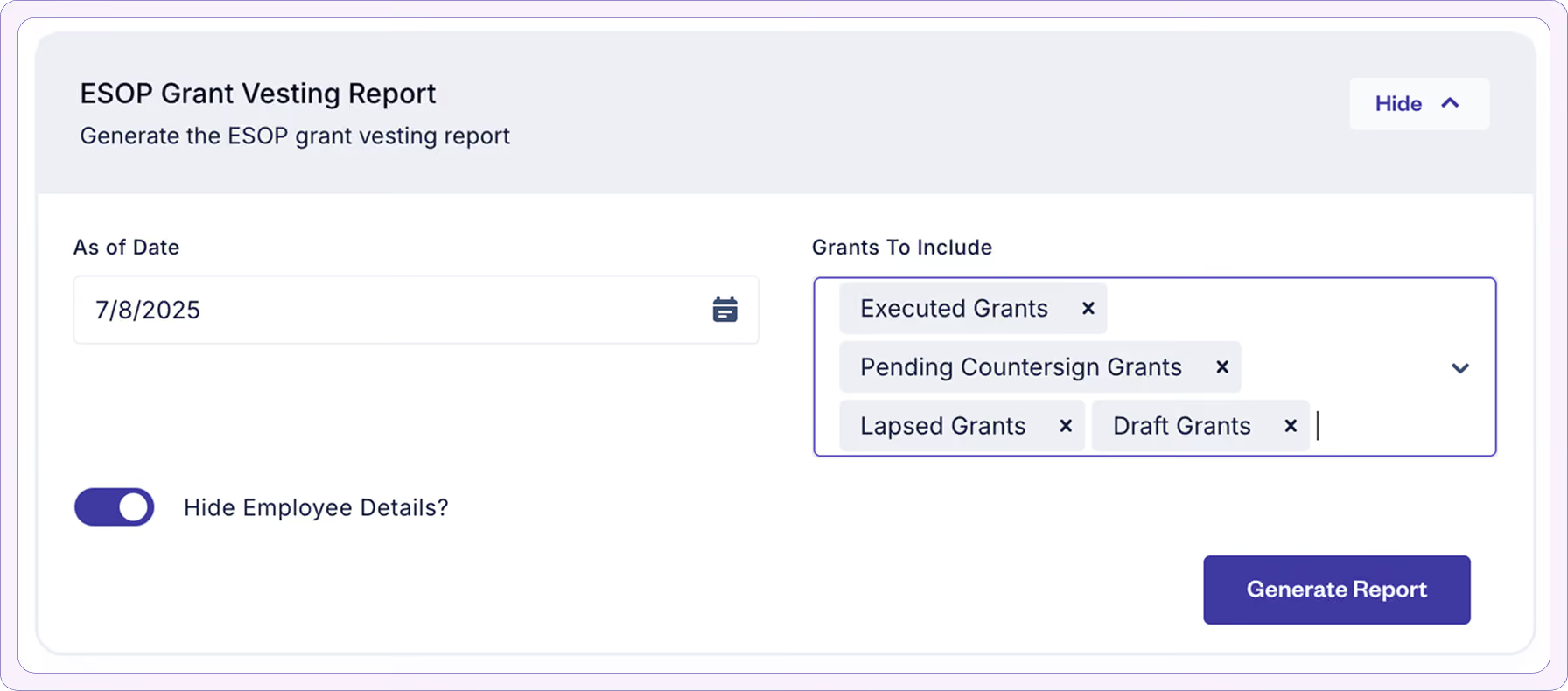
When you need to see how equity is vesting across your company, the new grant vesting reports give you cleaner formatting, smarter context, and deeper detail—so you can analyze and share your data with confidence.
Highlights:
- Clarity at a glance: Cleaner layout with gridlines removed, centered data, and clearly labeled sheets.
- Deeper insight: See every vesting event’s name, date, and percentage, along with a full breakdown of vested, unvested, exercised, and surrendered options.
- Global-ready: New ‘Grant Type’ column supports ISO, NSO, and INTL grants (blank for Indian companies).
[Note: You’ll also experience speed and performance upgrade for this report.]
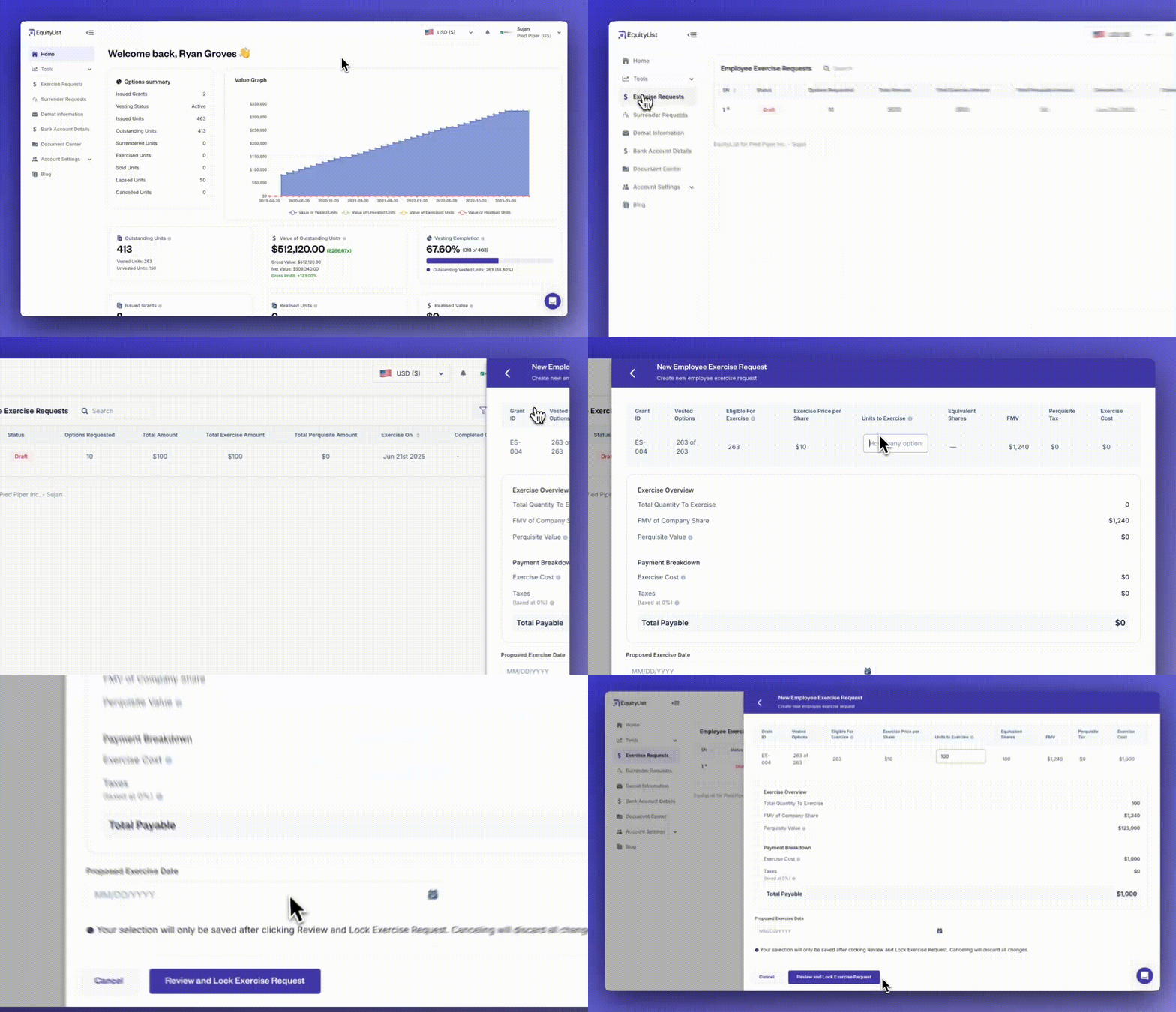
When employees want to exercise their stock options, the draft state has now been disabled and requests are only saved once they’re intentionally locked.
So along with reducing the total number of steps, this further eliminates clutter from incomplete requests and stops unwanted email notifications (especially during blackout periods for listed companies).
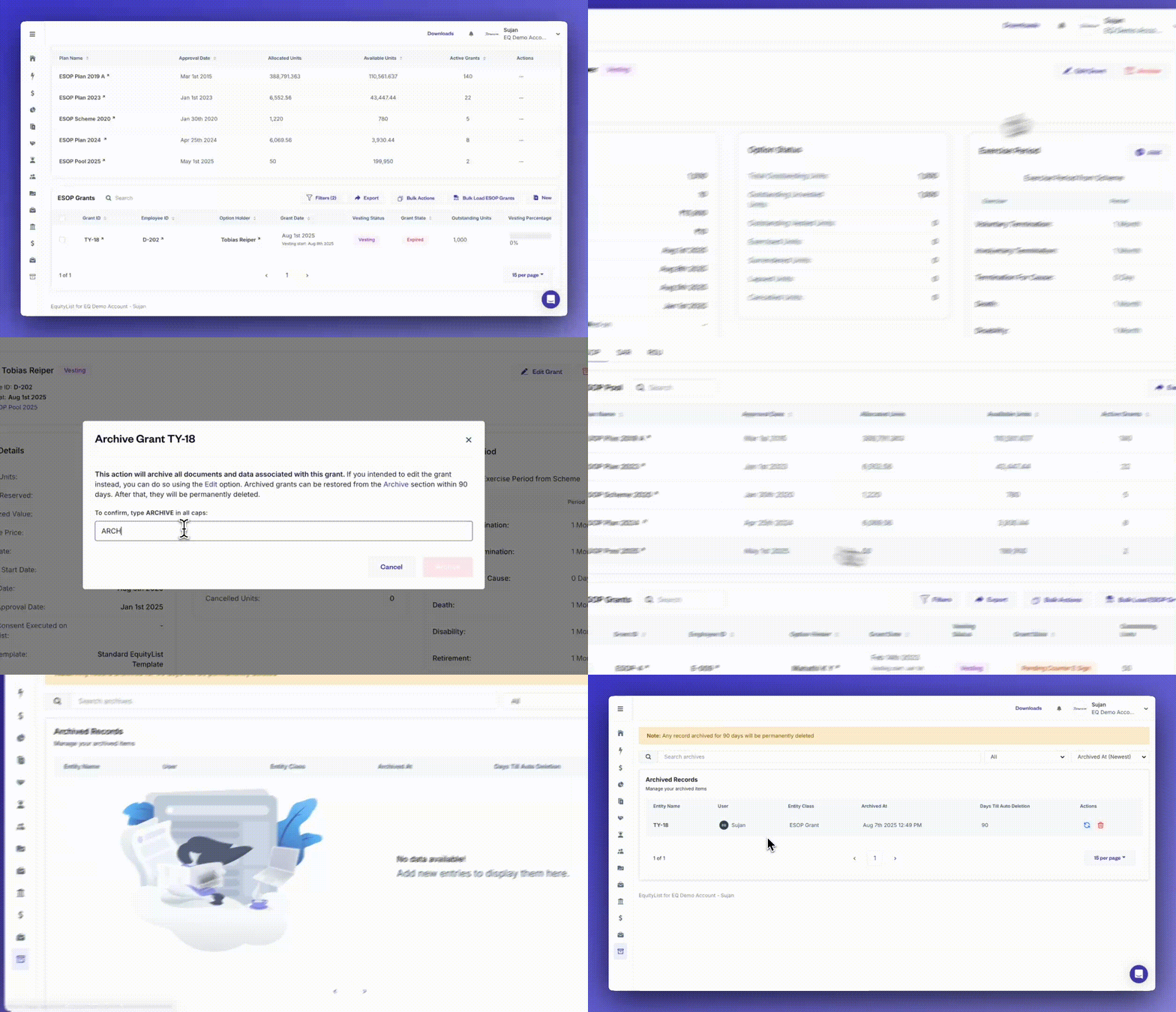
When you need to clean up outdated or inactive records, you can now archive draft-stage stakeholders, grants, share certificates, and other equity instruments—while staying compliant with ownership and execution rules.
[Note: Archiving is restricted for any active or linked records to prevent accidental data loss.]
When you're managing high-volume equity operations, the ‘Bulk Actions’ panel helps you save time and reduce manual work—whether you're uploading ESOP, SAR, or RSU grants, handling exercises, processing SAFEs or CCDs, or managing share certificates and convertible notes.
With smart templates, automatic data validations, and instant document generation, you can now process up to 12 types of equity-linked actions—all in one streamlined workspace under ‘Quick Actions’.

Under Equity Awards › ESOP Exercises, an ‘Allotment Date’ field now appears when you mark one or many exercise requests as executed.
Select a date there itself as opposed to manual spreadsheet uploads to back-fill allotment details later.

Under Cap Table › Shares › Share Classes, when adding new a class, the ‘Class Type’ dropdown now lists Compulsorily Convertible Preference Shares (CCPS) alongside Common and Preferred.
The form too has been organized into blocks so you can input data with less scrolling and less chances of errors.
Why it matters:
Elevating CCPS to a separate share class—rather than as a toggle buried with ‘Preferred’ previously—keeps things more organized and is just better user experience.

From Cap Table › Shares > ‘Share Certificates’, you can now add or edit ISINs (including uploading the supporting document); the record value for which show on the certificate itself and in every shareholder dashboard for instant reference.
Why it matters:
This is especially helpful for users who are actively dematerialising their securities.
(And if you’re undertaking dematerialisation through EquityList then our team is already adding these ISIN values in your dashboard.)

Under Equity Awards › Vesting Templates, you can now anchor each schedule to either the Resignation Date or the Last Working Day. Pick the one that matches your policy and EquityList will auto-adjust vesting calculations (no manual edits required when notice periods shift).
Why it matters:
Many companies stop vesting post-exit; so out of necessity, they created a workaround where resignation dates were clubbed together with the last working day…but this is an incorrect record system.
With EquityList, now they don’t have to.

Under Cap Table › Convertibles › Debentures, you can now record Compulsorily Convertible Debenture (CCD) issues, alongside ‘Convertible Notes’ and ‘SAFEs’.
Additionally, when adding a CCD, you’ll also see a new form layout that remains on a single page but is divided into clear blocks to cut data-entry errors.
Why it matters:
CCDs are common instruments for bridge financing. Capturing them in EquityList keeps dilution maths accurate and provides a clean, auditable certificate, removing the need for parallel spreadsheets or manual PDF edits.

A dedicated ‘Exercise Settings’ tab is now available under Company › Settings. It consolidates many rules that govern how—and when—employees can exercise their options, reducing manual overrides and audit follow-ups.
What’s included:
- Exercise payment-deadline rules: Set a hard calendar date or a rolling ‘N-day’ window, add a daily cut-off time, and decide whether employees can cancel exercise requests even after FMV is locked.
- Exercise payment-completion condition: Choose if employees can proceed to exercise e-signing
- ‘On Transaction Success’: allows eSigning immediately after the payment gateway confirms, or
- ‘On Payment Settlement’: allows eSigning only after funds are credited to your company’s account.
- FMV calculation method: You can now select the formula as
- [Default] ‘Average of Opening and Closing Price’, or
- 'Last Trading Day’s Closing Price’, or
- A custom formula that matches your internal valuation policy.
- Employee payment notification controls: Toggle the payment-deadline banner (a notification banner on employee dashboard) and payment-reminder emails (automated emails to follow up with employees) on/off with a single switch to match your communication cadence.
- Offline payments: Choose whether or not you wish to allow offline payments for exercise requests, like cheques and challans.
- Bank-account routing: You can now select between using a single MID (Merchant ID) for both the exercise cost and perquisite tax or separate MIDs for both accounts.
Why it matters:
No two companies handle option exercises the same way. Our new settings let you control every step so the workflow fits your policy, not the other way around. Few cap-table tools offer this depth of flexibility, and it removes the need for manual fixes or maintaining multiple side spreadsheets.
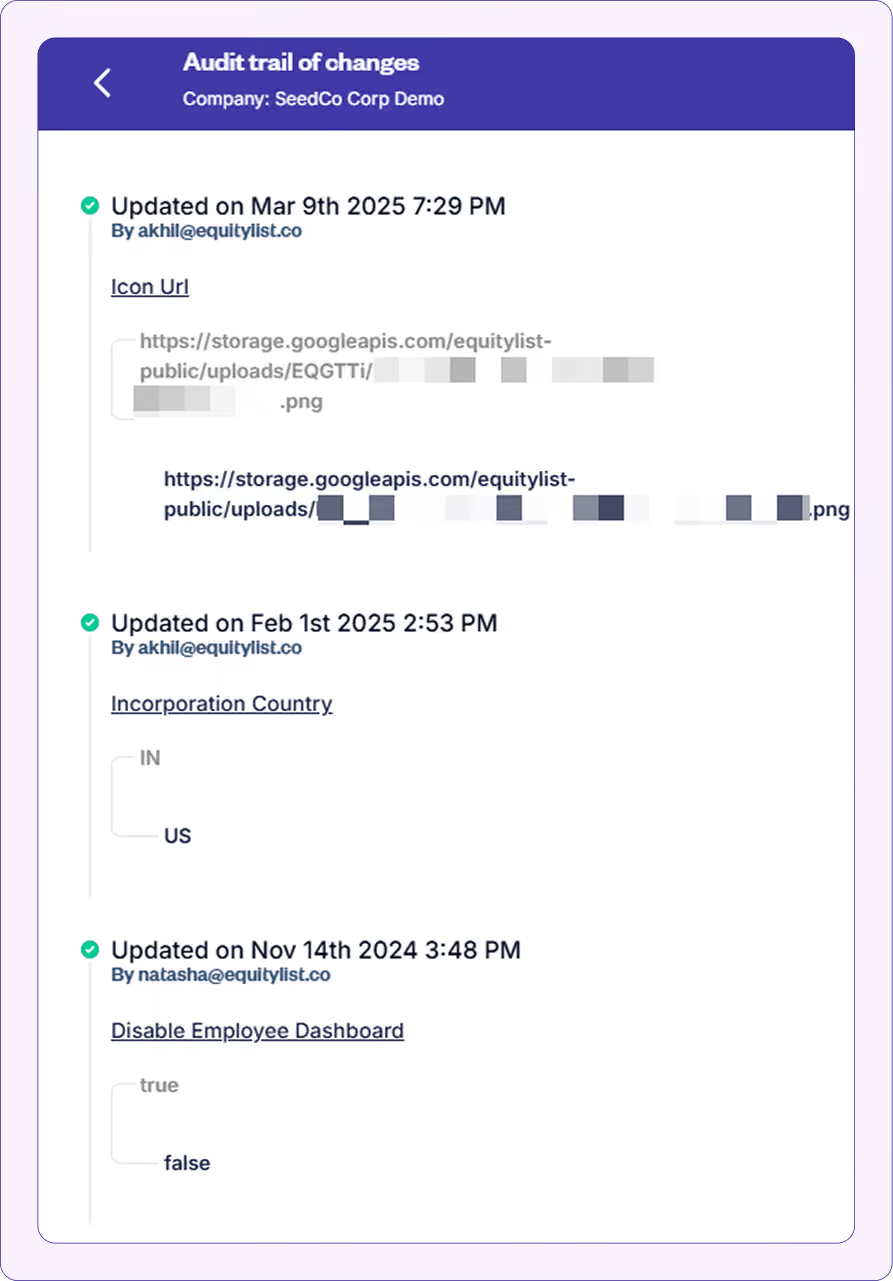
We've upgraded the activity logs (Admin > Activity Log) to show you exactly what changed in each record update. This enhancement gives you precise visibility into all modifications made across your equity data.
How does it work?
- New ‘View Changes’ button: When reviewing the *Activity Log*, you'll now see a ‘View Changes’ button next to any update action. Click it to reveal a detailed comparison of what was modified.
- Chronological change history: The change history displays all modifications from newest to oldest, with each entry showing the date, time, and person who made the change.
- Field-by-field comparison: For each update, you'll see exactly which fields were modified and the specific before-and-after values (e.g., ‘Title’ changed from “ENG” to “Engineering” or ‘Passport’ changed from [blank] to “QWE 442321”)
[Note: This feature works for all new changes going forward. The historical records updated before this enhancement won't display detailed change information.]
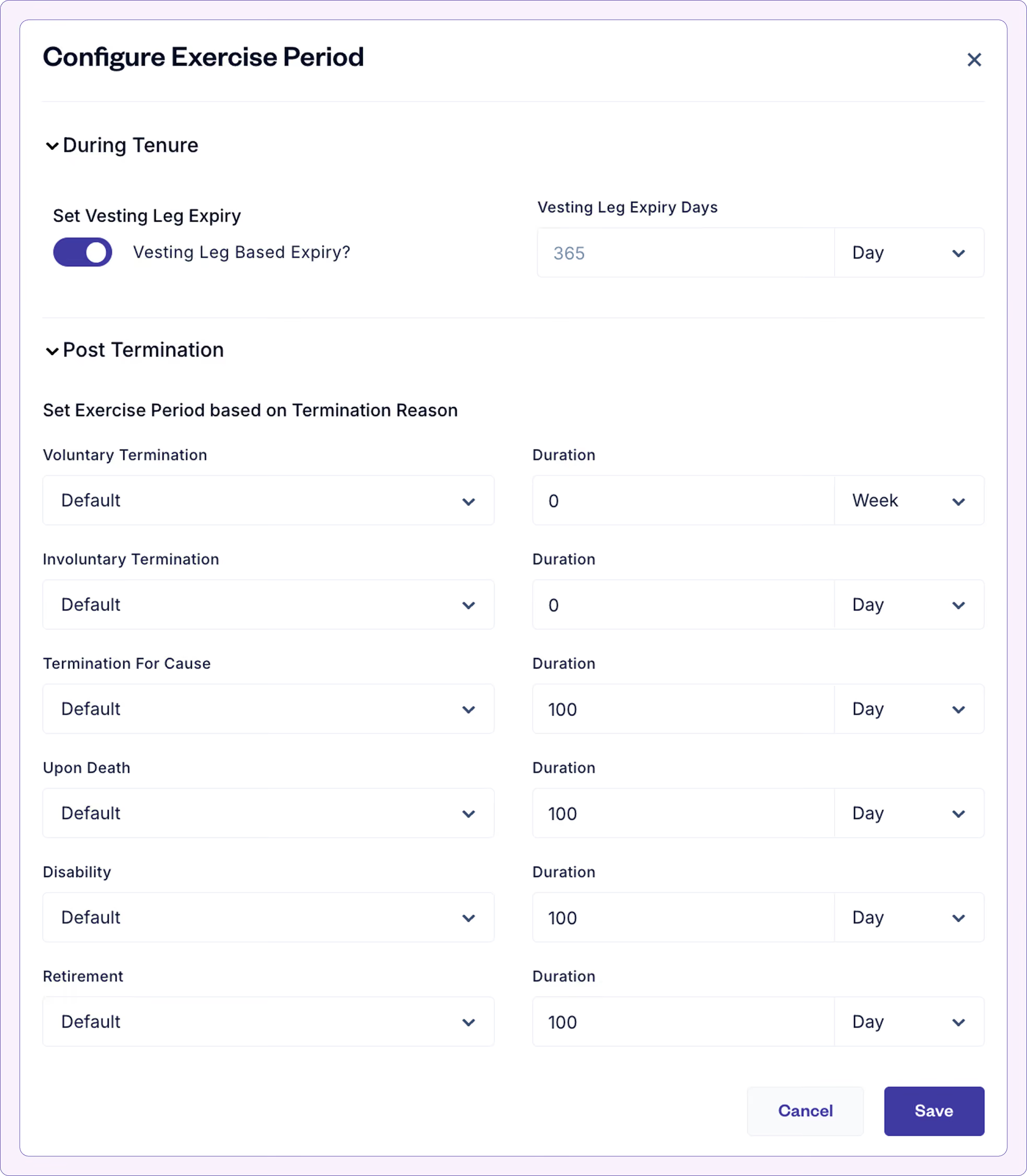
For every ESOP scheme, we've introduced granular control over stock option expiry periods with the new configurable vesting leg expiry settings. This enhancement gives you more flexibility to define customized expiry rules both during employment and post-termination.
What's new?
- Vesting leg-based expiry at scheme level: You can now set a uniform expiry duration for all vesting legs across all grants within a scheme, establishing a consistent policy for when options expire if not exercised.
- Extended post-termination expiry options: While termination-based expiry rules have always been available, you can now additionally configure vesting leg-based expiry under these conditions, with the ability to set standard time periods like weeks/months/years.
- Tenure-based expiry calculations: Create expiry rules that scale based on employee tenure, such as:
- 0.5x tenure for employees who served less than 2 years
- 2x tenure for employees who served 2+ years
This feature lets you set up expiry rules at the scheme level that automatically apply to all grants, saving you from having to manually configure these settings for each employee.
[To find these settings, select any ESOP scheme - listed under ‘Equity Plans’ in Equity Awards > Grants - and edit the ‘Exercise Period’.]
What's improved?
Two-step login process with multiple options: The new login flow first asks for a user’s email address, then offers different authentication choices between:
- One-time password (OTP) sent to the user’s email
- Google account sign-in
- Single Sign-On (SSO) through the company's identity provider (like Microsoft, Okta)
Under Admin > Permissions, we've introduced a comprehensive permission-based access system that gives you precise control over what each team member can view and modify within the EquityList platform.
How does it work?
- Default roles with customizable permissions: Under Admin > Users > [Username], each standard role (’Admin’, ‘ESOP Manager’, ‘Editor’ etc.) now comes with default permissions that you can further customize by toggling specific access rights on or off (through Admin > Permissions).
- Create custom roles: Define completely custom roles with specific permission sets based on your team's responsibilities. E.g., create a "View-Only ESOP" role for team members who need visibility without edit rights.
- Detailed permission toggles: Control access at a granular level across various functions, including:
- View/manage grants and schemes
- Access to analytics and activity logs
- Dashboard visibility
- Bulk upload capabilities
- Easy user role assignment: Quickly assign or update roles from the user management section (Admin > Users), with changes taking effect immediately upon page refresh.
This feature gives you the flexibility to align platform access with your company’s structure and security requirements, ensuring team members have exactly the right level of access they need.
When creating new ESOP/SAR/RSU grants (Equity Awards > Grants), you’ll see a redesigned grant creation experience with a vertical stepper form that provides helpful context and streamlines the entire process from creation to execution.
What's changed?
- Contextual grant insights: When you enter the number of stock options, you'll see helpful data like -
- How this grant compares to others in the same pool (percentile ranking)
- What percentage of the company’s total ESOP pool this grant represents
- The employee's ownership percentage on a fully diluted basis
- Flexible exercise period settings: For post-termination cases, the default exercise period is selected but you can toggle it off and specify a custom period.
- Execution options for different workflows: Based on your needs, select from multiple grant completion paths:
- Save draft without executing it
- Request company e-signature (maker-checker flow), or
- Complete full execution in one step
Hide employee details when generating reports
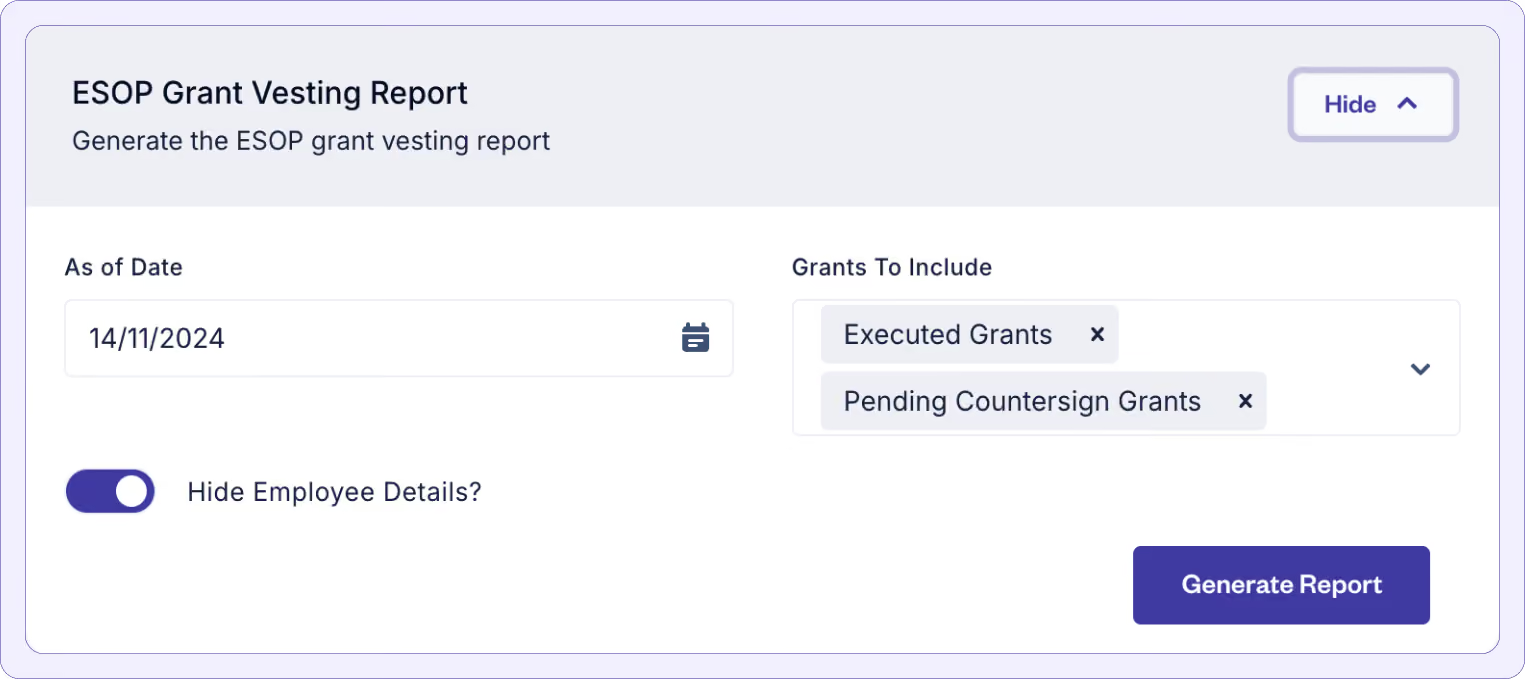
Under Equity Awards > Reporting, admins can now toggle on/off the option to hide employee PII (Personally Identifiable Information) when generating reports.
This flexibility is crucial in limiting the exposure of sensitive data when shared internally, or otherwise, and also preventing accidental disclosures.
For those who’re curious, the following information will not be included when this option is toggled on:
- Employee Name
- Work Email
- Personal Email
- Employee ID
- Title
- Beneficiary Details
(Note: ‘Hide Employee Details?’ option is now toggled ON by default.)
Bypass employee e-signature for grant execution
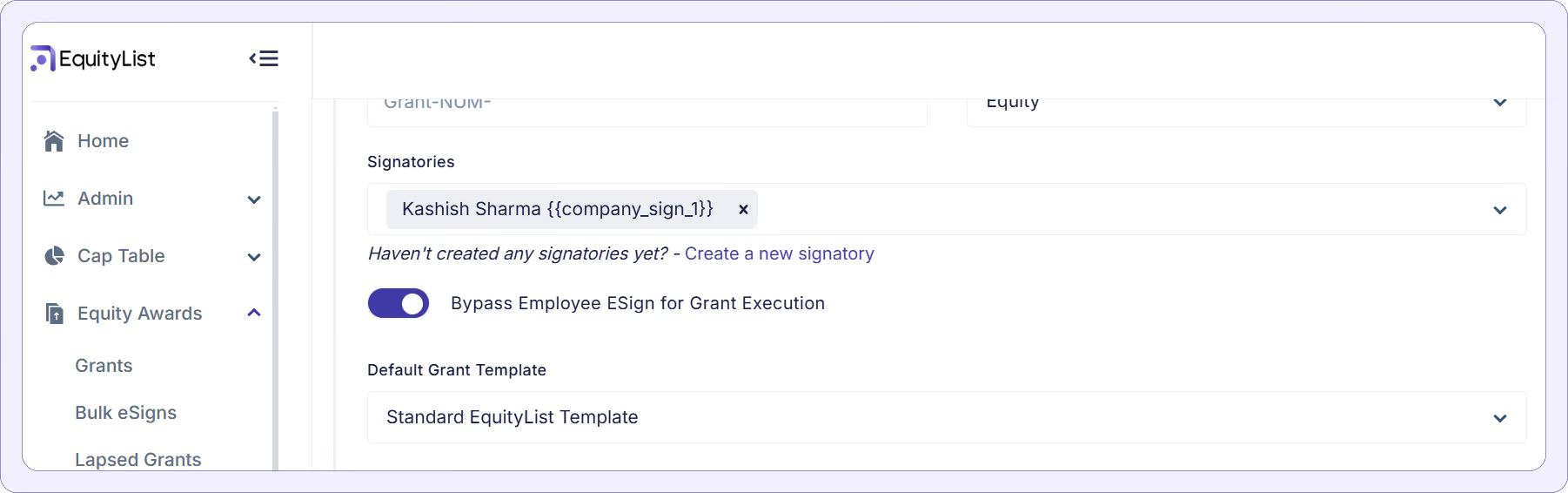
Under Equity Awards > Grants, we've introduced a new option allowing company admins to bypass the employee's e-signature requirement when executing equity grants. This update streamlines the grant execution process, especially for scenarios where collecting employee signatures may not be immediately necessary.
How it works?
- Setup toggle: Inside a scheme’s properties, company admins can now toggle on/off the ‘Bypass Employee E-Sign for Grant Execution’ option. When enabled, this feature allows grant execution to proceed with just the company's e-signature, skipping the employee's sign-off step.
- Faster grant execution: With the bypass enabled, the grant execution process is reduced to two steps: a) setting up a grant, and b) applying the company's e-signature. Employees will not receive an invite to sign; the grant gets fully executed upon the company's approval.
(Note: This option can be toggled off at any time, thereby reverting to the standard flow where employees are prompted to e-sign their grants. Currently, this toggle is available only for ESOP schemes.)
New employee consents feature
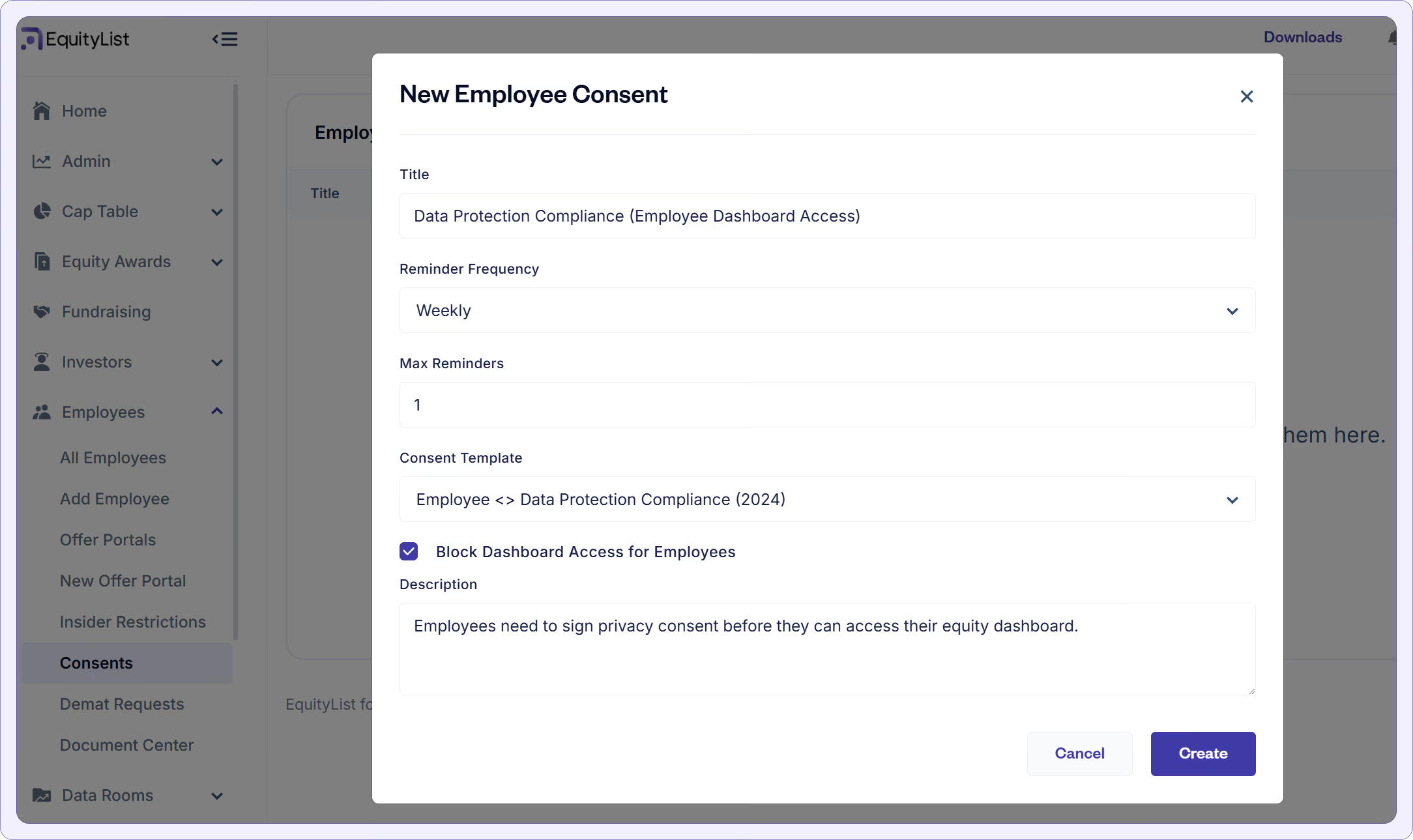
Under Employees > Consents, admins can now create, manage, and track employee consent requests. This feature ensures employees acknowledge specific policies or documents before gaining full access to their dashboards.
What’s new?
- Consent creation and customization: Admins can easily create new consents with a unique title, set reminder frequencies (daily, weekly, monthly), and specify the maximum number of reminders.
- Access control: When setting up a consent, admins can check the option to ‘Block Dashboard Access for Employees’ until the consent is signed.
When selected, employees with pending consents will be redirected to the signing page instead of their dashboards. When not selected, employees will be able to access their dashboards but their consent will still be pending.
- Tracking and status monitoring: Admins can monitor the consent’s status, check if employees have viewed or signed it, and track the exact dates and times of each action.
(Tip: Signed consent documents are accessible in the employee’s Document Center, maintaining transparency and record-keeping.]
- Guardrails for admins: Consents can be saved in draft mode, allowing admins to verify templates before sending them to employees.
(Note: Drafts can be deleted, but once sent, the consent becomes final and cannot be removed.)
New ‘Document Center’ to share files easily with employees
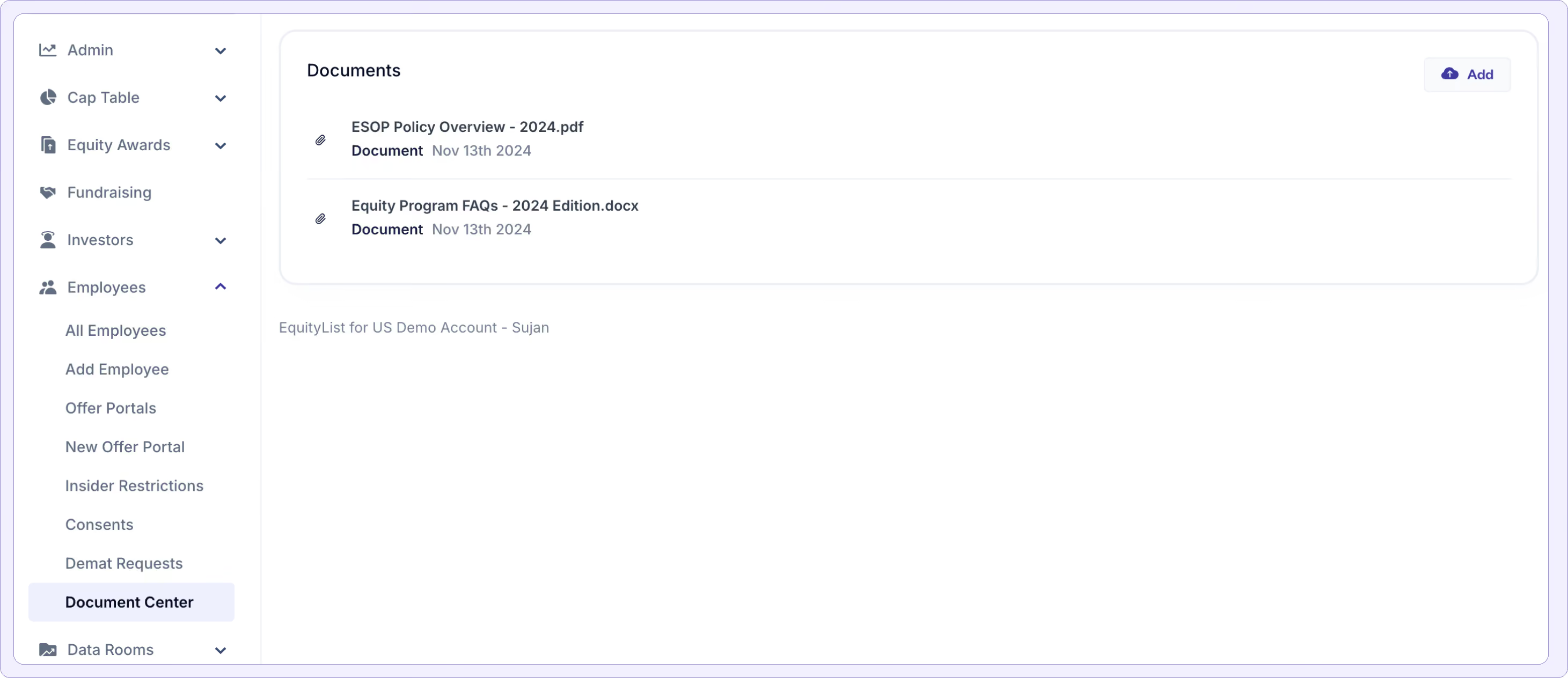
Under Employees > Document Center, employees and other stakeholders with grant documents can find system-generated documents auto-populated within their dashboard in a single place. Company admins can also upload standard employee documents that can be securely accessible in their dashboards.
How is a Document Center different from a Data Room?
Data Rooms are document vaults with additional security measures (like access passcodes) and are designed to share confidential information with fewer people, like investors or board members.
In contrast, a Document Center is more open, one-to-many option i.e. with a single upload, company admins can make a file available to all employees.
(Tip: As an EquityList admin, if you’re collecting employee consents, a signed copy of their own consent letter will also be automatically stored in the Document Center at their end.)
New Single Sign-On (SSO) integration
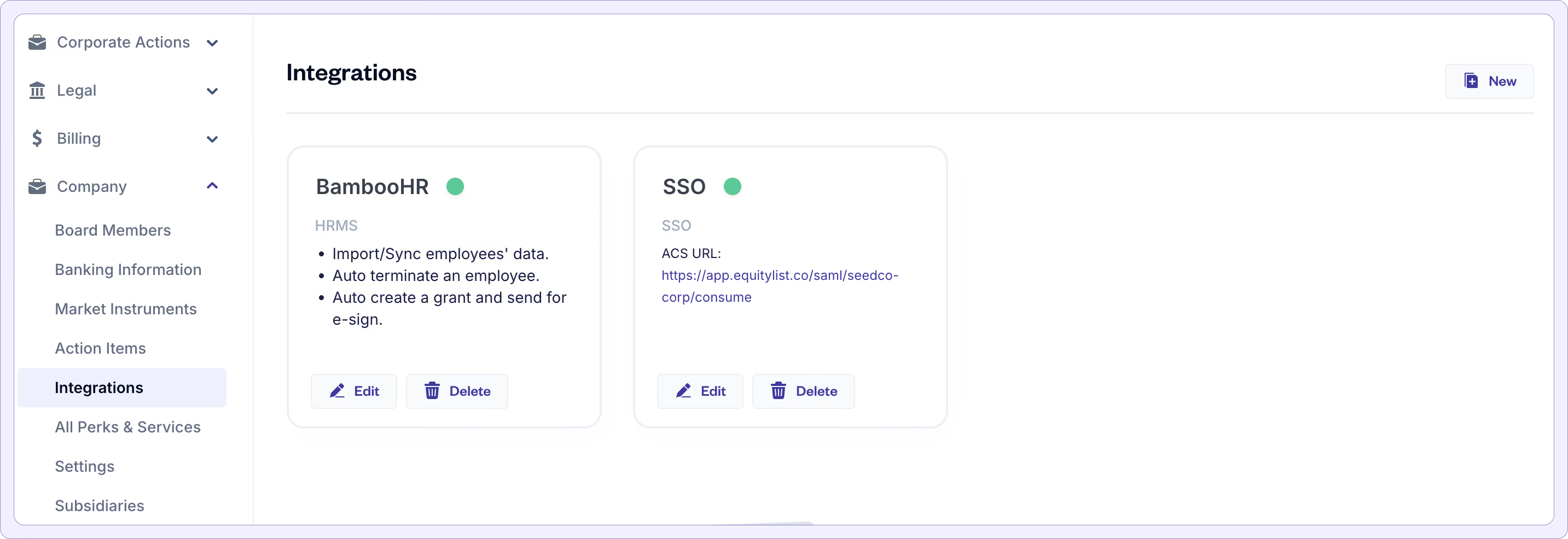
For our customers already using Single Sign-On (SSO) to streamline access to applications like Jira, GitHub, and Outlook via Microsoft Active Directory—we’re excited to announce a new SSO integration with EquityList.
Employees and admins can now access their EquityList accounts directly from their Active Directory or other SSO dashboards without needing separate EquityList credentials.
How it works?
- Integration setup: Under Company > Integrations, admins can select SSO and simply upload their SAML metadata URL or XML file from their SSO provider (e.g., Azure Active Directory).
- Seamless access for employees: Once configured, employees can log in to EquityList directly from their SSO dashboard by clicking on the EquityList logo—no additional login required!
- Enhanced security and control: With SSO, our customers get added security and simplified management. If an employee exits the company, revoking access from the SSO dashboard will also remove access to EquityList, ensuring data security.
Show FMV growth chart in the employee dashboard
Company admins can now show their FMV growth chart to option-holders directly in their dashboards.
This option is disabled by default since many companies may want to first ensure that their entire valuation history is correctly uploaded on the EquityList platform in the first place.
(If you're an EquityList customer and would like to enable this option, reach out to your Account Manager or write to us at help@equitylist.co.)
Upgraded board consents for equity grants
With the updated board approval features, admins can now seek Board Consents directly while issuing equity grants to stakeholders.
What’s new?
- Pool-based filtering: In the Equity Awards > Grants page, admins now have access to grant filters making it easier to locate ‘draft’ grants when sending board consent requests.
- Swift board approval process: Admins can bulk-create board consent requests by selecting grants, specifying board members for approval, and choosing the board meeting date and time.
- Automated email notifications: When a board consent request is initiated, invited board members receive an email with a direct link to review and sign the consent. Upon signing, automated emails notify all involved parties, confirming that the board consent has been approved.
- Auto-filled board approval dates: Once the board consent has been successfully executed, the board authorized dates will automatically be linked to the respective equity grants.
- Employee counter-signature: For grants configured to require employee acknowledgment, employees receive a notification to sign the finalized grant letter once board approval is complete.
- Real-time status tracking: The Legal > Board Consents page displays real-time signing statuses, showing the number of board members who have signed.
Comprehensive cap table ledger report
EquityList now provides a Comprehensive Cap Table Ledger export that consolidates all relevant information into a single report. This report, accessible under Cap Table > Exports, offers detailed insights, from ESOP grants to share certificates, and share classes.
What’s included in this report?
- Summary and detailed cap table: The report’s first two tabs provide a summarized view of the cap table, followed by a more detailed breakdown of shareholder holdings and equity distribution.
- Equity certificates by share class: Separate tabs are provided for each share class, including Equity, Seed, Series A, Series B, etc., making it easy to view equity certificates organized by class.
- Convertible instruments: The ‘Convertibles’ tab captures details for convertible notes and SAFEs, with fields for type, capital contribution, discount, conversion date, and linked share certificate ID for converted instruments.
- ESOP and SAR grants: Dedicated tabs provide an overview of ESOP and SAR grants, including vesting details. Additional fields such as federal exemption and state of residence are included where applicable for compliance.
This all-in-one report is designed to streamline cap table management, offering a holistic view for easy reference and decision-making. Any feedback is welcome as we continue refining this enhancement!
MAJOR upgrade to the exercise workflow
We might have outdone ourselves with this one … 👀
The entire exercise workflow has gone through a major upgrade to provide a consistent and complete experience for both admins and grant holders.
Employee side:
- Enhanced tax calculation and total payable breakdown: With a fresh coat of paint, we do a better job of clearly breaking down the total payable amount by the grant holder for an exercise transaction. Admins can also directly mention the specific tax bracket relevant for stakeholders to directly calculate the tax liability on exercise transactions.
- Confirmation of bank account and transaction details: Employees can now select primary bank account related to exercise transactions along with other details such as demat information (for Indian companies) and ‘lock-in’ their exercise request to finalize on the exercise quantity and payable amount.
- Add-multiple payment tranches for cheque and wire transfers: Ability to add multiple payment details and proof support in case of an offline transaction via cheque or direct wire transfer to the company’s bank account.
- Standardized exercise letters: The process uses EquityList’s standard exercise letter templates, ensuring consistency across users.
[Note: Custom exercise letters are available to customers on our ‘Scale’ pricing plan.]
Admin side:
- Editable exercise requests: (Equity Awards > ESOP Exercises) Admins can edit exercise requests to update details before locking them for approval. These requests then move to a ‘Pending Approval' state, offering an extra layer of review.
- Added ‘View Beneficiary Bank Details’: For admins, beneficiary bank details are now visible during the approval process.
- Admin-initiated requests: Admins can create draft exercise requests on behalf of employees, which employees can later review, consent to, and complete. This streamlines workflows for cases where employees need additional support.
- Reconcile offline transactions: Finance admins get a lot more flexibility in reconciling offline transactions on the platform with the ability to flag transactions as well in case of incorrect or partial transfers.
We've also embedded a payment gateway in the flow:
- Pay via UPI, Net Banking or debit card: We have now integrated with Cashfree’s payment gateway solution to open up various forms of payment module for exercise transactions.
- Setup a ‘Virtual Bank Account’ (VBA) for on-platform transactions: EquityList will work with company admins to setup a VBA, with the payment gateway providers, within 48 hours to ensure that the fund flows directly into the company’s bank accounts.
- Automated reconciliation: Reconciliation of payments done via the payment gateway will automatically get reconciled - saving your finance team time and effort in going through bank statements!
(Note: We currently provide payment gateway solutions for companies with Indian operations only. If you're an EquityList customer who'd like to opt-in to the payment gateway solution and have us setup your VBA, then please reach out to us at help@equitylist.co.)
1. Overall improvements to share transfer flow
Under Cap Table > Shares > ‘Share Certificates' tab, whenever a new ‘Transfer’ is initiated, our platform has now put in fields to capture ‘Reason’, ‘Round Stage’, and ‘Transfer Date’ (’Rule 144 Date’ for US companies), applicable to all shareholders.
- On a successful transfer, you will see the particulars mentioned under the ‘Transferred To’ section and the original share certificate will be marked as canceled.
2. Bulk invite shareholders to their EquityList dashboards
You can now bulk invite shareholders to their EquityList dashboards to track all the securities assigned to them.
- Add a custom message that will be part of the invitation email
- Track the shareholders that you have invited
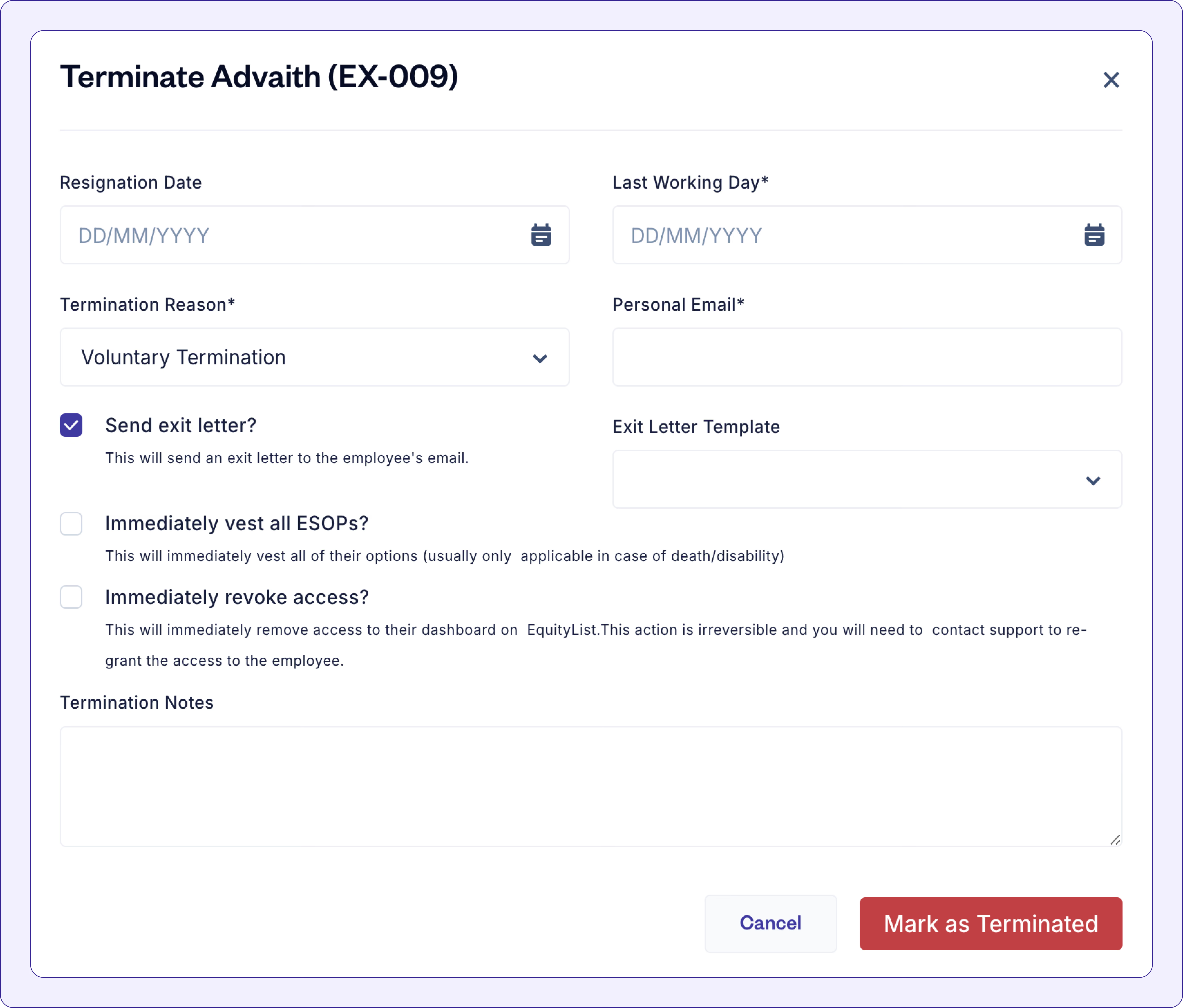
- When terminating an employee on EquityList, by default a system-generated email gets sent to the exited employee, summarizing their vested units.
- Now, you can also choose to send exit letters which get triggered on resignation, summarizing the stakeholder's vested options and requesting a counter-signature.
- Admins can also create their own exit letter templates under Legal > Templates.
Cap table administrators will now feel a lot more equipped when looking to study their cap tables in detail.
We’ve applied enhancements to:
- Search: Directly search for the cap table entity from the search bar on top.
- Filters: Apply filters to the cap table to view shareholders, employees, option pools, or even at a share class level.
- Reporting: Enhanced cap table reports, formatted for clarity.
[Psst, we’ve also upgraded the Cap Table > Fully Diluted page to load faster. Try it out!]
[Note: You’ll now find Vesting Templates under Equity Awards in the left-hand menu.]
We have completely revamped vesting templates for our customers to support customization and complex vesting schedules.
1. When adding/creating a new vesting template, you now get:
- Customizable vesting schedule: Select between ‘Standard’ and ‘Custom’ types to create the desired schedule.
- New duration intervals: ‘Vesting Duration’ and ‘Cliff Duration’, now both support daily, monthly, quarterly, and yearly durations.
- Immediate vesting: When issuing a new grant, you can select to immediately vest a percentage of the total grant, e.g. “20% immediate vesting upon grant date and 80% split across 4 years.”
2. Introducing ‘Performance Conditions’:
You can now create multiple performance conditions for vestings and link them with a vesting template.
This feature enables batch creation of grants tied to specific performance requirements, including customizable payout ranges.
E.g. “$3M ARR by Q4 2024, vesting payout between 50% and 100%.”
You can also realize these conditions by specifying the vesting payout (percentage of goal achieved) to vest units in bulk for all grants linked to a performance condition template.
3. Creating custom vesting templates:
You can now completely customize your vesting templates as well. This includes:
- ‘Performance Based Vesting’: Define milestones, vesting percentage, and link performance conditions.
- ‘Time Based Vesting’: Create your own time-based vesting schedules and link them to a performance condition as well.
[Note: When linked with a performance condition, the vesting will only be completed once both time duration and performance conditions are met.]
- ’Manual Vesting’: Create templates where you get to decide when to vest. With this option, vesting events occur only when you manually trigger them at the grant level.
Give it a try!
You can now issue and track warrants from EquityList
Find them under Cap Table > Warrants.
What does this release bring?
- Clear visibility into tracking issued warrants (recording warrants, exercise, expiry, and more).
- Streamlining administrative tasks associated with warrants like documentation, reporting, and compliance with accounting standards.
- A single comprehensive solution to manage all aspects of equity including stock options, convertibles, RSUs, and now warrants.
[Refresher: A warrant is an agreement between two parties that gives one party the right, but not the obligation, to buy the other party’s stock at a set price, over a specified period of time. Once a warrant holder exercises their warrant, they get shares of stock in the issuing party’s company.]
Cap table admins can now transfer one share certificate to multiple recipients in a single flow. Be it a simple transfer to one shareholder or multiple, our new flow reduces both time and effort to record multiple transfer actions.
You can now:
- Add multiple share certificate recipients in a single transfer panel without disrupting your flow.
- Add new share certificate information for each transfer like 'Certificate ID', 'Price Paid', 'Number of shares transferred', 'Notes', and upload the 'Transfer Agreement'.
- Track the source of a share certificate from Cap Table > Shares > Share Certificates. Sort between different sources such as 'Issued' (for direct issuance) or 'Transferred' (if the certificate originated out of a transfer).
- View the transfer trail within a share certificate.
[Note: In case of partial transfers, the platform will cancel the original share certificate and create a new share certificate entry with the balance shares assigned to the original shareholder. You can always edit the details of the new share certificate in case you’d like to override the Certificate ID.]
Customers can now enjoy EquityList’s complete end-to-end exercise workflows. This changes the company and employee experience when undergoing a stock option exercise.
For employees, within their employee dashboards they can now head over to Exercise Requests and create a new exercise request, if enabled by their company administrators.
The new flow allows employees to:
- Select options from various grants which are to be exercised.
- Dynamically visualize the total exercise cost and notional unrealized values of the options.
- Understand tax liability on the exercise and accordingly place an exercise request to company admins.
For equity award administrators, make your way to Equity Awards > Exercise Requests > ESOP Exercises.
- You’ll now see an updated end-to-end flow to process and execute employee requests for exercising stock options.
- This includes key action items of payment reconciliation, getting employee signatures on the exercise form, and releasing a digital copy of the share certificate to them.
- Absolute control for administrators to cross-verify exercise and tax values and propose edits.
[Note: Perquisite tax is the tax on the ‘perquisite value’, which is the difference between the total fair market market value of the shares and the total exercise price paid for them. This is taxable because the difference in value is considered a benefit that’s been paid by the employer.
Notional value is the theoretical or “on paper” value that an employee stands to gain if they sell their stock options.]
Earlier, under Equity Awards, we only showed pool calculations and breakdown of units based on fully executed grants. This means that only a grant that’s been executed both by the company and the option holder will be accounted for in all forms of pool analytics.
The problem?
However, a persistent issue arises when some grants remain unsigned by the recipients (i.e., employees), even after the company has sent multiple reminders.
As a result, Grant Administrators spend significant time reconciling data between the pool dashboard and reports
Our solution?
- All pool calculations by default now account for two types of grants: Executed (by both parties) and Partially Executed (pending countersign from the recipient).
- You can revert this change under Company > Settings and toggle off ‘Include partially executed securities’.
💪 We tested this change with a larger set of power users managing hundreds and thousands of grants and - they are loving it!
🗒️ To top it off, when generating options-related reports, you can now also download reports based on the states of the grants - Executed, Pending Countersign, Lapsed, and Draft.
We’ve made major improvements to the share certificate drafting and issuance flow. Cap table admins can now seamlessly start drafting a new share certificate and issue it to the shareholder, all in one go!
You can find it under Cap Table > Shares > Share Certificates > New.
The changes include:
- Updated user interface: Guides you through the process step-by-step, making it easier to follow and reducing errors.
- Option to save work-in-progress with drafts: Allows you to pause and resume your work without losing progress.
- Automated email notifications to shareholders: On each new issue, send an email directly to your shareholder to accept and view the new share certificate.
- Record share certificate possession: Keep track of who owns the original share certificate; the company or the shareholder.
- Dynamic calculation for your ease: EquityList will automatically calculate the distinctive number of shares, the total price per share based on face value and share premium, and even the total capital contribution. You can still override these values despite the platform’s prompt.
- (For Indian companies) New data capture fields: Ensures compliance and accuracy with fields for Folio No., Face Value of Shares, Share Premium, and Distinctive Number of Shares (From and To).
We’ve launched a major upgrade to our Cap Table feature and our customers are loving the new user-interface.
- Visualize your cap table at a summary level by navigating to Cap Table > Overview. This section summarizes all outstanding shares, fully diluted shares, capital contribution, and ownership details at both the share class and instrument level.
- Moreover, head over to Cap Table > Fully Diluted to dive deeper at a stakeholder level and view outstanding shares and fully diluted ownership across all security owners: shares, warrants, and stock option grant holders.
- Click on any stakeholder’s name to see a break-up of their ownership across multiple securities.
[Note: Capital raised through convertible securities will be accounted for under ‘Total Capital Raised’.]
Buyback enhancements:
- When submitting a buyback request through their dashboard, employees can choose to receive the payment in their salary account or enter different banking information for the transaction - an important workflow for exited employees.
- In the 'Legal' > 'Templates' > ‘New’ section, we now offer customizable surrender letters for different employee groups, such as former and current team members.
This way, letters for past employees can include their bank details, whereas those for current employees will not. This allows for two distinct templates that can be used in the same buyback.
Create and store RSU grant templates:
- Head over to ‘Legal’ > ‘Templates’ > ‘New’ to create and store RSU grant templates under a separate document category of ‘RSU Grant’. Keep things organized and easily filter between different template categories.
.avif)
We've made several enhancements across various features by adding summaries, emphasizing important metrics, and simplifying the layout to make dashboards easier to understand and use.
(Under ‘Equity Awards’ > ‘Grants’) When you issue a new grant and specify the 'Grant Terms,' you can now input either the total grant value or the number of options, and the system will automatically calculate the other for you.
(Note: you must first enter a 'Grant Date' for this feature to work)
Company admins now have the option to pause vesting for option holders, such as in cases where team members are on personal sabbaticals or extended leaves.
Pausing a vesting schedule automatically modifies the vesting events to accommodate the pause duration.
E.g. for a 12-month vesting period starting from Jan 1, 2024—if the employee takes a 30-day leave in March—then their vesting period now moves forward from Jan 1, 2025 to Jan 31, 2025.
How does it work?
- On the EquityList platform, under ‘Equity Awards’ > ‘Grants’, select the relevant grant.
- Scroll down to the ‘Vesting Schedule’ section. You’ll see a ‘Pause Vesting’ option on the right.
- On clicking the ‘Pause Vesting’ button, you’ll be notified to select the start and end dates.
- Upon pausing a schedule, the grant page will refresh and you will see a revised vesting schedule with updated dates.
We’re excited to unveil an improved version of our ‘Valuations’ feature (find it under ‘Cap Table’ on the left-side menu).
It's a comprehensive single-view to track past and current valuations of your company (à la historical ledger, so to speak).
What’s new?
- With the nifty new view, we’ve highlighted three important pieces:
- Your company’s current fair market value (FMV),
- the number of days left till the current FMV is valid,
- a progress chart to visualize the growth in value of your company since it started, along with its post & pre-money valuation.
- The dashboard also shows details for each valuation like:
- Effective Date (the date from which the valuation became effective),
- Round Type (the funding round it applies to),
- Valuation Type (how was the valuation determined e.g. through a merchant banker, registered valuer, 409A, in-house, etc.),
- FMV Per Share (the FMV of a share calculated from its related valuation),
- Option Pools (the valuation affects the FMV for which options pools; selected previously by you when adding a valuation), and more.
- Finally, if your company has also conducted a separate valuation for its stock options then you have the freedom to store that information too under the ‘*Options*’ tab.
Important: If you apply the ‘Options’ FMV to an options pool, then it will overwrite the ‘Shares’ FMV that had previously been set for that same pool.
Rearranged items in ‘Cap Table’ for easier access and logical flow:
- You will now find Share Classes, Share Certificates, and Shareholders items combined under a single page called ‘Shares’.
- Similarly, Convertible Debt and SAFEs are now under a single page called ‘Convertibles’.
Updated how currency amounts are displayed on the EquityList platform:
- When a user selects a currency format, all amounts will follow the related international standard e.g. one million will be displayed as ₹10,00,000 (India) and $1,000,000 (US)
.avif)
Previously, we were working with an external eSigning vendor to create electronic signatures on documents/agreements generated through the EquityList platform.
But that came with its limitations of customization, performance issues, and user experience…
…so we took it in our own hands and built the eSigning capability in-house!
Now we have even more control over the data (and its security) that is stored or created through our platform.
What does this mean for you?
- All documents eSigned on EquityList will now be affixed with a Signature Certificate.
- No more eSign token expiry, employees can still execute grants older than 90 days.
- A compliant electronic signature for executing your documents.
.avif)
We’ve updated the design of the default EquityList grant letter template so that it looks less like from 2012 and more like from 2024!
Note: When creating a new ESOP scheme, the new grant letter template is selected by default, with the name ”EquityList Standard Template”.
You also have the option to create and store your own custom-designed grant letter templates.
We’ve released a slick new version of our buyback flow.
Find it under Equity Awards > Buyback Programs.You can now:
- select an appropriate settlement method for your buyback program -
Recycle method will allow you to recycle the surrendered units back to the respective options pool for future issuance.
Extinguish method will cancel the surrendered units, effectively shrinking the pool size on your cap table.
- easily track the progress of your buyback program with the new user interface which highlights key metrics for requests and budget.
- bulk upload buyback requests and send invitation emails to employees.
- see all surrender requests related to buyback on the same page.
- create, issue, and execute surrender letters to employees who participated in the buyback.
With this revised buyback flow, you can run your entire buyback on EquityList without having to manually distribute surrender letters or make changes to your cap table.
With hundreds of grants being issued every month on the EquityList platform, it was about time that we further simplified your e-Signing flow by reducing repetitive actions.
Earlier, company admins had to repeatedly upload their signatures for executing a document on EquityList, you can now:
- Set specific signatories for different workflows, ie - executing share certificates, ESOP grants, and more
- Upload the signature image that needs to be affixed or draw/type signatures. These get saved on the platform (this is a one-time activity).
- Assign the relevant signatory to the respective ESOP/SAR scheme (this is a one-time activity).
- Whenever new share certificates or grants are queued for execution, the platform automatically assigns the relevant signatory and their signature with a unique hash key to the document (following standard e-Signing protocols).
We have also simplified the flow to execute a single grant at a time, encapsulating the entire journey within three simple steps:
- Generate a grant letter
- Sign as company
- Send employee invite emails + reminders
Test out the new flow and start generating grants!
In case you require assistance in setting up signatories then write to us at help@equitylist.co to help you out.
As our customers keep introducing different types of equity awards for their employees, contractors, and advisors - we decided to shuffle around the interface to make your grant management experience seamless.
Now find your ESOP, SAR, and RSU grants under Equity Awards >> Grants. Seamlessly switch between tabs to manage your different equity pools and their respective grants.
You can now also apply quick filters to your grants to better slice through hundreds of grants across various stages: Draft, Executed, Expired, and more.
Marking employees as terminated and performing post-termination actions has now gotten easier:
- Easier UI and flow to terminate employees in bulk
- Seamlessly switch employee dashboard access from company email addresses to personal emails post termination
- Uploading a .csv sheet for terminations
Admins so far had been using EquityList’s default template for grant letters. While we are proud of our overall design, we felt that allowing our customers to project their company branding and customize their grant letters with the utmost flexibility is necessary.
Under Legal → Templates, admins can create reusable official document templates - select a custom template you created and use it for your ESOP Grant Letters.
Admins can design these templates on a document editor and add headers, footers, images, tables, and even use EquityList’s template fields to fetch system generated data such as:
- Employee ID
- Exercise price
- Grant date
- Authorised signature signature placement
- Employee signatures
- Number of units, and so on ...
We are working on an in-line editor feature as well that will allow you to edit and design your custom grants in real time on the EquityList platform - this is available in beta and we’d love to hear your feedback. In the meantime, get started with uploading your fully customized .docx files and issue grants!
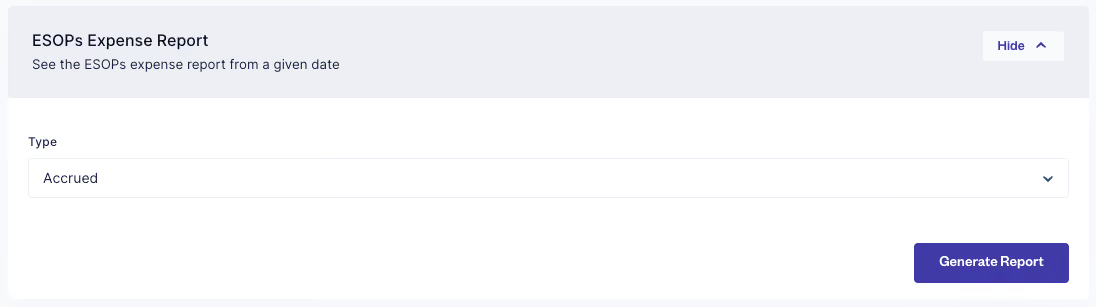
Save countless hours of internal accounting and report management by downloading expense reports directly from your dashboard!
We spent some time with customers to further improve Expense Reports and now:
- Cost accrual is done at a more granular level - basis the number of days leading up to a vesting event instead of the number of months
- Cost reversals for terminated employees are reflected against each unique grant allocated to them
Give it a shot, we'd love to hear your feedback!
We spent some time with customers to further improve Expense Reports and now:
- Cost accrual is done at a more granular level - basis the number of days leading up to a vesting event instead of the number of months
- Cost reversals for terminated employees are reflected against each unique grant allocated to them
Give it a shot, we'd love to hear your feedback!
Managing shareholders and employees across multiple entities so far has been an exhausting and broken experience for most teams. Your workflows and compliances get even more complex when you need to manage cross-border entities across different geographies.
We’re excited to announce multi-entity management support for EquityList customers! You can now track shareholding and stock option plans across different entities through a single dashboard.
- Track and manage cap tables across your parent and subsidiaries
- Manage multiple stock option pools across different entities
- Set different permission levels for each entity
- Request valuation reports across US (409A), India (Registered Valuer/Merchant Bank) and other geographies (on request)
- Download individual reports for different entities
You can reach out to your account managers or email us at help@equitylist.co in case you want to learn more and set this up.
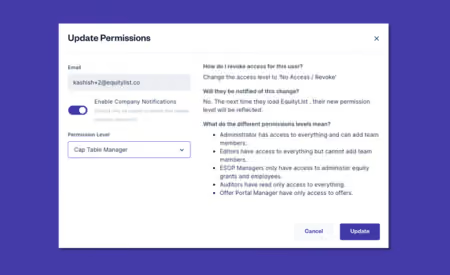
You can now grant ‘cap table’ only access to your team. With this permission, they could only view and perform actions on the company’s cap table, shareholders, and data rooms.
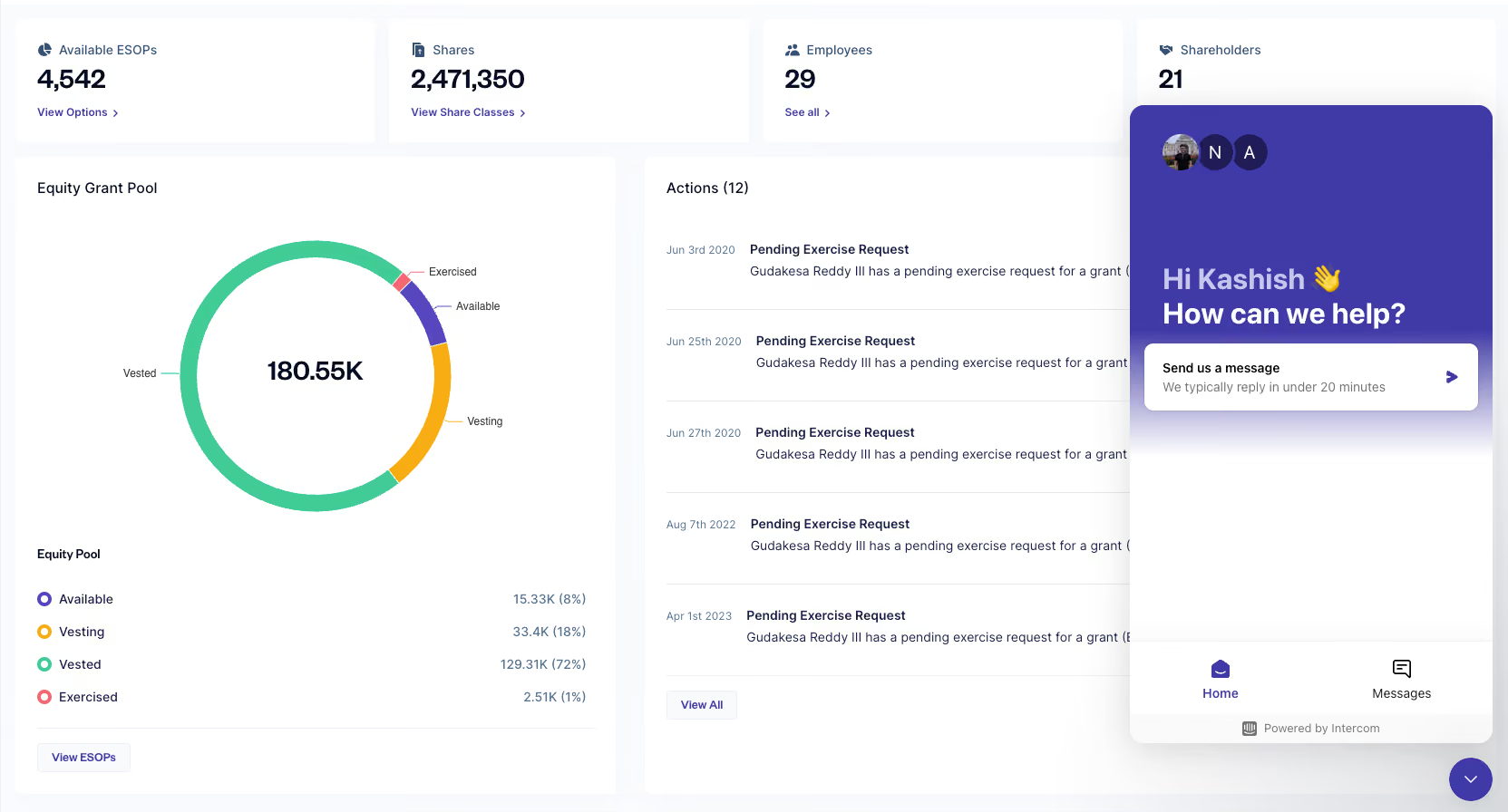
Intercom in-app chat is now embedded in our web app for easier and quicker interaction with our support team! Stay tuned for feature releases and easier FAQ support directly through Intercom.
No updates match that.
Try a different search or clear the filters.
Get started with EquityList today.
Swift data migration & onboarding within 24 hours.