






.avif)
.avif)
Hide employee PII across more reports
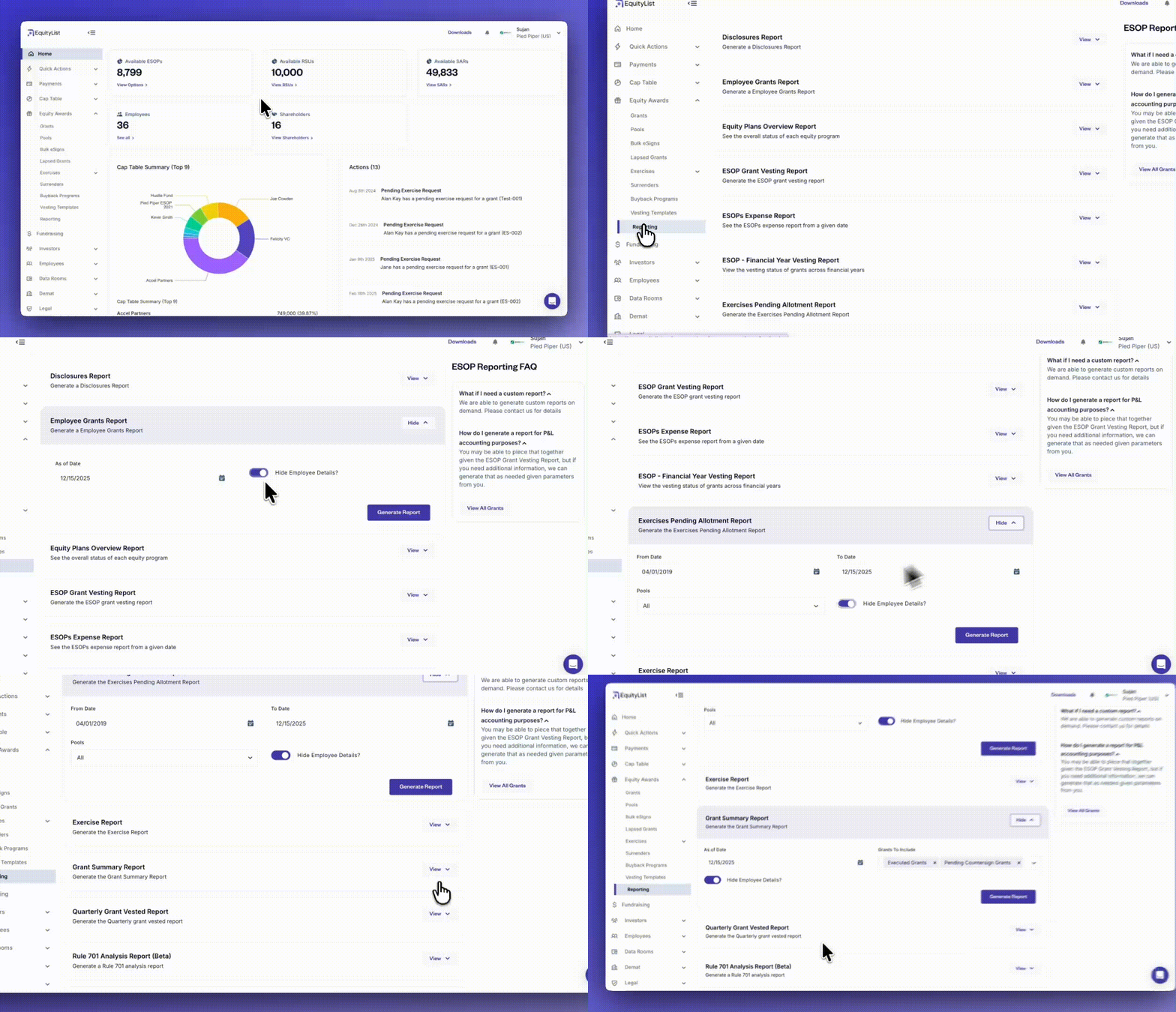
Under Equity Awards > Reporting, employee PII (personally identifiable information) can now be hidden across more reports, removing the need for HR or other teams to manually scrub sensitive information before sharing. This makes it easier to generate audit-ready reports while maintaining privacy and compliance.
Reports included in this update:
- Employee Grants Report
- ESOP Grant Vesting Report
- ESOPs Expense Report
- ESOP – Financial Year Vesting Report
- Exercises Pending Allotment Report
- Exercise Report
- Grant Summary Report
- Quarterly Grant Vested Report
- Rule 701 Analysis Report (Beta)
- Rule 718 ASC Expense Report (Beta)
- RSU Grants Vesting Report
- SAR – Financial Year Vesting Report
- SAR Grants Vesting Report
- SH6 Report
- Surrenders Overview Report
Reports currently excluded:
- Disclosures Report
- Equity Plans Overview Report
- RSU Pool Overview Report
Bulk invite employees using filters during onboarding
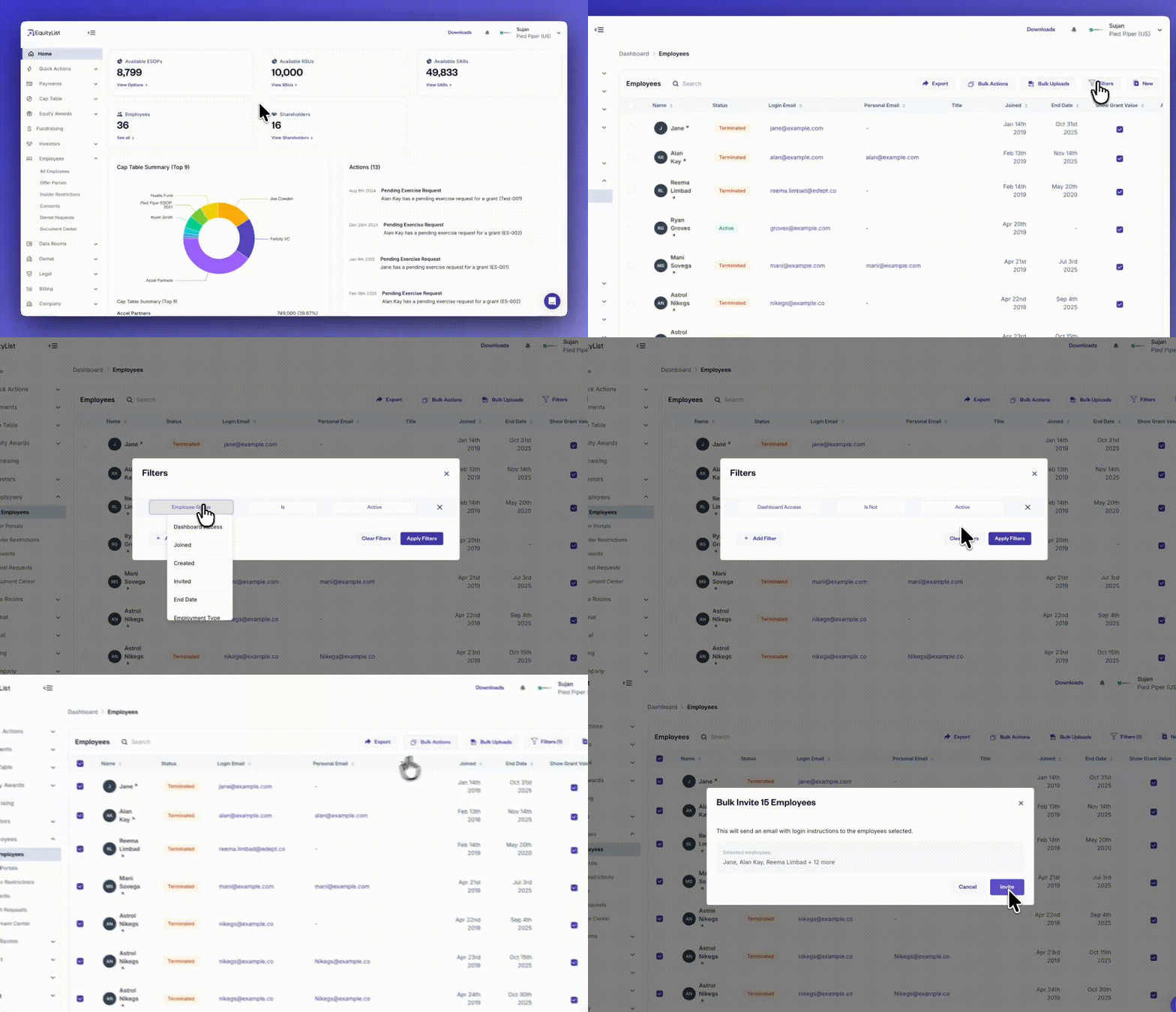
Under Employees > All Employees, you can now apply filters and send dashboard invitations in bulk to the selected employee group. This removes the need to navigate through the ‘Grants’ page or export spreadsheets just to determine who should be invited.
The bulk invite action makes onboarding significantly faster for companies with large teams or complex grant histories, and gives admins a clearer, more controlled way to manage rollout of dashboard access.
Filter employees by dashboard access and key attributes
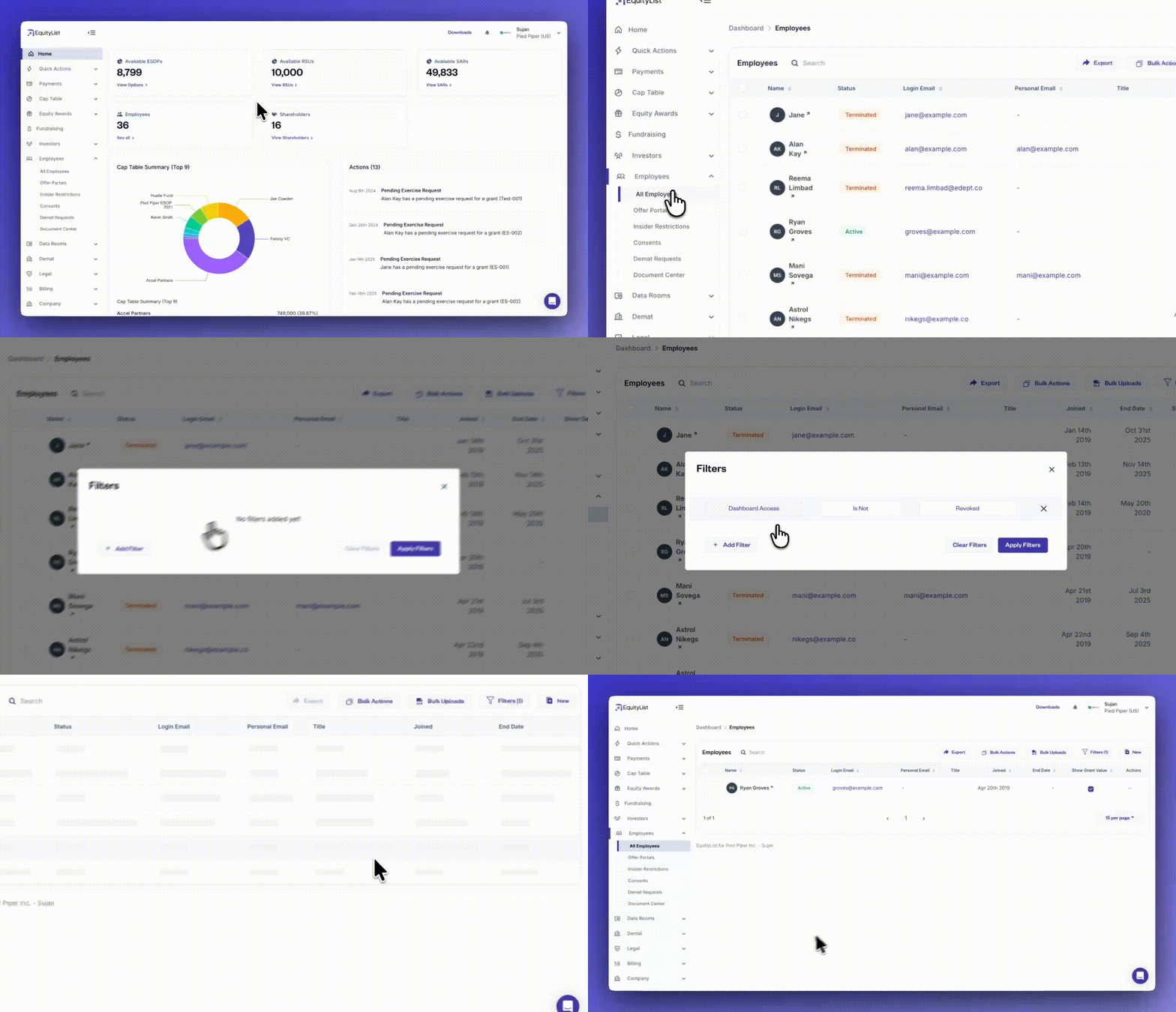
Under Employees > All Employees, it’s now much easier for HR and admin teams to see which employees have dashboard access and which don’t, without manually checking individual records.
The employees page includes new filters that let you segment by dashboard access, employment status, joining date, termination reason, employee type (full-time or contractual), and tax percentages, among others.
These filters simplify access reviews, onboarding checks, and offboarding audits, while also helping HR teams track employees by lifecycle or policy settings.
You can also revoke dashboard access in bulk directly from the filtered list whenever required.
Bulk update employee fields in one action
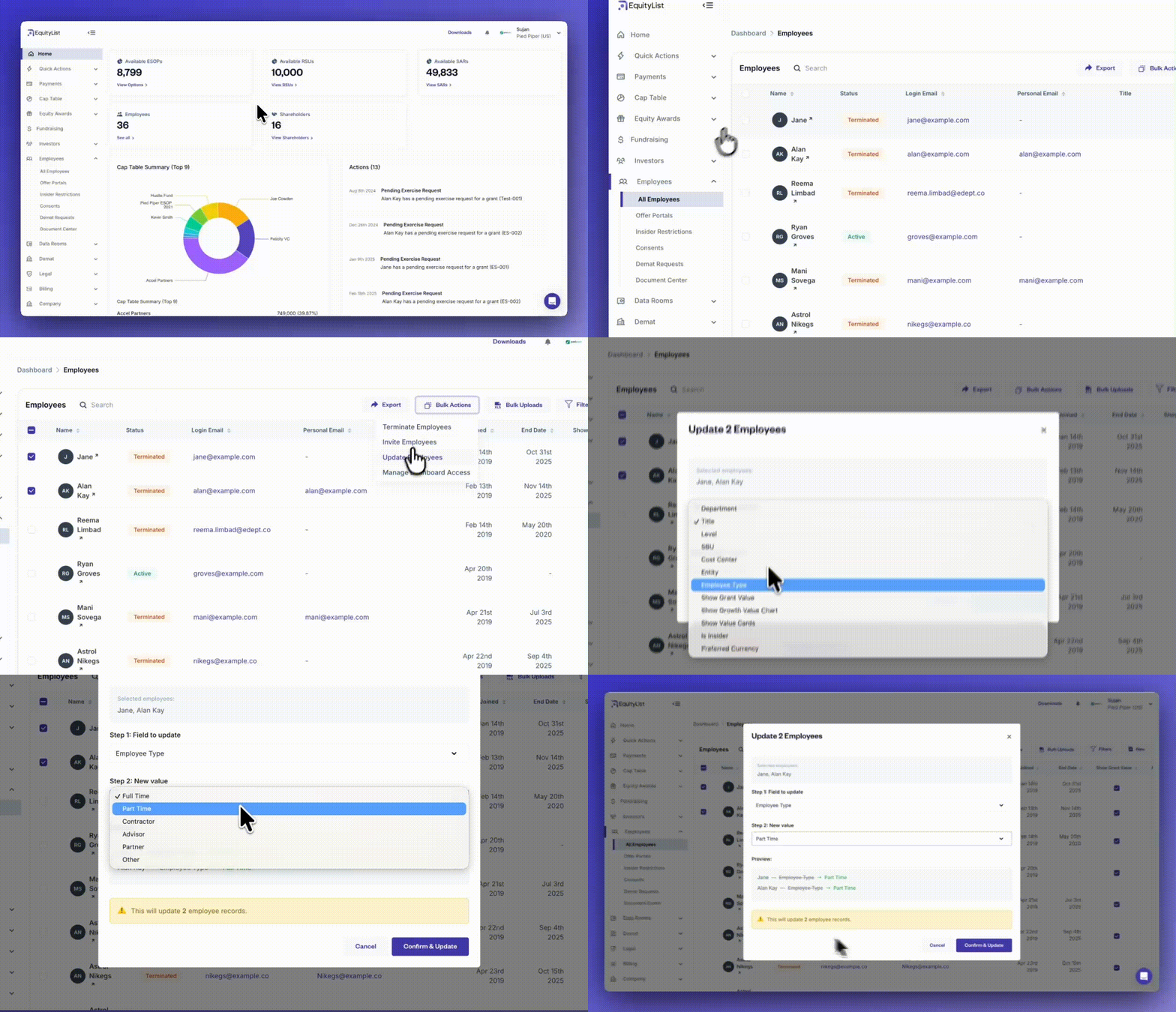
From the left-side menu, under Employees > All Employees, you can now make changes to multiple employee records at once without relying on bulk-upload spreadsheets. Select the employees you want to update, click on ‘Bulk Actions’, and choose the ‘Update Employees’ option.
A modal will let you pick the specific field you want to update and enter the new value. Once confirmed, the platform applies that change to all selected records instantly.
This helps you manage recurring updates without needing external files or manual edits.
Record share splits directly within the transfer workflow
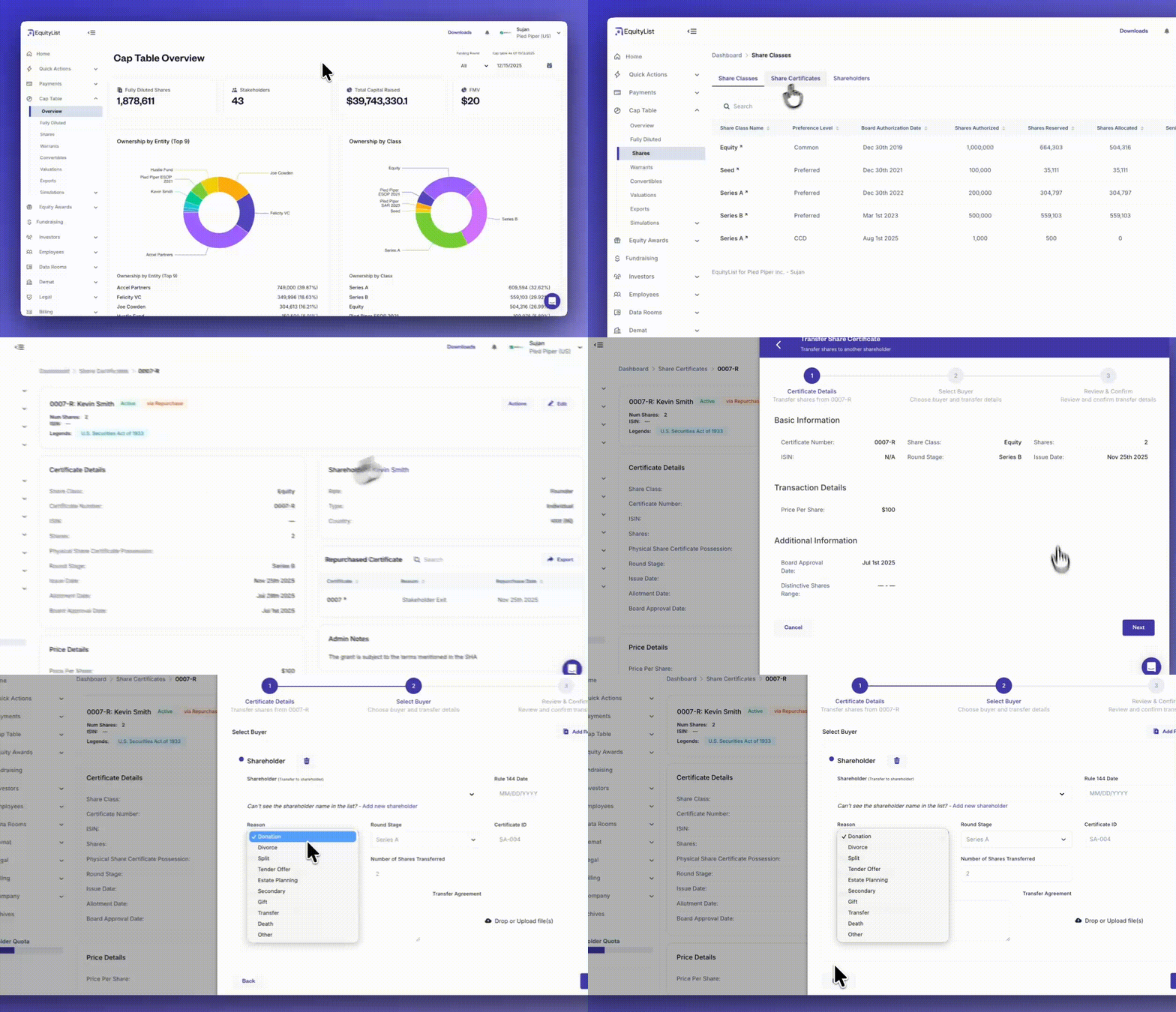
Under Cap Table > Shares > Share Certificates, share splits can now be formally recorded inside EquityList using the transfer workflow.
When creating a transfer, admins can select “Split” as the reason, ensuring the resulting certificate is clearly marked with a ‘Split’ state for easier auditability and downstream tracking.
Transfers to the same shareholder are supported within this workflow, as a mechanism to help represent split activity when no ownership change occurs.
Record past share repurchases with automatic cap table updates
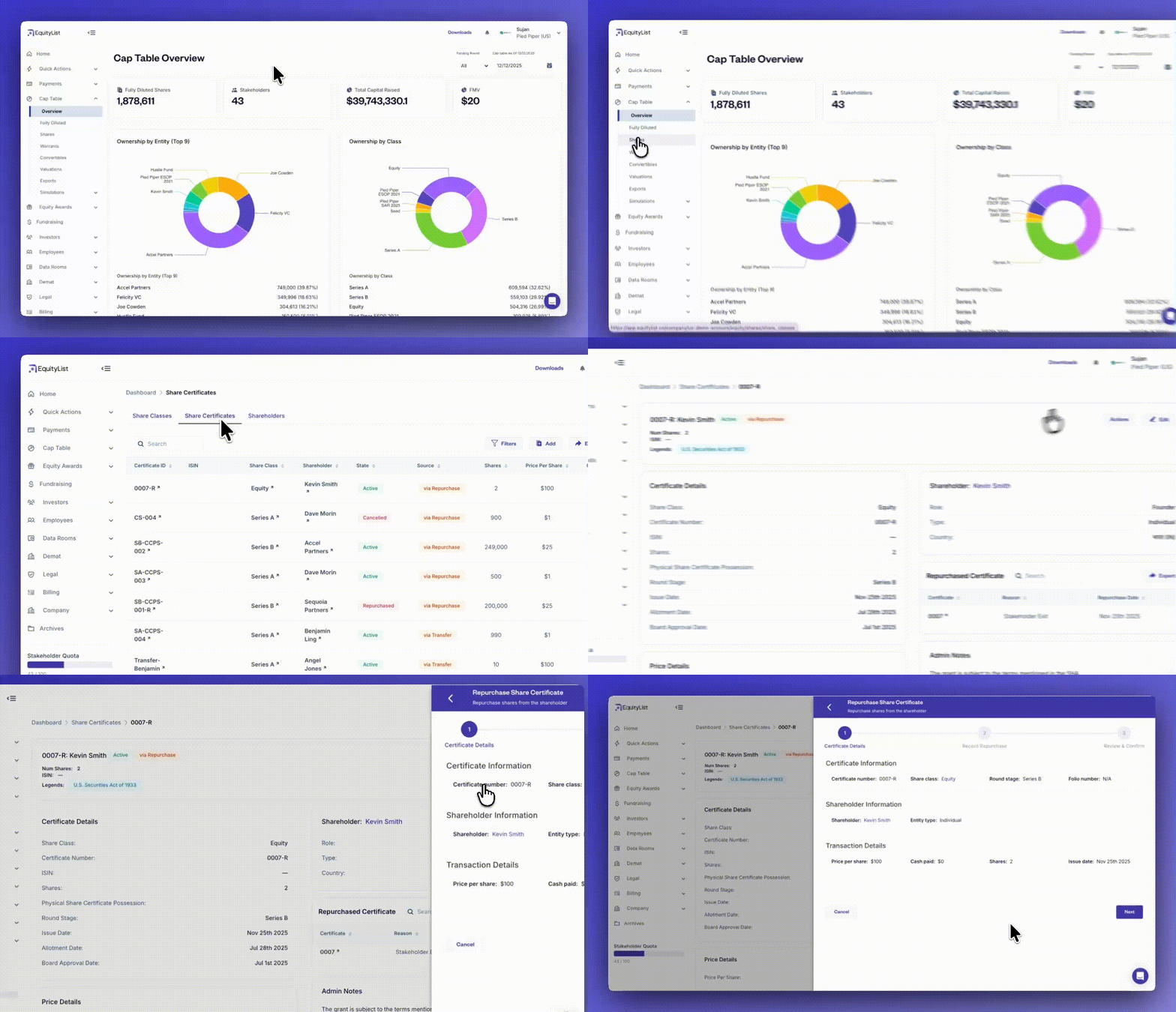
Under Cap Table > Shares > Share Certificates > [Certificate] > ‘Actions’ you can now reflect previously executed share repurchases directly on the platform.
Whether shares were bought back due to an employee departure or the company decides to clean its cap table, you can record repurchases and let EquityList handle all downstream adjustments automatically.
Once recorded, the system updates certificate statuses, adjusts the balance of remaining shares, and maintains a clean audit trail for compliance.
This ensures your equity records stay aligned with reality, even when transactions happen outside the platform.
- Record both full and partial repurchases with repurchase reason, pricing, and date
- Upload supporting documentation for future audits
- Auto-calculated transaction value with override support
- New certificate automatically issued for remaining shares in a partial repurchase
- Cap table and activity log updated instantly after confirmation
Separate pages for equity pools and grants
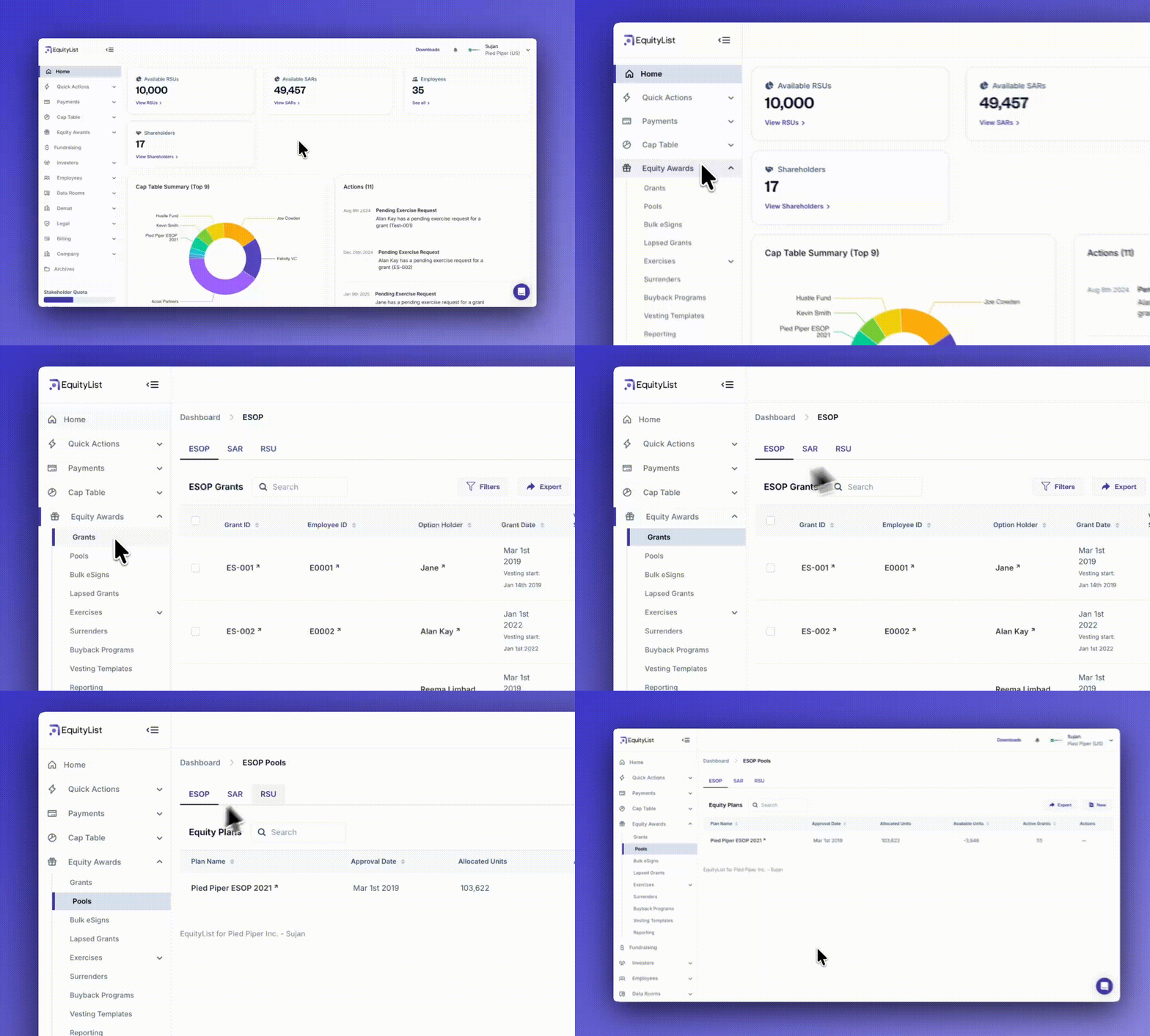
When you track pool allocations and grants, you’ll now see them on separate pages — reducing confusion and giving each its own detailed view.
- You can find the new ‘Pools’ page on the left-side menu under Equity Awards > Pools.
- The ‘Grants’ page, like earlier, continues to exist under Equity Awards > Grants.
Both pages retain the original categorization and separate list for ESOPs, SARs, and RSUs with clear labels.
Dynamic global banking details for fundraising accounts

(Under Company > Banking Information) When you need to store or verify bank details for fundraising, you can now capture both global and region-specific banking fields — all validated automatically based on the selected country.
- Smart forms: Common fields like Bank Name, Account Number, and Entity Type appear by default.
- Region-aware fields: IFSC and PAN in India, ACH Routing and EIN in the US, IBAN/SWIFT globally, and more.
- Built-in validation: Ensures every field follows regional banking standards before submission.
- Secure & compliant: All financial data is encrypted, logged, and auditable.
- Scalable system: Supports continuous expansion to new countries and regulatory requirements. [Note: Currently, available only on request]
Breadcrumb navigation added across pages
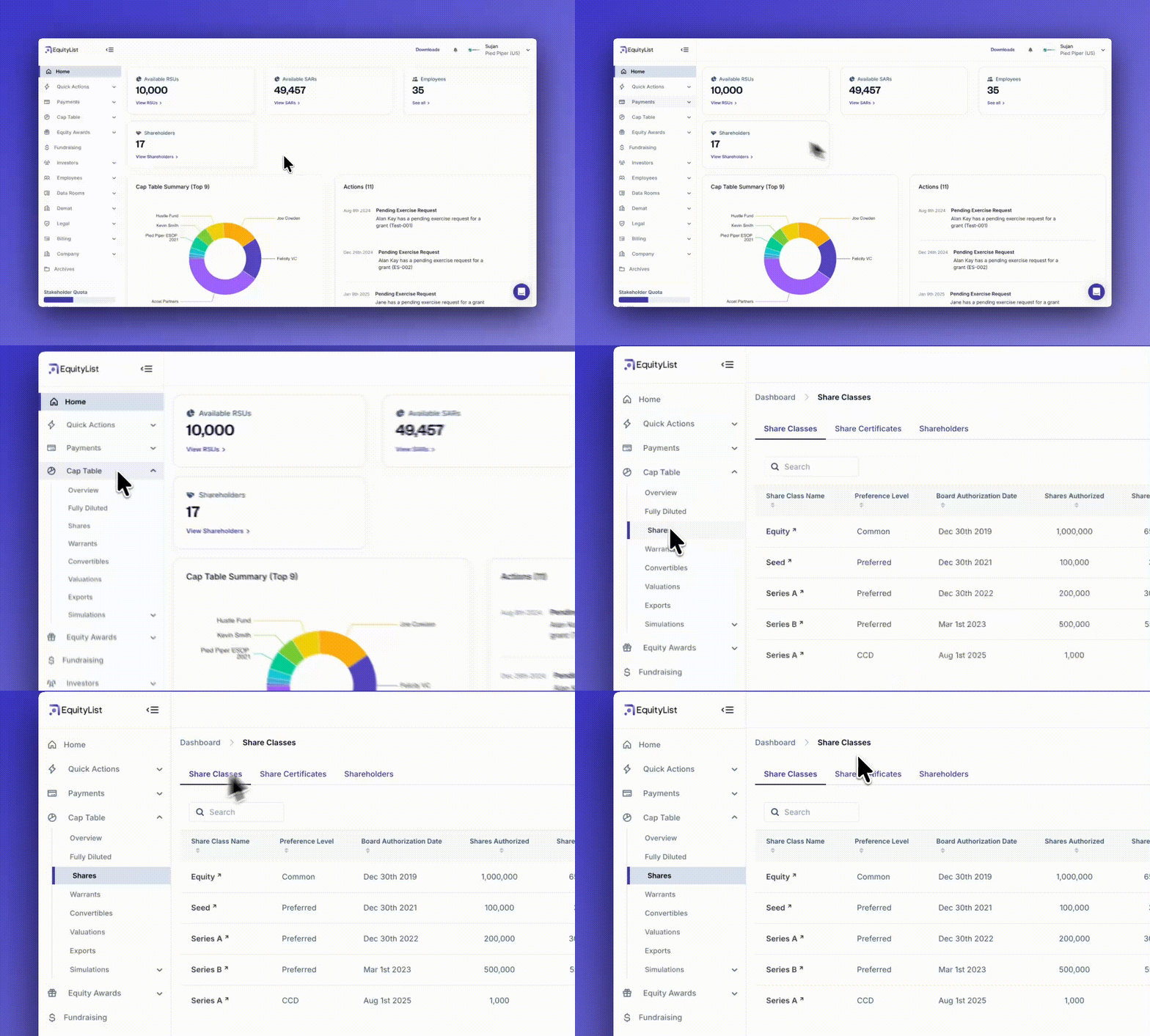
When you move between detailed views — you can now see a breadcrumb trail showing your exact navigation path. Furthermore, clicking any section of the breadcrumb instantly takes you back to that page.
- Clear context: Always know where you are within EquityList.
- Quick navigation: Jump back to higher-level pages in one-click.
- Consistent experience: Available across all major modules inside the platform.
CCD table added to shareholder view
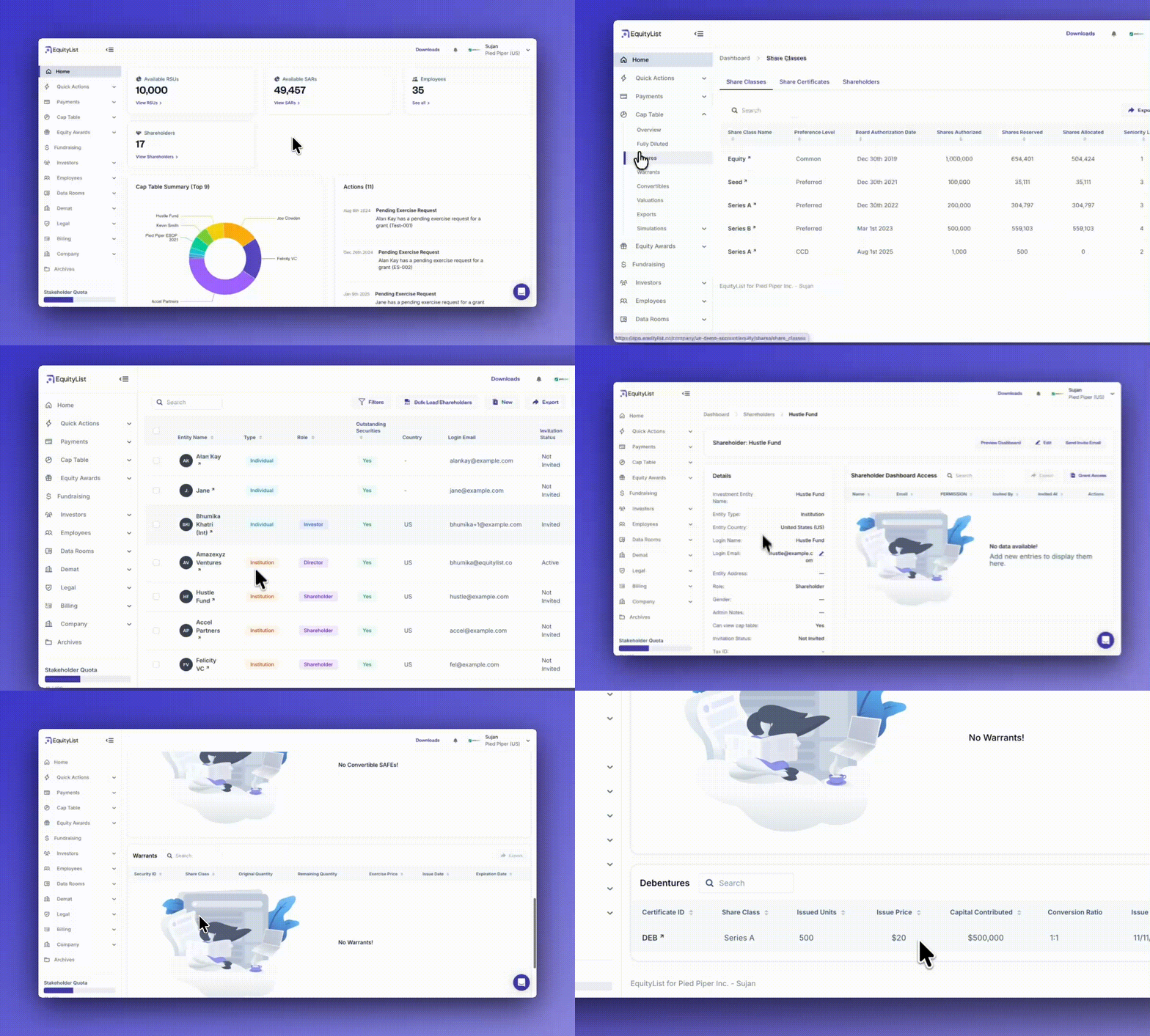
For admins, when you need to review debt alongside equity holdings for any shareholder (under Cap Table > Shares > Shareholders > [shareholder name]), you’ll now also see a dedicated ‘Debentures’ table along with the existing tables for share certificates, convertible debt, SAFEs, and warrants.
The same is applicable for your shareholders when they review their own dashboards.
Grant letters default to today’s date

When you generate a grant letter, the document now auto-fills with today’s date at the top, instead of using the historical grant date. This keeps the letter aligned with the actual day it’s created.
Refreshed ESOP expense reports (IND AS 15 & AS 102)
.gif)
This update affects Indian companies only.
When you need to prepare expense calculations under IND AS 15 or AS 102, you can now generate cleaner, standardized reports with improved formatting and clear data references. This enables your finance and audit teams get consistent, review-ready outputs every time.
- Simpler layouts: ‘Net Cost’ column removed for clarity.
- Consistent formatting: Number, date, and text alignment now match the Vesting Report style.
- Quick context: Top section now shows “Qty = Quantity | Date Format = YYYY-MM-DD.”
- Currency clarity: Cost columns include a currency symbol header.
- Structured headers: Updated field names for easier reconciliation and analysis.
Smartsheet uploads for all equity workflows
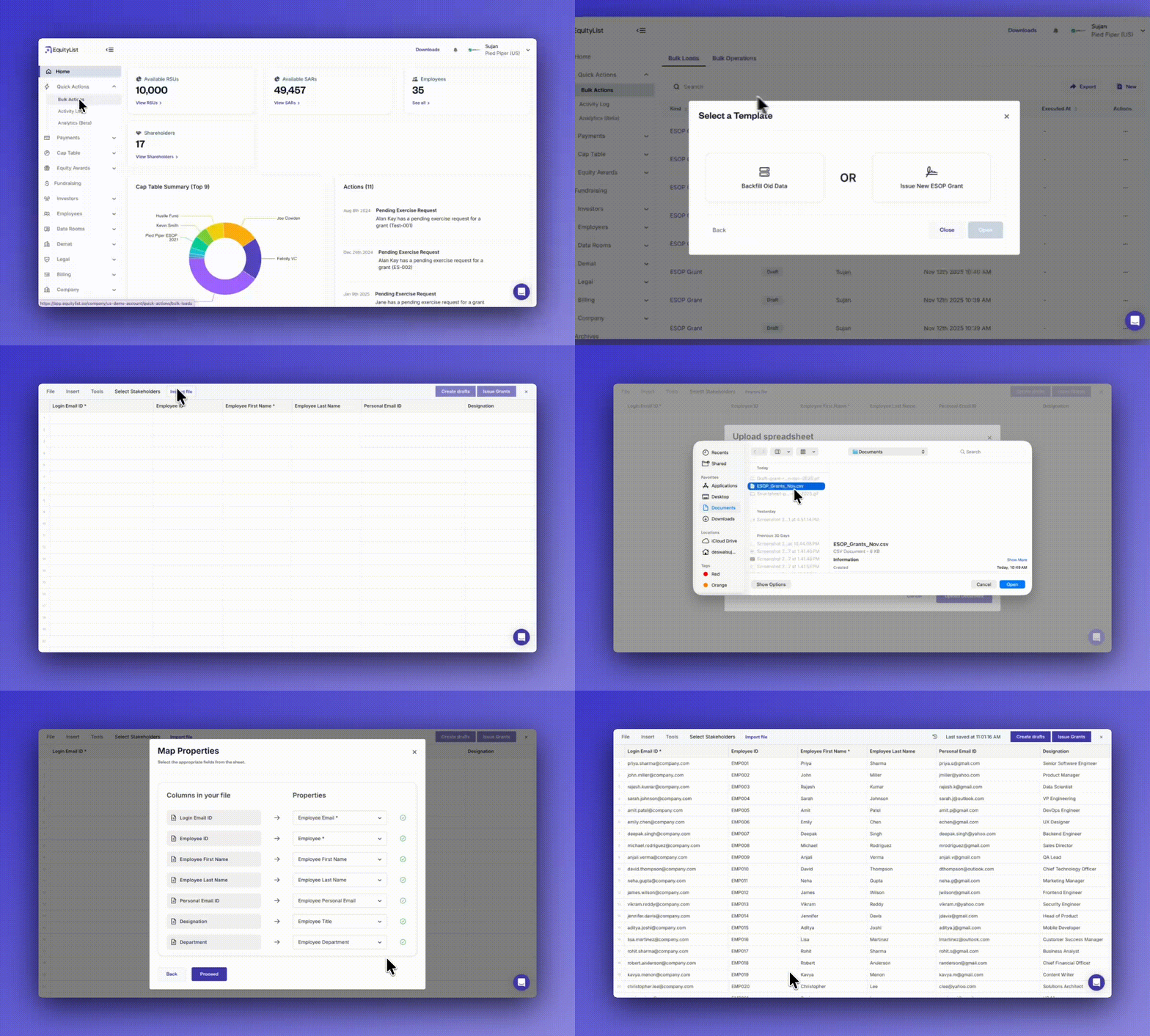
When you need to update multiple records at once, you can now bulk import data across all major modules using our new ‘Smartsheet’ interface (shortcut: Quick Actions > Bulk Actions).
- Unified imports: Works for ESOP, SAR, and RSU grants, employees, exercises, terminations, and all key instruments like CCDs, SAFEs, and warrants.
- Spreadsheet friendly: Easily upload
.xlsxor.csvfiles using our downloadable templates- Tip: Find these templates in the smartsheet itself under File > Export As.
- Smart mapping: Quickly match your spreadsheet columns to platform fields in seconds.
- Bulk actions: Instantly create or update records without manual entry.
Draft grants are now restricted for company admins

When you’re managing equity data, you no longer have to worry about draft grants being treated like active ones. Drafts are now clearly marked, hidden from most workflows, and excluded from billing. This keeps your records clean and compliant.
- Improved access control: Employees with only draft grants can’t log in or view dashboards.
- Clearer visibility: Draft grants now show a Draft tag instead of vesting status.
- Simplified views: Vesting progress, completion percentage, and events are hidden for drafts.
- Consistent across plans: Changes apply to ESOP, SAR, and RSU grants.
- Accurate reporting: Draft grants are excluded from billing. But you can still view them in reports by applying the right filters when generating the report.
To see a full list of past feature updates and launches, head over to our Product Updates page.
.avif)
.svg)
.svg)
.svg)